
Vandaag of morgen in huis

Kwaliteit gegarandeerd

Welkomstaanbiedingen ontgrendelen: GRATIS bezorging | Tot 80% korting | Gratis 30 dagen JoyPlus-proefperiode
Download de app
A wireless keyboard and mouse set keeps your desk tidier and gives you greater freedom of movement. However, not every wireless keyboard and mouse combination is suitable for your laptop, workspace or keyboard layout. A set may appear quiet, ergonomic or multi-device on paper, but in practice, connectivity, layout and power requirements can still come as a surprise.
With this buying guide, you can compare the most important features and find out which keyboard and mouse combination best suits the way you work.
In Dutch webshops, you will often come across QWERTY, US-QWERTY, UK-QWERTY and AZERTY. The physical keys and your computer’s language settings are not always the same. For example, a US-QWERTY keyboard may have a different Enter key layout and different special characters from a Dutch variant.
Before buying, check:
A set with a 2.4GHz USB receiver will usually work easily with a PC or laptop that has a spare USB-A port. For a tablet or smartphone, Bluetooth is often more convenient. If your laptop only has USB-C ports, you may need an adapter.
A Bluetooth keyboard and mouse may support multiple devices, but check whether both the keyboard and mouse can be paired at the same time. With some sets, Bluetooth only works for one component, or a USB receiver is required.
Terms such as “silent”, “quiet” and “quiet keys” do not describe a universal noise standard. According to the manufacturer’s product information, certain keys or mouse buttons may have been designed to operate more quietly, but the actual sound also depends on the surface, your typing style and the room.
So pay attention to the specific construction:
For a desktop PC or office computer, a USB receiver is practical. For laptops, tablets and phones, Bluetooth offers greater flexibility. A multi-device keyboard can be useful if you regularly switch between, for example, a work laptop, personal computer and tablet.
According to the product specifications, the Rapoo 9010M supports 2.4GHz and Bluetooth 4.0/5.0 and can be used with up to four devices. The Trust Lyra supports up to three devices via Bluetooth or USB. Always check whether switching is done with a physical button and whether your device’s operating system is supported.
A full-size keyboard usually has a numeric keypad. This is useful for spreadsheets, administration and entering figures, but it takes up more space. A TKL or compact keyboard leaves out the numeric keypad and is easier to carry around.
Examples:
Check whether the set uses AA or AAA batteries, or has a built-in rechargeable battery. A rechargeable battery means you do not need to replace loose batteries, but it does need to be charged regularly. With battery-powered models, the stated usage time depends on how the set is used, the connection and the settings.
According to the product information, the Rapoo 9010M runs on batteries and can last for up to approximately twelve months, depending on usage. The Trust Lyra has a rechargeable battery with a stated battery life of approximately six months per charge. Treat figures like these as an indication rather than a guarantee for every working situation.

Why it suits this profile: A straightforward set for working from home, studying and everyday computer use. Both devices work via a single USB receiver.
The connection type and US-QWERTY layout are clearly stated. This allows you to check in advance whether your computer has a suitable USB-A port.
One receiver, adjustable mouse speed of 800–1600 dpi, media keys and low-profile keys.

Why it suits this profile: Suitable for users who work with a PC, laptop, tablet and second computer from a single workstation.
The set supports both Bluetooth and 2.4GHz and states that it supports up to four devices. This reduces reliance on a single connection type.
Low-profile scissor-switch keys, quiet mouse clicks, adjustable 800–2400 dpi and Windows/Mac shortcut keys.

Why it suits this profile: A full-size set for office or home workspaces where a numeric keypad and wrist rest are desirable.
The product specification explicitly states a US-QWERTY layout, numeric keypad and USB receiver. This means you can check the available space and layout in advance.
Integrated wrist rest, quiet low-profile keys, numeric keypad and ambidextrous mouse.
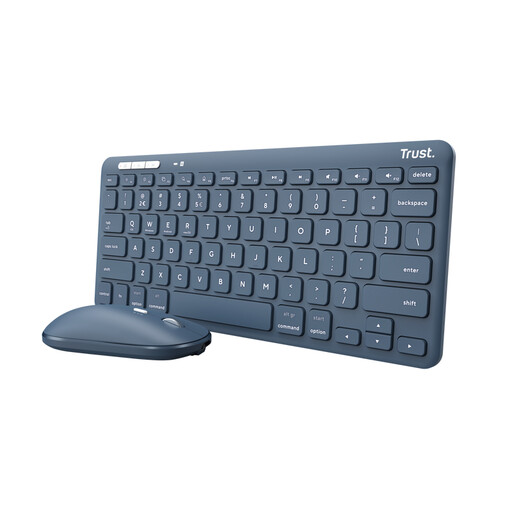
Why it suits this profile: The compact TKL design and support for three devices make it suitable for students and flexible workspaces.
The manufacturer states that it has a rechargeable battery, Bluetooth 5.0 and USB connectivity. The lack of a numeric keypad is also a practical trade-off for its compact design.
TKL design, scissor-switch keys, ambidextrous mouse and compatibility with Windows, macOS, Android, iOS and Chrome OS.
We have compiled a complete, up-to-date list of products that fully meet these strict selection criteria and the applicable European safety regulations.
Not automatically. Check whether your laptop supports Bluetooth or has a spare USB-A port for the receiver. If it only has USB-C ports, you may need an adapter. Also check the compatibility list for Windows, macOS, Linux, Chrome OS, Android or iPadOS.
This varies by model and usage. Manufacturers often provide an estimated duration based on average use. A set with replaceable batteries may last for months, while a rechargeable model needs to be charged via USB periodically. Switch the devices off when you are not going to use them for an extended period.
It can be, particularly when the product specification mentions quiet keys and mouse buttons. Bear in mind that “quiet” does not refer to a fixed noise limit. Also check the layout, size and connection method to ensure the set is practical for your office computer and workspace.
