
Vandaag of morgen in huis

Kwaliteit gegarandeerd

Welkomstaanbiedingen ontgrendelen: GRATIS bezorging | Tot 80% korting | Gratis 30 dagen JoyPlus-proefperiode
Download de app
A wireless keyboard and mouse set can make your desk more organised, but not every combination is suitable for a laptop, home office or flexible workspace. Some sets use just one type of connection, have an awkward keyboard layout or turn out to be less quiet than the product title suggests.
So don't focus only on the price or words such as “silent” and “multi-device”. Above all, check the connection, compatibility, layout and power supply. That way, you won't find yourself having to buy another set a few months later.
A wireless keyboard and mouse combination can work via a 2.4GHz USB receiver, Bluetooth or both. A USB receiver is practical for a desktop or laptop with USB-A, but less convenient when your laptop only has USB-C ports. Bluetooth eliminates the need for a separate receiver, but your device must support Bluetooth.
Also check whether the receiver only works with the supplied keyboard and mouse set. If your laptop has few ports, you may need a USB-C hub or USB-C docking station.
With a quiet wireless mouse and keyboard, the aim is usually to produce less noise than traditional keys or mouse buttons. The exact sound depends on how you type or click, the desk surface and the switches used.
Scissor keys generally have a low-profile design similar to a laptop keyboard. Mechanical keys can provide more feedback, but often make more noise. For a shared office, student room or working from home alongside housemates, a low-profile design is therefore a practical choice.
Many models sold in the Netherlands have a US/QWERTY layout. This differs from a Dutch QWERTY or international layout, particularly in terms of the Enter key, special characters and the position of certain punctuation marks.
Check the product photo and specifications before placing your order. Anyone who writes text every day will notice an incorrect layout sooner than someone who mainly answers emails or enters figures.
A multi-device keyboard and mouse is useful if you switch between a laptop, tablet, smartphone and desktop. Pay attention to the number of supported devices and how switching works. A model that remembers four devices is more practical for multitaskers than a set that has to be paired again each time.
According to the product description, the Rapoo 9010M uses 2.4GHz, Bluetooth 4.0 and Bluetooth 5.0 and can be paired with up to four devices. According to the stated compatibility, the connection works with Windows, macOS, Linux and Chrome OS. Before buying, check that your specific device supports the connection method you have chosen.
A set powered by AA or AAA batteries doesn't need a charging cable, but you will need to keep spare batteries to hand. A built-in battery is more convenient if you travel regularly, but it will need charging.
Battery claims depend on usage. When a manufacturer states a long battery life, you should read this as a specified maximum under certain conditions. The Rapoo 9010M is listed as offering up to approximately twelve months of use; according to the product information, this depends on usage.
An adjustable dpi setting determines how quickly the cursor moves across the screen. For office work, a range such as 800 to 1600 dpi is usually sufficient. Some models offer a wider range, such as the Rapoo 9010M with 800, 1000, 1200, 1600 and 2400 dpi.
Also consider the mouse's shape, weight and the amount of workspace available. A compact mouse is convenient when travelling, while a larger model may feel more comfortable in the hand. These features are a matter of personal preference and are no guarantee of greater comfort.
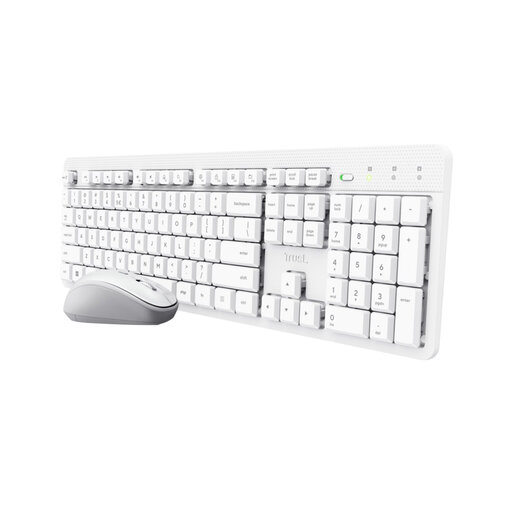
Why it suits this user profile: This set is aimed at home workers, students and office users who want to use a single USB receiver without installing any software.
The connection runs through a single supplied USB receiver. The US/QWERTY layout is clearly stated, so you can take this into account before choosing.
Quiet keys and mouse buttons according to the product description, adjustable 800–1600 dpi and storage for the magnetic receiver.

Why it suits this user profile: Suitable for anyone who wants to combine a Bluetooth keyboard and mouse with a 2.4GHz receiver and regularly switch between several devices.
The three connection options and support for up to four devices reduce the need to pair the set again each time.
Low-profile scissor keys, quiet mouse clicks and five adjustable dpi levels. The product information states compatibility with Windows, Mac, Linux and Chrome OS.
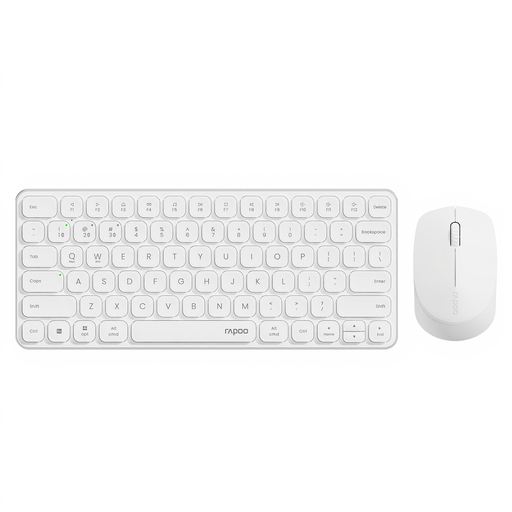
Why it suits this user profile: An option for flexible workers and multitaskers who want the same features as the black version, but prefer a lighter colour for their workspace.
The specifications list both Bluetooth and 2.4GHz and state the supported operating systems. The battery power supply is also specified in advance.
Support for up to four devices, quiet scissor keys and an optical mouse with dpi settings from 800 to 2400.
A keyboard and mouse for laptop use are often paired with additional connections. First check which ports your laptop has and whether an accessory supplies power.
We've put together a complete, up-to-date list of products that fully meet these strict selection criteria and the applicable European safety regulations.
No. Check whether your laptop supports Bluetooth or has a suitable USB port for the receiver. If it only has USB-C connections, you may need a USB-C hub, adapter or docking station.
This varies by model, frequency of use and energy-saving features. Manufacturers often provide an estimated maximum battery life. A set with automatic sleep mode or an on/off switch can help limit battery consumption. If storing the set for a long period, it is advisable to remove the batteries to prevent leakage.
Yes, provided the noise level, layout and connection suit your work. Choose quiet keys and mouse buttons for shared spaces, check the QWERTY layout and consider whether you want to use one device or several. For a fixed desktop, a USB receiver is often straightforward; for a laptop or tablet, Bluetooth offers greater flexibility.
