
Vandaag of morgen in huis

Kwaliteit gegarandeerd

Welkomstaanbiedingen ontgrendelen: GRATIS bezorging | Tot 80% korting | Gratis 30 dagen JoyPlus-proefperiode
Download de app
A wireless keyboard and mouse set keeps your desk tidier and is useful for working from home, studying or everyday office work. However, many sets look very similar. A low price may be tempting, but the wrong keyboard layout, noisy keys or a missing connection can quickly become frustrating.
Pay particular attention to these common pitfalls:
For many Dutch users, a QWERTY keyboard is the obvious choice. Check whether it is a US QWERTY keyboard or another variant. On a US layout, the Enter key, Shift key and punctuation marks, among other things, may be positioned differently from those on a Dutch or Belgian layout.
An AZERTY model may be suitable if you are used to the Belgian layout. One example is the DELL Wireless Keyboard Mouse KM5221W Black, which has an AZERTY layout according to the product details. If you touch-type using a Dutch QWERTY layout, you could unintentionally buy the wrong product.
A USB receiver keyboard and mouse usually works on a plug-and-play basis: you connect one receiver and both devices establish a connection. This is practical for a desktop computer or laptop with a spare USB port.
Bluetooth offers greater flexibility with modern laptops, tablets and phones. Therefore, check the following:
A USB receiver can also occupy a spare port. If your laptop has USB-C ports only, you may need a converter or hub.
A full-size model with a keyboard with numeric keypad is practical for spreadsheets, administration and financial data. A compact model saves space, but often lacks a separate numeric section.
Also look out for:
When it comes to batteries, note the difference between replaceable AA or AAA batteries and a built-in rechargeable battery. A battery-powered set does not require charging breaks, while a rechargeable model uses fewer disposable batteries.
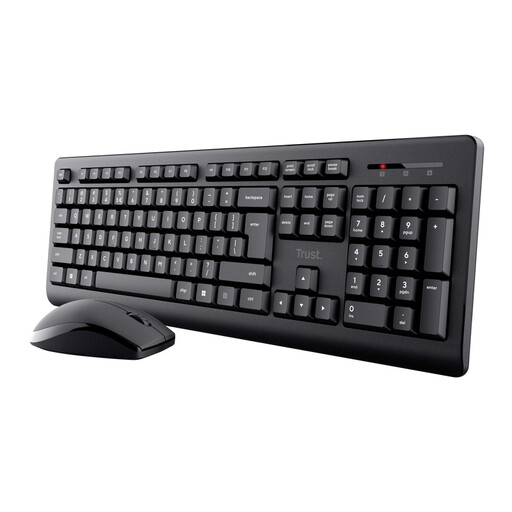
Why it suits this profile: This complete set offers a full-size keyboard, numeric keypad and one USB receiver for the keyboard and mouse. The symmetrical mouse is suitable for both left- and right-handed use.
The product details explicitly state US QWERTY, quiet low-profile membrane keys and a spill-resistant design. However, check that your device supports the supplied USB connection or converter.
Full-size layout, numeric keypad, one receiver and a mouse suitable for either hand. Trust also states that it contains 70% pre-consumer recycled plastic.

Why it suits this profile: The integrated wrist rest, quiet keys and media keys are ideal for working for long periods in a home office or shared workspace.
The US/QWERTY layout, membrane mechanism and USB-A nano receiver are listed in the product information. This makes it clear what you are buying in advance; it is not a mechanical gaming combination.
Numeric keypad, adjustable mouse sensitivity of 1000/1400/1800 DPI, and battery life stated by Trust as up to 48 months for the keyboard and 12 months for the mouse.
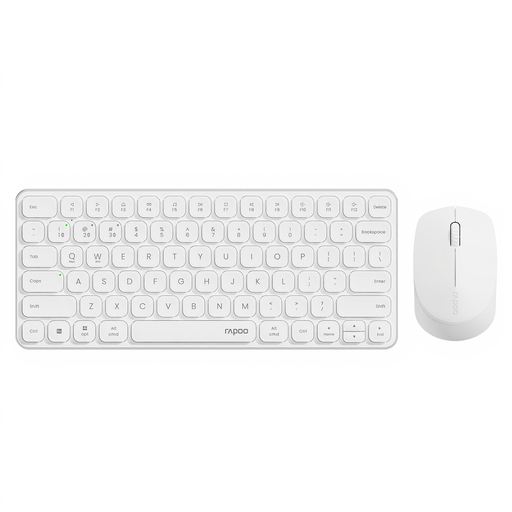
Why it suits this profile: If you switch between a computer, laptop, tablet and phone, a wireless keyboard and mouse combo with multiple connection options is more practical than a set with USB only.
According to the product specifications, the set supports 2.4GHz and Bluetooth 4.0/5.0. Before buying, check that your devices support these connections and take note of the supplied batteries.
Pairing with up to four devices, quiet low-profile scissor keys and a mouse with adjustable 800-2400 DPI.
We have compiled a complete, up-to-date list of products that fully meet these strict selection criteria and the applicable European safety regulations.
Sets with a USB receiver usually do not require any separate software. Insert the batteries, connect the receiver and switch on the keyboard and mouse. With Bluetooth, you must first pair the devices via your computer or tablet settings.
This varies by model, usage and battery type. Manufacturers often provide a maximum battery life under specific conditions. For example, Trust states that the Trezo Comfort lasts up to 48 months for the keyboard and up to 12 months for the mouse. Treat this as a product specification, not a guaranteed duration for every user.
Yes, a quiet mouse and keys with a dampened keystroke can be comfortable in a shared workspace. However, check whether “quiet” applies to both the keyboard and the mouse clicks. If you are looking for a mechanical keyboard or gaming features, your requirements will usually differ from those of someone who mainly wants to type and navigate quietly.
