
Vandaag of morgen in huis

Kwaliteit gegarandeerd

Welkomstaanbiedingen ontgrendelen: GRATIS bezorging | Tot 80% korting | Gratis 30 dagen JoyPlus-proefperiode
Download de app
A wireless keyboard and mouse set keeps your desk tidier and is handy for working from home, studying and everyday computer use. However, not every keyboard and mouse combination will suit your needs. The wrong layout, limited compatibility or a mouse that becomes uncomfortable after a few hours can make your purchase less practical.
As a Joybuy Product Recommendation Officer, I filter product specifications for practical usability. Below, you’ll find the key points to check before buying a wireless keyboard and wireless mouse.
Many people in the Netherlands use a QWERTY keyboard, but if you are used to a Belgian or French layout, you may be looking for an AZERTY keyboard instead. Also check whether it uses an ANSI or ISO layout. An unfamiliar layout can mean that punctuation and special characters are not where you expect them to be.
A compact set may also lack a numeric keypad. That is useful on a small desk, but less practical for administrative work or spreadsheets.
An RF wireless set usually works via a 2.4 GHz USB receiver. This is often straightforward: plug in the receiver and start using the set. With a Bluetooth mouse and keyboard, you do not need a USB dongle, but you do need to pair the device through your Bluetooth settings.
Pay attention to the number of available USB ports and check that your laptop, tablet or PC supports the connection you have chosen. For example, a USB-A receiver cannot be used on every modern laptop without an adapter.
A silent mouse generally has quieter click buttons, while a silent keyboard refers to the noise made by the keys. Check whether the description mentions both devices. A set may include a silent mouse but still have a clearly audible keyboard.
Battery claims also deserve attention. ‘Up to’ a certain number of months depends on usage, settings and connection type. So also compare the battery type, whether the device can be recharged and how you check its status.
Choose a connection that suits your workspace:
A multi-device keyboard and mouse can remember several paired devices. Check whether the keyboard and mouse can switch between devices independently, or whether this function is available on only one of them.
A full-size keyboard usually includes a numeric keypad. A TKL or compact wireless set leaves it out and takes up less space. Also consider:
An ergonomic mouse may have a vertical or rounded shape. That is a design feature, not a guarantee of a particular physical outcome. Above all, choose a shape that suits your hand and take regular breaks during prolonged computer use.
A rechargeable mouse and rechargeable keyboard eliminate the need for disposable batteries, but they do need to be connected regularly. With some sets, a full charge takes around two hours and you can continue working while they charge. Other models use AA or AAA batteries, which can be replaced immediately.
Check whether the cable is included and whether the connection is USB-C, micro-USB or another type. Also look at the stated battery life and whether an indicator shows when charging or replacement is required.

Why it suits this profile: This compact set is designed for everyday use, small desks and users who switch between a computer, tablet and phone.
The specifications state QWERTY US, allowing you to check the layout in advance. The set supports one USB receiver and two Bluetooth connections.
78 keys, scissor switches, rechargeable devices and compatibility with Windows, macOS, iOS, iPadOS, Android and Chrome OS.
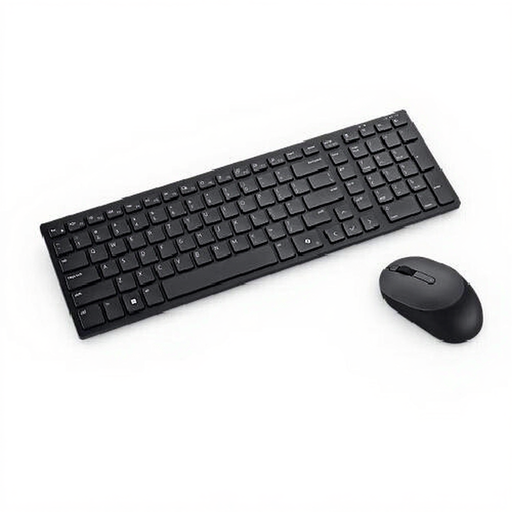
Why it suits this profile: This office mouse and keyboard combination is designed for anyone who needs a full-size AZERTY set, a numeric keypad and several connection options.
The Belgian AZERTY layout and 105 keys are clearly specified. You can also choose between RF via USB and Bluetooth 5.1.
Full-size design, numeric keypad, multimedia and programmable keys, plus a mouse sensor with 4,020 dpi.

Why it suits this profile: Suitable for users who work across several devices with wide spreadsheets, timelines or large documents.
The product information specifies RF plus two Bluetooth channels. This gives the multi-device function a clear definition rather than using it merely as a marketing term.
Six buttons, rechargeable battery, quiet buttons, up to 3,200 dpi and an extra horizontal scroll wheel for wide documents.
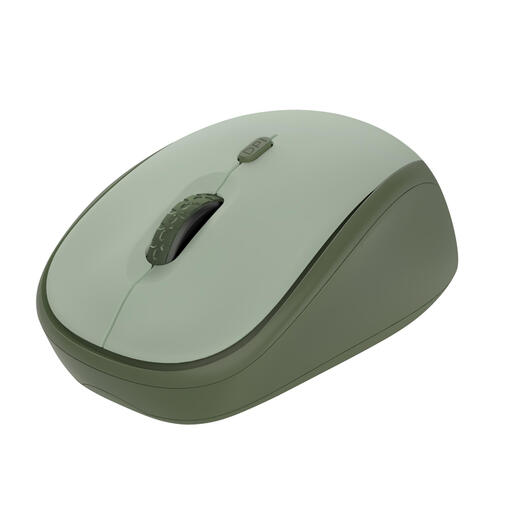
Why it suits this profile: A compact wireless set sometimes starts with just a mouse. This model is well suited to laptops, hot-desking and users who want to keep their workspace clear.
The RF connection, 8-metre range and compatible operating systems are clearly stated. The silent click avoids any ambiguity around the noise claim.
Compact size, adjustable 800–1,600 dpi, optical sensor and stated battery life of up to 12 months.
We have put together a complete, up-to-date list of products that fully meet these strict selection criteria and the applicable European safety regulations.
Not automatically. Check that the set is suitable for your operating system and whether your laptop supports Bluetooth or has a compatible USB port. USB-C laptops may require an adapter for an RF receiver.
That depends on your devices. Bluetooth leaves a USB port free and is useful for tablets. RF is practical with a fixed PC setup because you plug in the receiver and can usually start using the set straight away. A combination of both connection types offers greater flexibility.
With a model using replaceable batteries, you will eventually pay for AA or AAA batteries. A rechargeable mouse or set does not require disposable batteries, but it does need regular charging. So do not compare only the purchase price; also consider battery life, the charging cable and the number of devices you will use it with.
