
Vandaag of morgen in huis

Kwaliteit gegarandeerd

Welkomstaanbiedingen ontgrendelen: GRATIS bezorging | Tot 80% korting | Gratis 30 dagen JoyPlus-proefperiode
Download de app
A wireless keyboard and mouse set may seem like a simple purchase, but small differences can determine whether the combination remains comfortable to use. The wrong keyboard layout, a missing USB receiver or a mouse that does not suit your hand can quickly become frustrating.
For users in the Netherlands, these pitfalls are particularly important:
First, choose the right language and layout. For many users in the Netherlands, a QWERTY keyboard with mouse is the obvious choice. If you use a Belgian or French layout, you are more likely to look for an AZERTY keyboard with mouse.
Also consider the size:
A gaming keyboard often has a compact design, mechanical or optical switches and lighting. That can be appealing for gaming, but it is not automatically practical for office work.
A Bluetooth keyboard and mouse is convenient for laptops, tablets and computers with Bluetooth. It also leaves a USB port free. An RF set with a USB dongle may be simpler to use with desktop computers: connect the receiver, insert the batteries and pair the devices.
Some sets support both options. For example, the Dell Pro Plus KM7120W is available with 2.4GHz RF and Bluetooth 5.0. However, check whether the version has a QWERTY or AZERTY layout. The same model name may be sold in different language variants.
Also check:
An ergonomic mouse may fit comfortably in your hand, but “ergonomic” is not a universal size or shape. Consider the design, weight and whether the mouse is suitable for left- or right-handed use.
The DPI value determines the adjustable sensitivity. An office mouse with 1,600 DPI is sufficient for many everyday tasks. Gaming models can offer much higher values, such as 30,000 or 35,000 DPI. A high DPI value does not automatically mean that the mouse will work better for every user.
Finally, consider the power supply:
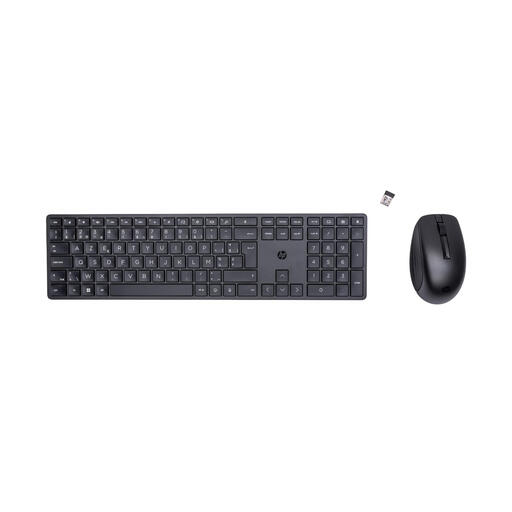
Why it suits this profile: A full-size wireless combination for home use, with a numeric keypad and Belgian AZERTY layout. Suitable if you have specifically chosen AZERTY.
The product details clearly state AZERTY, 2.4GHz RF and a mouse with 4,000 DPI. Before buying, check that this layout matches the way you are used to typing.
Full-size design, numeric keypad, wireless RF connection and included mouse.
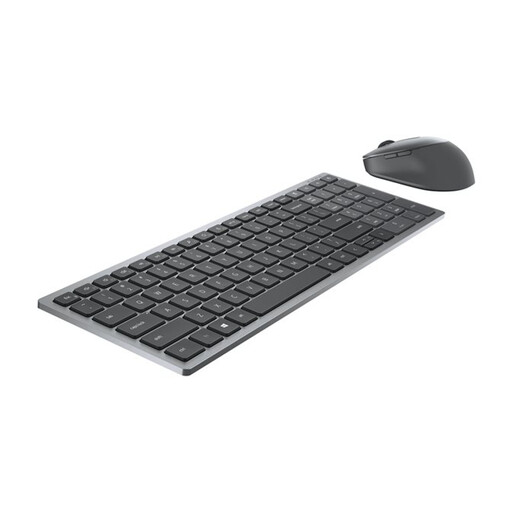
Why it suits this profile: Designed for office work, with a 95% layout, numeric keypad, programmable shortcut keys and two connection options.
The connection is not limited to Bluetooth: the set also supports RF. This means you can choose the option that best suits your computer and available USB ports.
Bluetooth 5.0 and 2.4GHz RF, 7 mouse buttons, 1,600 DPI and a battery life stated in the product specifications as up to 36 months.

Why it suits this profile: For gamers looking for a standalone gaming mouse with plenty of customisation options, rather than a standard mouse from an office combination.
You are choosing gaming features specifically, rather than paying extra for functions in a set designed mainly for office work.
11 programmable buttons, wireless 2.4GHz and Bluetooth connections, and a stated sensor resolution of up to 35,000 DPI.
Not necessarily. Bluetooth saves a USB port and is convenient with laptops and tablets. An RF receiver can be more practical with desktop computers or if you want a simple plug-and-play setup. A wireless keyboard and mouse combination with both options offers greater flexibility.
It varies by model, battery type and usage. Some sets run for months or longer on AA or AAA batteries. Check whether the stated period is a maximum value. A rechargeable mouse, such as the Dell Pro Premium Mouse MS900, eliminates the need for loose mouse batteries, but it does need to be charged regularly via USB-C.
For casual gaming, a standard set may be sufficient. For competitive games, users often consider response time, sensor settings, weight and programmable buttons. A separate gaming keyboard and gaming mouse offer more choice, but usually require more space or budget than a simple keyboard and mouse combination.
We have compiled a complete, up-to-date list of products that fully meet these strict selection criteria and the applicable European safety regulations.
