
Vandaag of morgen in huis

Kwaliteit gegarandeerd

Welkomstaanbiedingen ontgrendelen: GRATIS bezorging | Tot 80% korting | Gratis 30 dagen JoyPlus-proefperiode
Download de app
A wireless keyboard and mouse set keeps your desk tidier and is practical for working from home, studying and everyday computer use. However, many sets look very similar. A low price or the term “silent” does not automatically mean that the combination is comfortable to use, compatible with your computer or low-maintenance.
As a Joybuy Product Recommendation Officer, I filter out the most important product specifications and common purchasing pitfalls. This helps you compare wireless keyboards and mice based on the features that make a real difference in everyday use.
A QWERTY keyboard with mouse and an AZERTY keyboard with mouse are not interchangeable in everyday use. The physical layout determines where the letters, punctuation marks and special keys are located. So do not just check the language settings in Windows or macOS – also check the symbols printed on the keys.
For many Dutch users, a US or UK QWERTY layout is familiar, while Belgian users often look for an AZERTY layout. Changing the software settings can solve part of the problem, but the symbols on the keys will still differ from what you are typing.
A silent keyboard and mouse set usually has low-profile membrane or scissor keys and a mouse with dampened buttons. This can reduce typing and clicking noise, but the result also depends on the surface beneath the set and the way you type. Mechanical keyboards are generally not the obvious choice if you want to make as little noise as possible in a shared workspace.
Also pay attention to the wording used in the product information. A manufacturer may make performance claims based on its own product information or research. Treat “silent” as a design feature, therefore, rather than a guarantee that nobody will hear any sound.
A USB receiver keyboard and mouse often works straight away once you plug in the receiver. Bluetooth is more convenient if you are using a laptop, tablet or smartphone without a spare USB port. A 2.4GHz receiver and Bluetooth each suit different situations.
Also check whether a single receiver operates both devices. This saves a USB port. With a Bluetooth keyboard and mouse, check how many devices can be paired and how you switch between them.
A full-size keyboard usually has a numeric keypad. This is useful for administration, spreadsheets and entering figures, but it takes up more space. A compact TKL model leaves out the numeric keypad and is a better fit for a small desk or laptop bag.
Check the following points:
An ergonomic keyboard and mouse set may include a wrist rest, adjustable angle or a symmetrical mouse. These are practical design choices, but they are not medical solutions. Take regular breaks during prolonged use and adjust your chair, screen and desk to suit you.
Look beyond the word “wireless”. An RF set uses a USB dongle, while Bluetooth connects directly to devices that support Bluetooth. Some models combine both options.
Pay attention to:
The Trust Lyra and Rapoo 9010M are examples of sets with multiple connection options. According to the product information, the Rapoo 9010M supports up to four paired devices via 2.4GHz and Bluetooth. The Trust Lyra supports up to three devices via a USB receiver and Bluetooth.
A set powered by AA or AAA batteries works straight away, but will require replacement batteries over time. A rechargeable model has a charging cable and a built-in battery. Check the stated battery life, but treat “up to” as a guideline: brightness, frequency of use and power-saving features all affect the actual duration.
Switch off the keyboard and mouse when you are not going to use them for an extended period. Remove loose batteries if a device is being stored for a long time. This reduces the risk of leakage and corrosion.
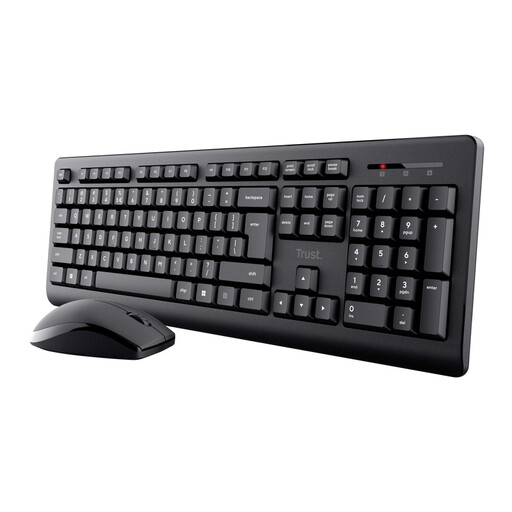
Why it suits this profile: This set is aimed at people working from home, students and beginner computer users who want a single USB receiver and a full-size US QWERTY keyboard.
The layout and connection type are clearly specified. The set uses a single receiver and has a spill-resistant keyboard; spill-resistant does not mean waterproof.
US QWERTY, numeric keypad, quiet low-profile keys and a symmetrical mouse with 1,200 dpi.

Why it suits this profile: Ideal for anyone who switches between a desktop, laptop, tablet and phone and prefers to use a single keyboard and mouse combination.
The set offers both 2.4GHz and Bluetooth 4.0 and 5.0. According to the product information, you can pair up to four devices and switch between them using the keys.
Low-profile scissor keys, quiet mouse clicks and adjustable mouse resolution from 800 to 2,400 dpi.
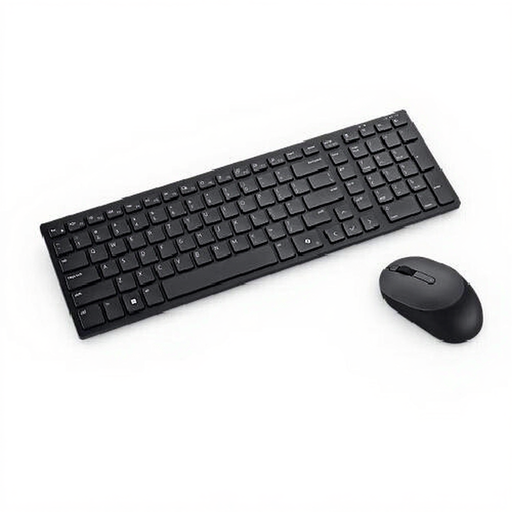
Why it suits this profile: A practical choice for Belgian AZERTY users who want an office-focused set with Bluetooth and RF.
The Belgian AZERTY layout is clearly specified. The combination supports RF via USB and Bluetooth 5.1, allowing you to choose the connection method that best suits your workspace.
Full-size 95% format, numeric keypad, programmable keys and a mouse with 4,020 dpi according to the product specifications.

Why it suits this profile: Suitable for students, hybrid workers and users who want to save space and switch between a computer, tablet and phone.
The compact TKL layout means you do not have to give up unnecessary desk space. The set is rechargeable, so you are not reliant on loose AA or AAA batteries.
Up to three devices, scissor keys, USB and Bluetooth, plus a rechargeable battery with a manufacturer-stated battery life of up to six months.
We have put together a complete, up-to-date list of products that fully meet these strict selection criteria and the applicable European safety regulations.
With an RF set, plug the USB receiver into a spare port and insert the batteries. With Bluetooth, switch on Bluetooth on your computer, tablet or phone and follow the pairing steps. Check beforehand whether the set uses USB-A, USB-C or Bluetooth.
This varies by model and usage. According to the stated product specifications, some sets work for anywhere from several months to several years. A rechargeable set does not require disposable batteries, but it does need to be connected to the cable periodically. Switch off both devices when you have finished working.
Yes. In that case, pay particular attention to quiet keys, a suitable layout, a numeric keypad if you enter lots of figures and a comfortable mouse shape. Gaming or specialist applications may have different requirements, such as mechanical switches or a higher polling rate.
