
Vandaag of morgen in huis

Kwaliteit gegarandeerd

Welkomstaanbiedingen ontgrendelen: GRATIS bezorging | Tot 80% korting | Gratis 30 dagen JoyPlus-proefperiode
Download de app
A wireless keyboard and mouse set may seem easy to choose at first. But many buyers are tempted by a low price, an impressive DPI figure or the promise of “silent typing”, only to find that the set doesn’t suit their laptop, workspace or keyboard layout.
For people working from home, students and office workers, these are the three main pitfalls to watch out for:
A USB wireless mouse usually uses a 2.4GHz receiver. Plug it into a USB-A port and you can often get started straight away. This is a good choice for a permanent workspace and many desktop PCs.
A Bluetooth mouse connects directly to a laptop, tablet or other compatible device. You won’t need a separate dongle, but the pairing process can vary between operating systems. A model with both a USB receiver and Bluetooth gives you more flexibility.
Also look for multi-device functionality. According to the product information, the Rapoo 9010M can connect to up to four devices via 2.4GHz and Bluetooth 4.0/5.0. The Trust Yvi+ Multi-Device supports up to three devices. This is useful if you switch between a laptop, desktop PC and tablet.
Always check the layout before you buy. QWERTY and AZERTY keyboards have different positions for letters, punctuation and special keys.
The range includes options such as:
US or UK QWERTY layouts will often be familiar to users in the Netherlands, but check the images and product specifications if you need specific keys, such as the euro key, accents or a numeric keypad.
A silent mouse is useful in a shared home office, library or workplace. Don’t just look for the word “silent”: check whether it refers to the mouse buttons, scroll wheel or keyboard too.
DPI determines the sensitivity of the optical sensor. For everyday tasks, values of around 800 to 1600 DPI are usually enough. Adjustable DPI is useful if you switch between a large screen and a smaller laptop. The Trust Yvi+, for example, switches between 800 and 1600 DPI. The Rapoo 9010M offers several settings up to 2400 DPI.
Shape is just as important. A compact mouse is handy when you’re on the move, while a larger, right-handed or vertical design may offer more support. Also check whether the mouse is suitable for left- and right-handed use. An ergonomic mouse may feel comfortable in your hand, but the right choice depends on your hand size, grip and posture.
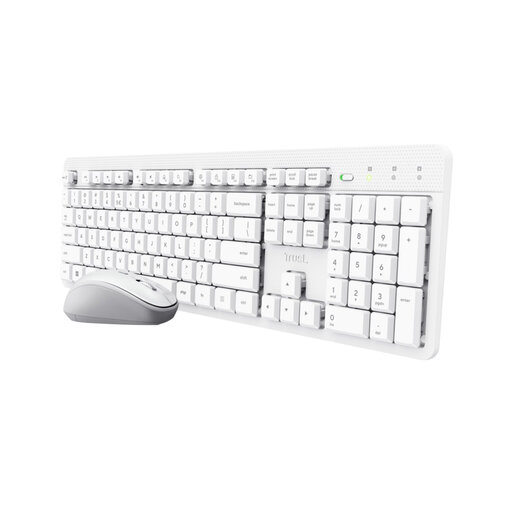
Why it suits this type of user: This set is designed for everyday use at home, in the office or while studying. The US/QWERTY keyboard and single USB receiver keep setup simple.
The product information mentions quiet keys and mouse buttons, adjustable DPI from 800–1600 and plug-and-play setup via a single receiver.
Wireless RF connection, media keys, adjustable typing angle and compatibility with Windows, macOS, Linux and Chrome OS.

Why it suits this type of user: This combo is ideal if you want to use one keyboard and mouse with several devices.
The set uses both 2.4GHz and Bluetooth 4.0/5.0, so you don’t have to rely solely on a USB-A port.
Supports up to four devices, with quiet low-profile scissor keys and a mouse with adjustable DPI from 800 to 2400.
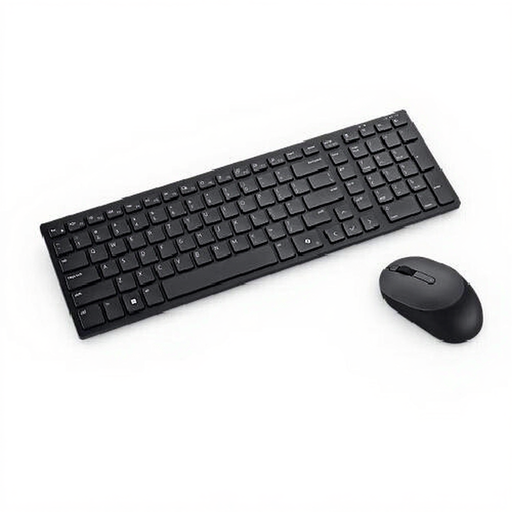
Why it suits this type of user: This set is a good choice for office workers who need a full-size keyboard, numeric keypad and AZERTY layout.
The product description specifically states that it has a Belgian AZERTY layout and supports both Bluetooth 5.1 and RF via USB.
Full-size design, multimedia and programmable keys, spill-resistant construction and an optical mouse with 4020 DPI.
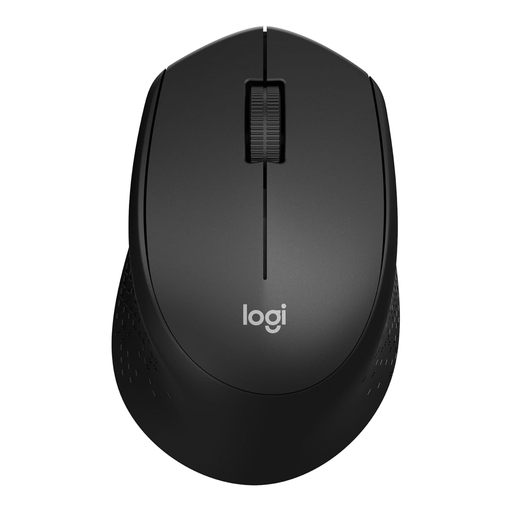
Why it suits this type of user: If you already have a keyboard and mainly want a quieter mouse for your laptop or office, buying a separate mouse lets you choose exactly what you need.
According to Logitech, clicking is up to 90% quieter than with standard mice. The product information also lists a USB nano receiver and a range of up to 10 metres.
Right-handed shape, optical tracking, three buttons and a battery life of up to 24 months according to Logitech.
We’ve put together a full, up-to-date list of products that meet these strict selection criteria and comply with current European safety regulations.
Not necessarily. Check whether your laptop supports Bluetooth or has a spare USB-A port for the receiver. If your laptop only has USB-C ports, you may need an adapter. Also check the supported operating system and keyboard layout.
It depends on the model, how often you use it and the type of battery. Product information for some sets gives a battery life of anything from a few months to several years. These are quoted figures; heavy typing, frequent clicking and leaving devices switched on can shorten the actual battery life. An on/off switch and automatic sleep mode help reduce power consumption.
For a mouse that uses AA or AAA batteries, replacement batteries are the main ongoing cost. A model with a long battery life can help keep costs down, while a rechargeable mouse uses fewer disposable batteries but may cost more to buy. So compare more than just the purchase price: check the battery type, stated battery life and how you use the mouse each day.
