
Vandaag of morgen in huis

Kwaliteit gegarandeerd

Welkomstaanbiedingen ontgrendelen: GRATIS bezorging | Tot 80% korting | Gratis 30 dagen JoyPlus-proefperiode
Download de app
A wireless keyboard and mouse set may seem easy to choose: select a keyboard, add a mouse and you’re done. Yet problems often only emerge after a few weeks. The layout may be wrong, the connection may not work with your laptop, or the noise may be disappointing in a shared workspace.
So don’t just look at the price or a polished product image. Check the connection, layout, dimensions and power supply. That way, you can find a wireless keyboard and mouse combination suited to working from home, the office, studying or use with multiple devices.
In the Netherlands, you will often come across a QWERTY keyboard. A Belgian version usually uses AZERTY. The positions and labels of letters, punctuation marks and shortcut keys differ. If you order a set without checking, you may end up pressing the wrong keys every day.
Also check whether the product name mentions “UK English”, “US QWERTY” or “Belgian AZERTY”. Changing the language setting in Windows or macOS does not automatically change the physical labels on the keys.
An RF wireless keyboard and mouse generally uses a 2.4GHz USB receiver. This usually works straight away with a PC or laptop that has a spare USB port. A Bluetooth keyboard and mouse connects directly to devices that support Bluetooth, such as tablets and some laptops.
A USB receiver can be inconvenient with a tablet that has no USB port or a laptop with limited connectivity. Conversely, Bluetooth is not always available on an older desktop computer. So first check which ports and wireless functions your devices have.
A quiet keyboard and mouse can be more comfortable to use in a home office, library or shared workspace. However, noise levels vary depending on the key construction, surface and typing style. According to Trust’s product information, the buttons on the Ozaa+ and Yvi+ are designed for quieter clicking; this is a brand-specific product specification, not a universal noise standard.
The same applies to an ergonomic mouse. A particular shape, rubber grip or vertical angle may suit your personal preferences, but it does not automatically mean that every user will experience greater comfort. Consider your hand size, the weight and shape, and whether the mouse is suitable for left- or right-handed use.
Choose a wireless keyboard and mouse set based on your devices:
Also pay attention to the operating system. Some sets specify support for Windows, macOS, Linux or Chrome OS. Function keys and shortcut keys may work differently depending on the system.
A full-size set usually includes a numeric keypad. This is useful for administration, spreadsheets and office work, but it takes up more space. A compact keyboard is better suited to a small workspace or a bag.
Check the following:
For intensive typing, the key shape may be more important than the appearance. A low-profile keyboard with a scissor mechanism feels different from a membrane keyboard. Base your expectations on the construction described rather than on general marketing terms.
A mouse’s DPI value determines cursor sensitivity. A higher maximum DPI is not automatically necessary for office work. For documents and browsers, adjustable settings such as 800, 1200, 1600 or 2400 DPI are often sufficient. The Trust Ozaa+ specifies an adjustable sensor of up to 3200 DPI, while the HP 650 set specifies 4000 DPI.
Also consider the power supply:
With a wireless keyboard and mouse set, also check whether a single receiver is included and where it can be stored. A small USB receiver is easily lost; some mice have a storage compartment for this purpose.
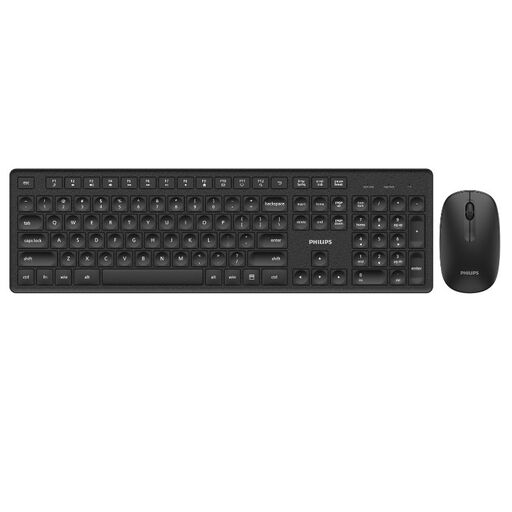
Why it suits this profile: A straightforward set for anyone looking for a complete office solution with a UK QWERTY layout and 2.4GHz USB receiver.
The layout and wireless method are clearly stated in the product name, so you can check in advance whether this combination is compatible with your PC or laptop.
Full-size keyboard, UK QWERTY layout and one 2.4GHz receiver for both the keyboard and mouse.

Why it suits this profile: Ideal for anyone who values quiet operation and multiple connection options at home or in the office.
You are not limited to Bluetooth or RF alone: according to the product information, the set supports 2.4GHz and Bluetooth 4.0/5.0.
Connects to up to four devices, has a low-profile design with scissor keys and a mouse with adjustable DPI up to 2400.
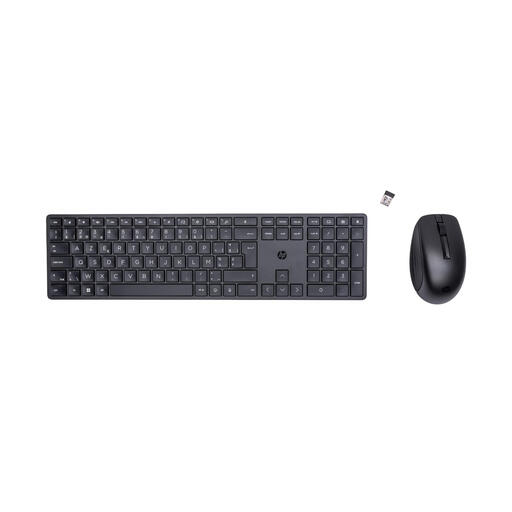
Why it suits this profile: A sensible choice for users who specifically need a Belgian AZERTY layout and a full-size keyboard at home.
The Belgian AZERTY layout is listed as a product specification, reducing the risk of choosing the wrong physical keyboard layout.
Full-size format, numeric keypad, 2.4GHz RF connection and a mouse with a stated resolution of 4000 DPI.
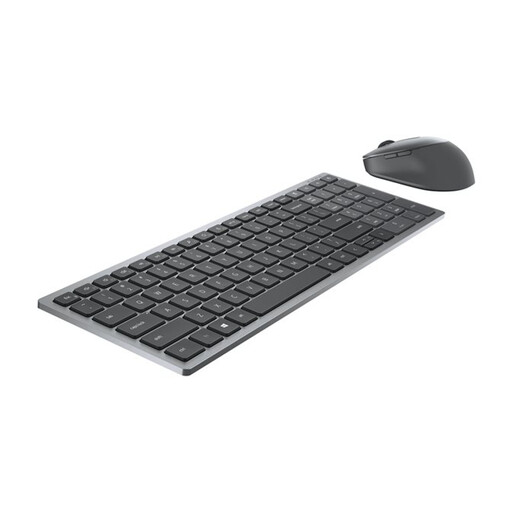
Why it suits this profile: Designed for office workers who need a Belgian layout, numeric keypad and the flexibility to switch between RF and Bluetooth.
The dual connection means you do not have to rely on just one connection method in advance; however, check whether your device supports Bluetooth or USB.
Bluetooth 5.0 and 2.4GHz RF, AZERTY layout, seven mouse buttons and stated battery life of up to 36 months.
We have put together a complete, up-to-date list of products that fully meet these strict selection criteria and the applicable European safety regulations.
An RF set with a USB receiver often works on a plug-and-play basis: connect the receiver and switch on the keyboard and mouse. Bluetooth models must first be paired through the Bluetooth settings. Always check the manual and compatibility list for the specific model.
This varies by product and usage. Manufacturers often state a maximum operating time under certain conditions. A set with standard batteries may last for months, while a rechargeable mouse needs to be connected to the cable regularly. Switch devices off when you are not using them for longer periods and follow the safety instructions for batteries and rechargeable batteries.
Yes, provided the connection, layout and dimensions suit the workspace. In a shared environment, you may wish to look for models with quiet keys or quiet mouse buttons. According to brands’ own product information, these features are intended to reduce noise; the perceived volume may vary depending on the user and the surface.
