
Vandaag of morgen in huis

Kwaliteit gegarandeerd

Welkomstaanbiedingen ontgrendelen: GRATIS bezorging | Tot 80% korting | Gratis 30 dagen JoyPlus-proefperiode
Download de app
A wireless keyboard and mouse set can tidy up your desk and is handy for home working, the office or study. Yet not every wireless keyboard and mouse combination suits every user. The wrong layout, a missing USB connection or an uncomfortable shape often only become apparent after purchase.
So don’t just focus on a low price or terms like “quiet” and “ergonomic”. Pay particular attention to the specifications that determine everyday use.
In the Netherlands you’ll come across different layouts. A QWERTY keyboard and mouse with a US layout places punctuation differently from a Belgian AZERTY keyboard and mouse. If you order a set blind without checking the layout, you may struggle with special characters and shortcuts.
Watch for the difference between:
Always check the product title and the technical specifications. An image isn’t always enough to determine the layout reliably.
Many sets work via a 2.4GHz USB receiver. That’s simple: you plug the receiver into a spare USB port and usually pair immediately. This is less convenient if your laptop only has USB-C ports, unless an adapter is included.
Bluetooth is an alternative without a separate receiver, but not every wireless keyboard and mouse supports it. Also check how many devices you can pair if you switch between a laptop, tablet and desktop.
According to product information from various brands, low-profile, membrane or scissor keys generally make less noise than mechanical keys. However, “quiet” doesn’t mean completely silent. A splash-resistant keyboard isn’t waterproof either. A knocked-over cup of coffee can still cause damage.
A full-size keyboard typically has a separate numeric keypad. That’s useful for admin, spreadsheets and entering numbers. Compact TKL models save space, but often lack the numpad.
Choose a full-size keyboard and mouse for the office if you regularly work with numbers. For a small home-working space or mobile use, a compact model may be more convenient.
Check before buying:
According to the product information, the Trust Primo uses one USB receiver for both devices and comes with a USB-C-to-A converter. The manufacturer lists support for Windows, macOS and Chrome OS. Check your own ports before ordering.
A battery-powered set doesn’t need a charging cable on your desk, but you do have to replace AA or AAA batteries. Some models use a built-in rechargeable battery. According to Trust’s own product specifications, the Lyra can run for up to six months per charge, depending on use.
Note that battery life is usually a stated indicative value. Heavy use, wireless interference and battery type can affect actual runtime. An on/off switch helps limit unnecessary consumption.
A symmetrical mouse usually suits both left- and right-handed users. An ergonomic keyboard and mouse can be comfortable when the shape matches your working posture, but ergonomics are personal. So pay attention to dimensions, wrist rest, adjustable feet and the placement of buttons.
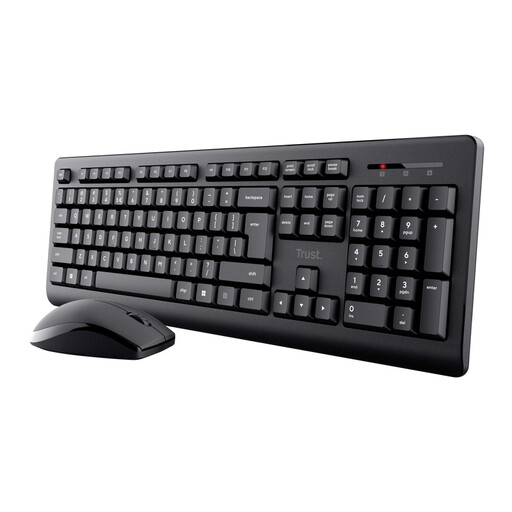
Why this suits the profile: A complete QWERTY US set for home use, study or a first office setup. According to the product information, the mouse is symmetrical and therefore suitable for both left- and right-handed use.
The product information clearly states the QWERTY US layout. The set uses a single USB receiver and includes a USB-C-to-A converter. Here, splash-resistant does not mean waterproof.
Full-size keyboard with numeric keypad, low-profile membrane keys, adjustable feet and a stated mouse resolution of 1200 dpi.
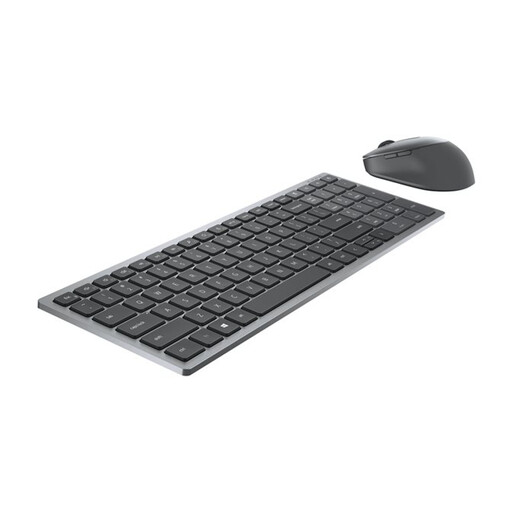
Why this suits the profile: Ideal for office professionals who want a Belgian AZERTY layout, a numeric keypad and extra connection options.
The layout is listed as Belgian AZERTY. In addition, according to the product data this model supports both 2.4GHz RF and Bluetooth 5.0. The mouse is specifically designed for right-handed use.
Scissor keys, programmable shortcuts, numpad, seven mouse buttons and, according to Dell, a battery life of up to 36 months when using alkaline batteries.

Why this suits the profile: A full-size set for those who type a lot every day and value an integrated wrist rest, quiet operation and a long stated battery life.
The product information mentions a US/QWERTY layout, a numpad and a 2,4GHz USB receiver. According to Trust, the quiet keys are designed to reduce typing and click noise; this is not a mechanical keyboard.
Integrated wrist rest, media keys, symmetrical mouse, adjustable DPI of 1000/1400/1800 and, according to Trust, a battery life of up to 48 months for the keyboard.
We’ve put together a complete, up-to-date list of products that fully meet these strict selection criteria and comply with current European safety regulations.
With a set that uses a USB receiver, plug the receiver into a spare USB port. Then insert the batteries or charge the devices and switch on the keyboard and mouse. Bluetooth models need to be paired via the Bluetooth settings on your computer, tablet or phone.
That varies by model, battery type and use. Manufacturers often state an estimated usage time. According to the product information, Dell quotes up to 36 months for certain models and Trust lists up to 48 months for the keyboard on the Trezo Comfort. Treat these values as guidelines, not a guarantee for every usage situation.
Yes, especially if you choose a set with quiet keys, a stable USB or Bluetooth connection and the right layout. Also check whether you need a numeric keypad and whether the mouse suits your dominant hand. That way you avoid an attractively priced set turning out to be impractical in everyday work.
