
Vandaag of morgen in huis

Kwaliteit gegarandeerd

Welkomstaanbiedingen ontgrendelen: GRATIS bezorging | Tot 80% korting | Gratis 30 dagen JoyPlus-proefperiode
Download de app
A wireless keyboard and mouse set keeps your desk tidy, but not every combination suits the way you work. People working from home often prioritise quiet operation, students look for a compact size and office professionals need a numeric keypad. If you focus only on the price or an impressive number of features, you could still end up with an awkward layout, flat batteries or a connection that is not compatible with your laptop.
This buying guide will help you compare a wireless keyboard and mouse based on connection, layout, comfort, noise level, compatibility and running costs.
A QWERTY keyboard and mouse is not the same as an AZERTY keyboard and mouse. In the Netherlands, both US QWERTY and Belgian AZERTY models are available. So do not just check the image; check the product specification too.
Pay attention to:
A set that works well technically can still be awkward in practice if the keys do not match your usual layout.
A wireless keyboard and mouse can work via a 2.4GHz USB receiver, Bluetooth or both. A USB receiver is usually practical for a desktop PC or laptop with a spare USB port. Bluetooth is more convenient for tablets, phones and laptops without an available USB-A port.
Check the following before buying:
A multi-device keyboard and mouse can support several devices, but the exact number varies by model. Rapoo 9010M states that it supports up to four devices. According to the product specifications, Trust Lyra works with up to three devices via one receiver and two Bluetooth connections.
A quiet keyboard and mouse generally make less noise than a mechanical keyboard or a mouse with a standard click mechanism. However, the key action, the surface underneath and the way you type can all affect the noise level.
Look out for terms such as:
A Bluetooth keyboard and mouse does not require a USB receiver, but your device must support Bluetooth. With a 2.4GHz set, you need to check that the receiver fits a suitable USB port. Some sets use one receiver for both the keyboard and mouse, leaving a USB port free.
Also check the operating system. The range includes models for Windows, macOS, Linux, Chrome OS, Android and iPadOS, among others. Compatibility may vary by function: basic input may work, while shortcut keys are primarily configured for a particular operating system.
For lots of typing and email, a compact model may be sufficient. If you work with financial data, addresses or spreadsheets every day, a full-size keyboard with a numeric keypad is usually the better choice.
An ergonomic wireless mouse may have a different shape from a standard compact model. According to the product description, a vertical mouse such as the Trust Bayo II has an angle of 57 degrees and is designed for right-handed use. This is a design feature, not a medical solution. Always check that the shape suits your hand and working posture.
Pay attention to the difference between:
According to the product specifications, the Trust Ody II works with the included batteries and one USB receiver. The Trust Lyra has rechargeable components; the manufacturer states a battery life of up to six months per charge. Always check what is actually included in the box before buying.

Why it suits this profile: According to the product specifications, the set uses one USB receiver and works with Windows, macOS, Linux and Chrome OS. This makes installation straightforward for anyone buying their first wireless set.
The US QWERTY layout, quiet keys and adjustable mouse speed are clearly stated. Do check that this layout matches your preference.
One receiver, low-profile keys, media keys and a mouse with adjustable 800–1600 dpi.
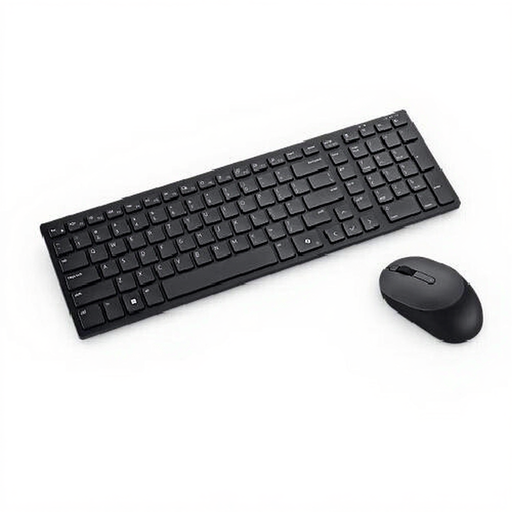
Why it suits this profile: This full-size combination is designed for office work and combines RF with Bluetooth 5.1. The Belgian AZERTY layout and numeric keypad are practical for users who work with figures every day.
The connection and AZERTY layout are specified clearly. This means you can check in advance whether the set suits your computer and preferred key layout.
Full-size format, numeric keypad, Bluetooth 5.1, RF receiver and mouse with 4020 dpi according to the product specifications.

Why it suits this profile: According to the product specifications, the set supports up to four paired devices and supports 2.4GHz plus Bluetooth 4.0 and 5.0. This suits people working across, for example, a desktop PC, laptop, tablet and phone.
You are less reliant on a single connection type. However, check in advance how many USB ports and Bluetooth profiles your devices have available.
Up to four devices, scissor-switch keys, quiet mouse clicks and adjustable 800–2400 dpi.
We have put together a complete, up-to-date list of products that fully meet these strict selection criteria and the applicable European safety regulations.
Yes, provided the connection, layout and compatibility suit your computer. Quiet keys and mouse buttons are practical in a shared workspace. Also check whether the set has a numeric keypad if you work extensively with spreadsheets.
This varies by model, battery type and usage. Manufacturers sometimes state a battery life of several months or even years. Treat these figures as product estimates: intensive use, Bluetooth connections and forgetting to switch the set off can affect the actual battery life.
Many sets with a USB receiver are plug-and-play. With Bluetooth, you usually need to pair the devices once via the settings on your computer, tablet or phone. Also check that your device supports the required Bluetooth version and the correct operating system.
