
Vandaag of morgen in huis

Kwaliteit gegarandeerd

Welkomstaanbiedingen ontgrendelen: GRATIS bezorging | Tot 80% korting | Gratis 30 dagen JoyPlus-proefperiode
Download de app
A wireless keyboard and mouse set keeps your desk tidy and is ideal for working from home, studying or everyday office tasks. However, not every wireless keyboard and mouse combination is equally practical. A low price may be tempting, but the wrong layout, limited connectivity or an uncomfortable design can quickly become frustrating.
Pay particular attention to three common pitfalls:
For UK users, the layout is a practical consideration. Many sets come with a US QWERTY layout. This means the characters and keys for certain punctuation marks are positioned differently compared to a UK or Belgian layout. A Belgian AZERTY set may be a better fit if you’re already used to that layout.
Also consider the size:
A compact model saves space, but is less suitable if you regularly enter lots of numbers.
An RF wireless keyboard and mouse typically uses a USB receiver on the 2.4 GHz band. With sets like the Trust Ody II, the keyboard and mouse connect via a single receiver. This is practical for computers with a free USB-A port.
A Bluetooth keyboard and mouse works without a separate receiver. That’s convenient for laptops, tablets and phones. Check beforehand that your device supports Bluetooth and that the operating system is compatible.
A multi-device keyboard and mouse often combines both options. According to the product specifications, the Trust Lyra can connect up to three devices via a USB receiver and Bluetooth. The Rapoo 9010M supports up to four paired devices according to the product information, and works with 2.4 GHz and Bluetooth 4.0/5.0.
Keep an eye on the number of USB ports. A set with one receiver uses fewer connections than separate wireless devices.
For a shared workspace, home office or library, a quiet keyboard and mouse set and soft mouse buttons are a pleasure. According to the product specifications, the Trust Trezo Comfort uses quiet, low-profile keys and has an integrated wrist rest. The Trust Ody II features flat keys, an adjustable typing angle and quiet keys and mouse buttons.
A rechargeable keyboard and mouse set saves you from having to replace AA or AAA batteries regularly. Do check:
Battery life depends on factors such as daily usage hours, the connection type and settings. Any claim about long battery life should therefore be seen as a manufacturer’s stated guideline, not a guaranteed duration.

Why this fits the profile: This set offers a simple RF connection via a single USB receiver and a US QWERTY layout. That suits home use, study and office work without complicated setup.
The specifications mention quiet keys and mouse buttons, an adjustable typing angle and a storage compartment for the USB receiver.
One receiver for both devices, adjustable mouse speed from 800 to 1600 dpi and compatibility with Windows, macOS, Linux and Chrome OS.
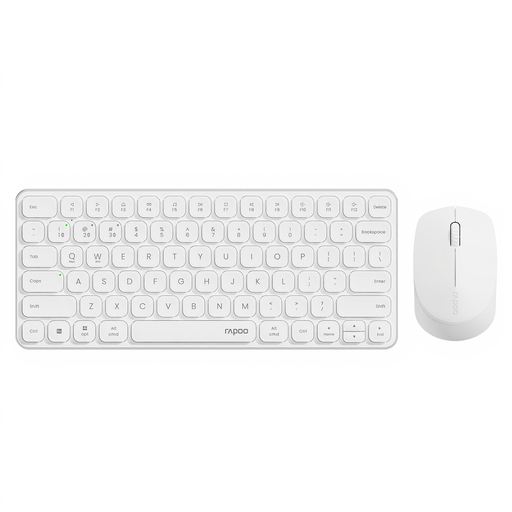
Why this fits the profile: The combination of Bluetooth and RF is ideal for anyone switching between a laptop, desktop, tablet and phone, without compromising on flexibility.
The product information mentions four paired devices, indicator lights and separate connections via Bluetooth 4.0/5.0 or 2.4 GHz.
Low-profile scissor keys, quiet mouse clicks and an adjustable mouse resolution from 800 to 2400 dpi.

Why this fits the profile: This full-size set is designed for long working sessions with a numeric keypad, integrated wrist rest and quiet operation. That suits spreadsheets, admin work and a shared office space.
The set explicitly mentions quiet low-profile keys, a wrist rest and an RF connection via a nano receiver.
Full-size US QWERTY layout with numeric keypad, mouse for left- and right-handed use and stated battery life of up to 48 months for the keyboard.
We’ve put together a full, up-to-date list of products that fully meet these strict selection criteria and comply with current European safety regulations.
Yes, if your laptop has a free USB port for an RF receiver or supports Bluetooth. A Bluetooth set is handy when you don’t want to use a dongle. With a USB receiver, do check whether your laptop needs USB-A, USB-C or an adapter.
That varies by model and usage. Manufacturers sometimes state a maximum battery life, such as up to 48 months for the keyboard of the Trust Trezo Comfort. Treat such figures as a guide. Heavy typing, lots of mouse movement and daily use can reduce the actual duration.
No. “Quiet” usually means the keys and mouse buttons make less noise than standard versions. The noise level also depends on the surface, the force of your keystrokes and the way you type. So alongside the marketing term, also look at the type of key, such as scissor-switch, membrane or low-profile.
