
Vandaag of morgen in huis

Kwaliteit gegarandeerd

Welkomstaanbiedingen ontgrendelen: GRATIS bezorging | Tot 80% korting | Gratis 30 dagen JoyPlus-proefperiode
Download de app
A wireless keyboard and mouse set keeps your desk tidier and is handy for working from home, studying and everyday computer use. However, many sets look similar. A low price, for example, might mean there’s no Bluetooth, while a quiet keyboard and mouse combination isn’t necessarily comfortable for long working days.
Pay particular attention to the layout, connection method and dimensions. Below, you’ll find out which common pitfalls to avoid, which specifications matter and which models suit different types of user.
Dutch online shops sell both QWERTY keyboards and AZERTY keyboards. A US/QWERTY layout places keys such as Enter, Shift and the punctuation keys differently from a Belgian AZERTY keyboard.
Always check:
An AZERTY model may suit someone who already uses that layout, but it can be impractical if you’re used to QWERTY.
Many sets connect via a 2.4GHz USB receiver. It’s straightforward: plug the receiver into a spare USB port and it will usually connect without any extra software. If your laptop only has USB-C ports, you may need an adapter.
Bluetooth is more convenient if you want to connect directly to a laptop, tablet or smartphone. A multi-device keyboard and mouse can also switch between several paired devices. Check how many devices are actually supported, and whether the keyboard and mouse use the same connection method.
A quiet keyboard and mouse is welcome in a shared workspace, but noise levels say nothing about the shape, key feel or wrist support. Look out for:
An ergonomic keyboard and mouse set may feel comfortable, but personal preference still matters. Remember to take regular breaks and vary your working posture, too.
A USB receiver for a keyboard and mouse is practical for a desktop or office PC. Check whether the receiver uses USB-A or USB-C, and whether a converter is included. For use with multiple devices, Bluetooth 4.0 or 5.0 and a device-switching button are useful features.
Also check support for Windows, macOS, ChromeOS, Linux, Android and iOS. A model may connect successfully, but certain shortcut keys won’t always work in the same way with every operating system.
Battery-powered models don’t need a charging cable on your desk. Check the battery type: AA and AAA batteries aren’t always used for both devices. For a rechargeable set, check the stated battery life, charging time and whether you can keep working while it charges.
Battery life depends on usage, settings and connection method. Treat stated battery life in months as a product specification based on certain conditions, not as a fixed guarantee.
A full-size keyboard is useful for spreadsheets and admin work, thanks to its numeric keypad. Compact models save space but often don’t have a separate number pad. Low-profile or scissor keys generally feel flatter than mechanical keys. If you’re looking for a mechanical feel, RGB lighting or a high polling rate, you’ll need a different type of product.
DPI settings are useful on a mouse. A range such as 800 to 1600 DPI is suited to general office work. Higher resolutions don’t automatically make a mouse more comfortable to use.
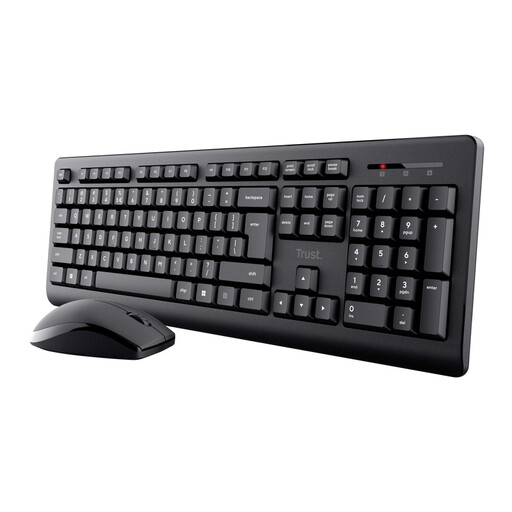
Why it suits this type of user: According to the product information, this set is designed for people working from home, students and office workers looking for a straightforward wireless solution with quiet keys.
The specifications list a US/QWERTY layout, a single USB receiver, quiet low-profile keys and a spill-resistant design. Check whether your computer has USB-A or needs an adapter.
A full-size keyboard with a numeric keypad, adjustable keyboard feet and a mouse for left- and right-handed use.
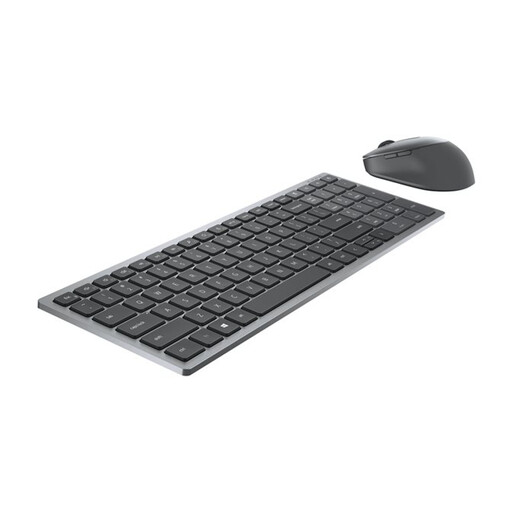
Why it suits this type of user: This model is a good fit for office workers who want to combine a Belgian AZERTY keyboard, Bluetooth and an RF connection in one set.
The layout is clearly listed as Belgian AZERTY, making it less likely that you’ll accidentally order a US/QWERTY version. According to the product information, a wrist rest isn’t included.
Bluetooth 5.0 and 2.4GHz RF, a numeric keypad, programmable shortcut keys and a mouse with 1600 DPI.
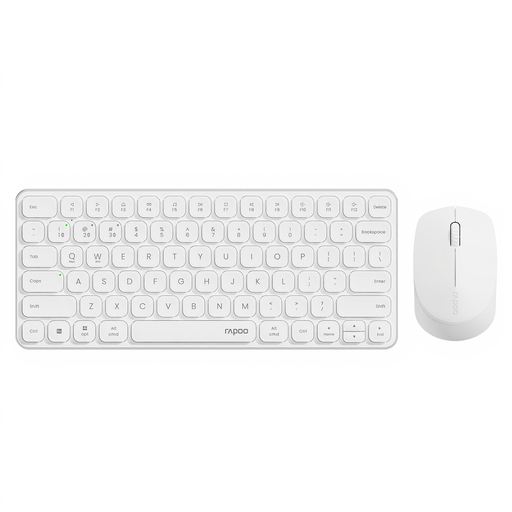
Why it suits this type of user: A multi-device keyboard and mouse is handy if you switch between a desktop, laptop, tablet or phone.
The product information lists 2.4GHz and Bluetooth 4.0/5.0, with pairing for up to four devices. Check in advance that your chosen devices support Bluetooth.
Low-profile scissor keys, quiet mouse clicks, switching between four devices and adjustable mouse sensitivity from 800 to 2400 DPI.

Why it suits this type of user: According to the product information, this set is designed for a quieter working environment, with a full-size keyboard, integrated wrist rest and wireless connection.
The US/QWERTY layout, integrated wrist rest and quiet keys are clearly listed in the specifications. This model is less suitable if you’re looking for mechanical keys or gaming features.
A 2.4GHz nano receiver with a stated range of up to 10 metres, a numeric keypad and a mouse for left- and right-handed use.
We’ve put together a complete, up-to-date list of products that meet these strict selection criteria and current European safety regulations.
For an RF set, insert the batteries, plug in the USB receiver and switch on both devices. For Bluetooth, open the Bluetooth settings on your computer or tablet and follow the pairing steps. Check in advance whether you need a spare USB-A port, a USB-C port or an adapter.
It varies by model and usage. According to the product information, some keyboards are rated to last for several years, while mice generally need new batteries more often. Switch the devices off when you can, and remove the batteries if you won’t be using the set for a long time.
Yes, as long as the layout, size and connection suit your workspace. A wireless keyboard with a numeric keypad is practical for spreadsheets. Quiet keys and mouse buttons are useful in a shared space. If you use several devices, choose a set with Bluetooth and a clearly marked switch button.
