
Vandaag of morgen in huis

Kwaliteit gegarandeerd

Welkomstaanbiedingen ontgrendelen: GRATIS bezorging | Tot 80% korting | Gratis 30 dagen JoyPlus-proefperiode
Download de app
A wireless keyboard and mouse set might seem simple to choose. Yet problems often only appear after a few weeks: the layout is wrong, the connection drops, or the quiet keyboard still makes too much noise. Some sets are also less suitable for a laptop without a USB-A port, or for daily use with multiple devices.
With this practical buying guide, you can compare a wireless keyboard and mouse combo based on verifiable specifications. This way, you'll find a set for working from home, the office, studying, or a shared workspace without relying solely on marketing jargon.
In UK shops, you'll come across QWERTY and AZERTY among others. A QWERTY keyboard and mouse set has a different placement of letters, punctuation marks and special keys than a Belgian AZERTY version. If you're used to touch typing, you'll notice the difference immediately.
So don't just check the product title, but also:
A keyboard with mouse for the office isn't automatically suitable for every UK user. Especially with AZERTY models, you need to check whether the layout suits your working habits.
A USB wireless keyboard and mouse usually uses a 2.4GHz receiver. This often works plug-and-play, but you do need a free USB port. A Bluetooth keyboard and mouse can connect directly to a laptop, tablet or smartphone, but the device must support Bluetooth.
Some multi-device models combine both options. This is handy when you switch between, for example, a desktop, laptop and tablet. Pay attention to the number of devices that can actually be paired and how you switch between them.
A "silent" model generally makes less noise than a standard keyboard, but it isn't necessarily noiseless. The type of switch mechanism, the key construction and the surface all affect the experience. Mechanical keyboards, for example, are often less suitable for a shared workspace unless they are specifically equipped with silent switches.
Also look at the shape. A flat keyboard with low-profile keys can be comfortable for laptop users, while an integrated wrist rest or adjustable angle may be better for long working sessions. An ergonomic keyboard and mouse set won't replace a well-adjusted office chair or correct screen height, but it can help you organise your workspace practically.
Check whether the set works with your operating system. The product information often mentions Windows, macOS, Linux and Chrome OS. For tablets and smartphones, iOS, iPadOS or Android are relevant.
Also pay attention to:
A battery-powered set works straight away when you insert AA or AAA batteries. The stated battery life depends on usage, settings and battery type. Some models mention a long lifespan; treat this as a product specification under certain conditions, not a guaranteed duration.
Rechargeable sets don't need separate batteries, but must be plugged in periodically. Check whether you can continue working while charging and how long a full charge takes. Also consider the cost difference: batteries are easy to replace, whereas a built-in battery may lose capacity over time.
A full-size keyboard usually has a numeric keypad and takes up more space. A compact or tenkeyless model is more convenient for a small desk or for travel, but offers fewer keys.
With the mouse, the DPI value is mainly an adjustment option for cursor speed. A higher DPI doesn't automatically mean a better office experience. For word processing and spreadsheets, shape, grip and a well-functioning scroll wheel are often more important than a very high resolution.

Why this fits the profile: This set uses one USB receiver for both keyboard and mouse and has a US/QWERTY layout. This makes setup straightforward for daily use at home or in the office.
The layout and connection are clearly described. The mouse speed is adjustable from 800 to 1600 DPI, so you're not stuck with one cursor setting.
Silent keys and mouse buttons, adjustable typing angle, media keys and compatibility with Windows, macOS, Linux and Chrome OS.

Why this fits the profile: The Rapoo 9010M combines 2.4GHz with Bluetooth 4.0 and 5.0. According to the product information, you can pair up to four devices and switch between them.
You're not dependent on one connection type. Just check beforehand whether your devices support Bluetooth or need a USB receiver.
Low-profile scissor keys, quiet mouse clicks, Windows and Mac shortcut keys, and a mouse with adjustable 800–2400 DPI.
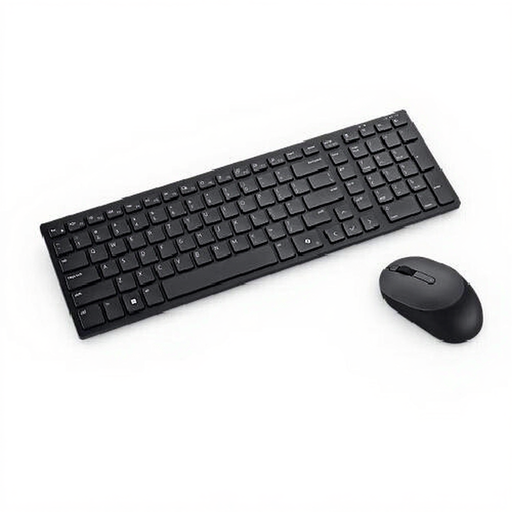
Why this fits the profile: This wireless keyboard and mouse combo is aimed at users who need a Belgian AZERTY layout, numeric keypad and multiple connection options.
The AZERTY layout is explicitly stated. Additionally, according to the product specifications, this model supports both RF via USB and Bluetooth 5.1.
Full-size format, numeric keypad, programmable keys, quiet plunger keys and a symmetrical mouse with 4020 DPI.

Why this fits the profile: This compact set is designed for those who switch between computer, tablet and phone and have limited desk space.
The connection consists of a USB receiver and two Bluetooth channels. This means the set suits devices with different connection options.
Rechargeable battery, pairing with up to three devices, quiet scissor keys and a compact TKL format.
We've put together a full, up-to-date list of products that fully meet these strict selection criteria and current European safety regulations.
With a 2.4GHz set, plug the USB receiver into a free USB port and insert the batteries. With Bluetooth, activate Bluetooth on your computer, tablet or phone and follow the pairing steps. Always consult the manual for your specific model.
This varies per set, battery type and usage. Product information may, for example, state a lifespan of several months or longer. This is an indication under certain usage conditions. Switch the set off when you're not using it for an extended period and remove the batteries for long-term storage to help prevent leakage.
A set with quiet keys and mouse buttons can reduce noise, but generally won't make every sound completely inaudible. In addition to the product specification, pay attention to the key mechanism, the surface and your own typing style. For a shared workspace, low-profile scissor keys or damped membrane keys are often a practical choice.
