
Vandaag of morgen in huis

Kwaliteit gegarandeerd

Welkomstaanbiedingen ontgrendelen: GRATIS bezorging | Tot 80% korting | Gratis 30 dagen JoyPlus-proefperiode
Download de app
A wireless keyboard and mouse set keeps your desk tidy and eliminates extra cables. Yet many sets look similar, while the differences in layout, connection, comfort and battery life become noticeable during daily use. For home workers, students and office professionals, it's essential that the combination suits your computer, the available space and the way you type.
A set may look familiar, but still have a different layout. QWERTY US and AZERTY Belgian place certain keys in different positions. You'll notice this most with punctuation marks, symbols and shortcut keys.
So check before you buy:
A US QWERTY set can work perfectly well with a British computer, but the printed legends and the actual key layout may not match exactly.
Brands use terms like silent, quiet and low-profile. These descriptions usually mean the keys or mouse buttons make less noise than a standard model. They don't mean there's no sound at all.
A quiet keyboard and mouse combination is especially useful in a shared workspace, library or office. Look beyond the marketing term at the type of key mechanism. Membrane and scissor-switch keys feel different from mechanical switches. If you prefer a distinct clicky feel, you'll have different requirements from someone who wants to work quietly.
A USB receiver keyboard and mouse typically works simply: you plug the receiver into a free USB port and switch the devices on. With laptops that only have USB-C, you'll need an adapter or converter.
Bluetooth offers more flexibility, but not every set supports Bluetooth. So check:
A full-size keyboard gives you room for a numeric keypad and function keys, but takes up more space. A compact TKL model leaves out the numeric section and is handier for small desks or mobile use.
An ergonomic keyboard and mouse set isn't automatically the right choice. Look at specific features such as:
A wrist rest can be comfortable, but it takes up extra space. Position the keyboard so that your shoulders stay relaxed and your wrists aren't constantly bent upwards.
Battery life is often stated as "up to" a certain number of months. That's a product specification under conditions that can vary depending on usage. So check whether the set uses AA or AAA batteries, or whether charging via a cable is required.
A model with standard batteries is ready to use straight away and easy to maintain. A rechargeable set avoids loose batteries, but needs to be charged periodically. Also check what's included in the box. Some models come with batteries, others don't.
The DPI value indicates how sensitive the mouse pointer is. A higher value isn't automatically better. For office work, stable control and a comfortable shape are most important. Models with adjustable DPI, for example between 800 and 1600 or 1000 and 1800, offer more choice.
Also check whether the mouse:
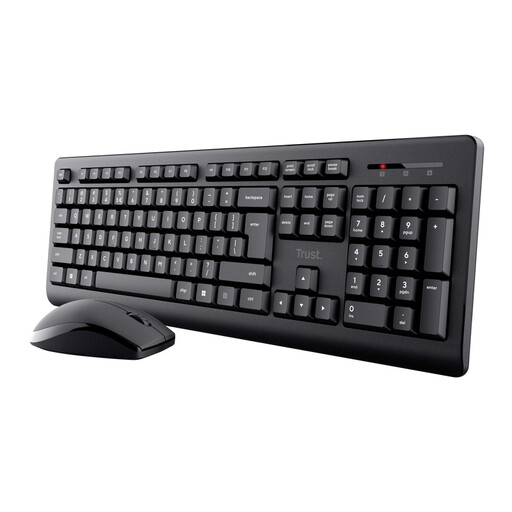
Why This Fits Their Persona: A practical choice for students and home workers looking for an affordable QWERTY US set for everyday typing.
The product information states quiet low-profile membrane keys, a single USB receiver and a spill-resistant keyboard. Spill-resistant does not mean waterproof.
Numeric keypad, ambidextrous mouse and included AA batteries. The stated wireless range is 8 metres.

Why This Fits Their Persona: Aimed at home workers and office professionals who type for long periods and want a wrist rest.
The set specifies an integrated wrist rest, quiet keys and a full-size layout. So you don't have to infer comfort from a general ergonomic claim alone.
QWERTY US layout, numeric keypad, adjustable DPI of 1000/1400/1800 and battery life according to the product information of up to 48 months for the keyboard.
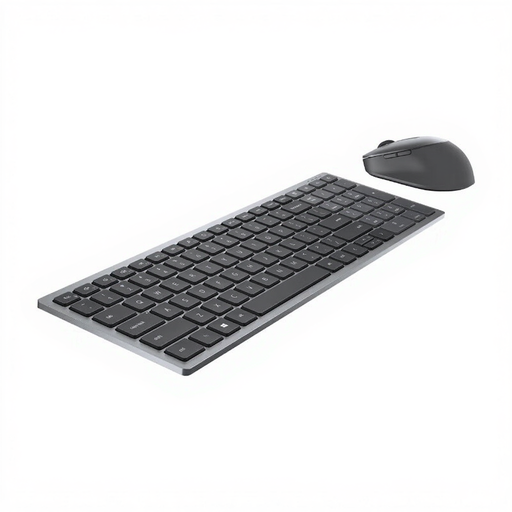
Why This Fits Their Persona: Suitable for professionals who work across multiple systems and use a numeric keypad plus extra mouse buttons.
You're not limited to just a USB receiver: the specifications mention RF and Bluetooth 5.0. Do check in advance which connection your computer supports.
QWERTY US layout, numeric keypad, seven mouse buttons and a stated battery life of up to 36 months.

Why This Fits Their Persona: Handy for users who switch between a laptop, tablet and smartphone and have limited desk space.
The compact TKL design makes it clear this isn't a full-size model. So you know in advance that a separate numeric keypad isn't included.
Pairing with up to three devices via USB receiver and Bluetooth, plus rechargeable batteries with a stated usage time of up to six months.
Browse a current selection of wireless keyboard and mouse sets with different layouts, connections and comfort features.
Not automatically. Check the operating system and the available ports. A USB receiver requires a compatible USB port, while Bluetooth must be present and enabled on the device. Product information often states support for Windows, macOS, Chrome OS and Linux, but always check the current specifications of the model you choose.
This varies depending on the set, frequency of use and power-saving settings. Manufacturers usually state a maximum or estimated usage time. A set with rechargeable batteries may, according to the product information, last for months, while models with AA or AAA batteries will need new batteries periodically.
Yes, when the layout, mouse shape and connection suit your workspace. For home working, quiet keys, a stable connection, a numeric keypad and an adjustable typing angle are often practical. Also check that the set isn't too wide for your desk and that the USB receiver fits your laptop without an adapter.
