
Vandaag of morgen in huis

Kwaliteit gegarandeerd

Welkomstaanbiedingen ontgrendelen: GRATIS bezorging | Tot 80% korting | Gratis 30 dagen JoyPlus-proefperiode
Download de app
A wireless keyboard and mouse set might seem simple to choose: you pick a colour, look at the price and order. In practice, it’s the keyboard layout, connection type and noise level that determine whether you’ll enjoy using it every day. A set that works well for a student could be impractical for an administrative office role.
So, watch out for these common pitfalls before you buy a wireless keyboard with mouse.
Terms like “silent”, “quiet” and “low-noise” aren’t a fixed technical standard. A membrane keyboard generally sounds different from a mechanical model with quiet switches. Mouse clicks can also still be audible, even when the keys are relatively quiet.
For a shared office, a student room or working from home during a video call, low-profile membrane keys or scissor-switches are often a practical choice. If you prefer a clear mechanical feel, you’ll be looking at a gaming keyboard. Just check which type of switch is included; “quiet red switch” doesn’t automatically mean the keyboard is completely silent.
A USB receiver keyboard usually uses a 2.4GHz radio connection. This often works straight away once you plug the receiver in, but you’ll need a free USB port. A Bluetooth keyboard and mouse can pair directly with devices that support Bluetooth, such as tablets, smartphones and some laptops.
Also pay attention to the connection type included. Some sets use USB-A, while others come with a USB-C receiver or an adapter. Check this before you order, especially if your laptop only has USB-C ports.
A QWERTY US keyboard is not the same as a Dutch keyboard. The position of punctuation marks, special characters and some function keys can differ. You’ll notice this most when word processing, programming and entering passwords.
Do you need to enter a lot of numbers? Then choose a model with a keyboard with a numeric keypad. Compact 60% and TKL models save space, but often lack the numeric section and some navigation keys.
For an office keyboard and mouse, the following details are more useful than just the term “silent”:
Also check whether the keyboard has an adjustable typing or viewing angle. An integrated wrist rest can be comfortable, but the right desk height and a neutral working posture remain important. An ergonomic keyboard with mouse isn’t automatically suitable for everyone; dimensions and shape determine the practical fit.
A set with a single USB receiver keeps your desk tidy. Check:
A model with a radio connection is practical for one computer. If you work with a laptop, tablet and smartphone, you might be better off with a multi-device set featuring Bluetooth 4.0 or 5.0 and a USB receiver.
Wireless sets run on disposable batteries or a built-in rechargeable battery. A rechargeable battery needs charging, while disposable AA or AAA batteries are easy to replace. Don’t just look at the claimed battery life: it depends on usage, power saving and when the product switches itself off.
According to Trust’s product information, the Trezo Comfort, for example, has a stated usage time of up to 48 months for the keyboard and up to 12 months for the mouse. That’s a product specification, not a guarantee for every usage scenario. For a model with a rechargeable battery, such as the Trust Lyra, a usage time of around six months per charge is stated.
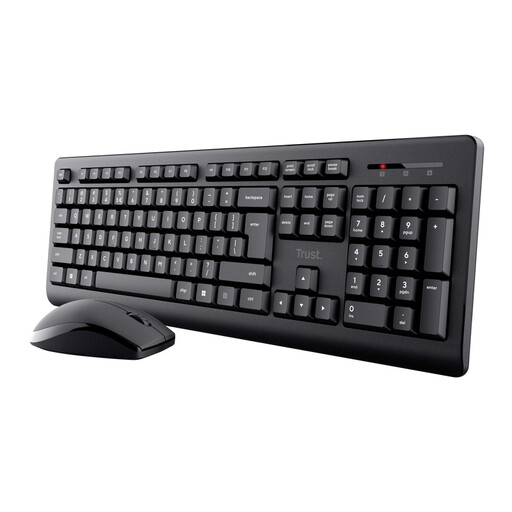
Why this fits the profile: This full-size set is aimed at home workers, students and office workers who want a single, simple connection and a numeric keypad.
The product specifications mention quiet low-profile membrane keys, a spill-resistant design and a single USB receiver for both devices. The mouse is symmetrically shaped.
QWERTY US layout, numeric keypad, adjustable feet and a mouse suitable for left- and right-handed use.

Why this fits the profile: The integrated wrist rest, full-size layout and quiet keys suit long working days at home or in the office.
The product description explicitly mentions quiet keys and mouse buttons, a USB receiver and a US/QWERTY layout. This means the noise level and layout can be checked in advance.
Numeric keypad, media and office keys, adjustable mouse sensitivity of 1000/1400/1800 DPI and stated battery life of up to 48 months for the keyboard.
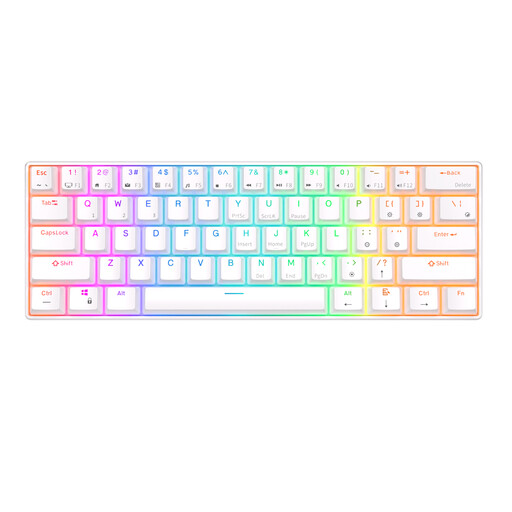
Why this fits the profile: This compact gaming keyboard is aimed at users who want to save desk space and are looking for mechanical keys, RGB lighting and multiple wireless connections.
The limited 61-key layout makes it clear that this is not a full-size office solution. Only choose this model when a numeric keypad and mouse are not needed.
Mechanical, hot-swappable keys, RGB lighting, Bluetooth and support for up to three paired devices according to the product information.
We’ve put together a full, up-to-date list of products that fully meet these strict selection criteria and comply with current European safety regulations.
With a set that uses a USB receiver, you plug the receiver into a free USB port, insert the batteries and turn the devices on. Many models then work straight away without any additional software. With Bluetooth models, you first need to pair the keyboard and mouse via the Bluetooth settings on your device.
This varies by model and usage. An on/off switch, automatic sleep mode and the use of backlighting all affect battery life. Check whether the manufacturer gives an indication for the keyboard and mouse separately. With rechargeable battery models, you also need to factor in charging time.
For simple games, an office combination can be sufficient. For competitive gaming, a gaming keyboard and gaming mouse with mechanical switches, a suitable connection mode and appropriate sensor settings make more sense. Also check whether the model lacks a numeric keypad, arrow keys or other features due to a compact layout.
For many Dutch users, a US QWERTY layout is usable, but the key positions differ from a Dutch layout. A Belgian AZERTY set, such as some Dell models, is arranged differently again. So, before you buy, look at an image of the keys and check the language settings on your operating system.
