
Vandaag of morgen in huis

Kwaliteit gegarandeerd

Welkomstaanbiedingen ontgrendelen: GRATIS bezorging | Tot 80% korting | Gratis 30 dagen JoyPlus-proefperiode
Download de app
A wireless keyboard and mouse set might seem straightforward to choose at first glance. Yet many home workers and students end up with a combination that doesn't feel right after a few weeks. The most common issues are the wrong keyboard layout, limited connectivity options, and keys or mouse buttons that are noisier than expected.
With this buying guide, you can compare the key specifications and see which wireless keyboard and mouse combo suits your workspace, devices and usage time.
Dutch online shops offer both QWERTY and AZERTY layouts. A QWERTY keyboard and mouse is standard for English-language systems and many international laptops. An AZERTY keyboard and mouse is better suited to the Belgian layout.
Don't just look at the letters on the keys – also consider:
A US QWERTY set will technically work on a Dutch system, but the printed symbols may not match the software settings. Check this before you buy.
A set can work via a USB receiver, Bluetooth, or both. With a USB receiver keyboard and mouse, you usually plug in one dongle that handles both the keyboard and mouse. This is practical for a desktop or laptop with a free USB port.
Bluetooth is more convenient when you're using a tablet, smartphone or laptop with limited USB ports. Do check that both devices support Bluetooth, and whether the keyboard and mouse need to be paired separately.
A multi-device keyboard and mouse offers extra flexibility. Pay attention to how many devices can actually be connected at the same time and how you switch between them.
A quiet keyboard and mouse generally makes less noise than a mechanical keyboard, but “quiet” doesn’t mean silent. The noise depends on the key construction, the surface you're working on, and the way you type.
Scissor mechanisms and flat membrane keys are often used in office and laptop-style sets. According to Trust's product description, the keys and mouse buttons on the Ody II are designed for quieter operation. That's a claim from the manufacturer; the actual noise level can vary from person to person.
Choose a connection type that suits your everyday equipment:
A USB-C adapter may be needed for modern laptops. Also check whether the receiver can be stored inside the keyboard or mouse. That reduces the chance of losing the small dongle when you're on the move.
A full-size keyboard usually has a numeric keypad. That's useful for admin work, spreadsheets and entering numbers, but it takes up more space. A compact or tenkeyless model fits better on a small desk and is easier to carry around.
Also look at:
Battery-powered sets are ready to use as long as you have spare batteries to hand. Check which type is needed: AA and AAA are often used between the keyboard and mouse.
Rechargeable models save you from having to replace batteries regularly, but they do need to be charged in time. Claims about long battery life depend on usage, connection mode and power saving. Treat a claim like “up to twelve months” as a stated maximum, not a guaranteed lifespan.
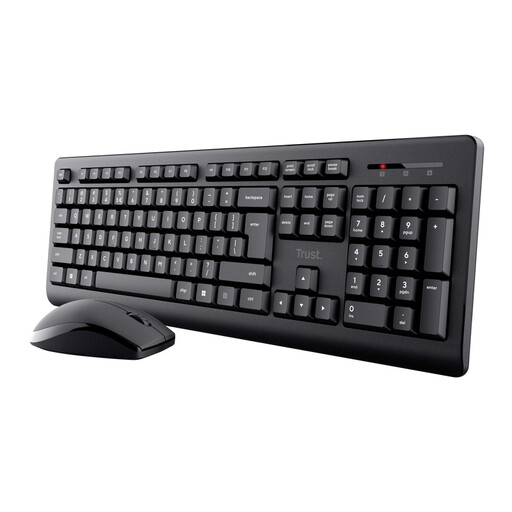
Why this fits the profile: This set combines a full-size QWERTY US keyboard with one USB receiver, a numeric keypad and a symmetrical mouse. That suits students and home workers looking for a simple solution for one computer.
The product information mentions a USB receiver, quiet low-profile keys, adjustable feet and a spill-resistant design. Spill-resistant does not mean waterproof; spills should still be avoided.
Full-size layout, 1200 dpi mouse, suitable for left- and right-handed use, and 70% recycled material according to the product specification.

Why this fits the profile: The integrated wrist rest, full-size layout and quiet operation appeal to office professionals who spend long hours typing every day.
The flat keys, dampened mouse buttons and adjustable mouse sensitivity give you more control over noise and cursor movement. You do need to consciously choose the US/QWERTY layout.
Wrist rest, numeric keypad, ambidextrous mouse and stated battery life of up to 48 months for the keyboard and 12 months for the mouse.

Why this fits the profile: The Rapoo 9010M is aimed at users who switch between up to four devices, such as a PC, laptop, tablet and phone.
The combo supports 2.4GHz and Bluetooth 4.0/5.0 according to the product specification. That means you're not solely reliant on a free USB port.
Support for Windows, Mac, Linux and Chrome OS, quiet low-profile switch construction and a mouse with adjustable 800–2400 dpi.

Why this fits the profile: The compact TKL format saves space and the set can be used with up to three devices via a USB receiver and two Bluetooth connections.
You don't have to choose between only Bluetooth or only a dongle. The three separate switching buttons make the connection choice clearer in everyday use.
Rechargeable battery, compact size, scissor keys and compatibility with Windows, macOS, iOS, iPadOS, Android and Chrome OS.
We've put together a full, up-to-date list of products that fully meet these strict selection criteria and comply with current European safety regulations.
Not automatically. A set with a USB receiver needs a compatible USB port or adapter. A Bluetooth keyboard and mouse must be supported by the laptop. Also check the operating system and keyboard layout before you order.
That varies by model and usage. Manufacturers sometimes state a maximum usage time, but the type of typing, intensive mouse use and an active wireless connection can all affect the actual duration. A model with an on/off switch or a rechargeable battery can make running costs more predictable.
Yes, especially in a shared space, dampened operation can be pleasant. Do be aware of the difference between less noise and completely silent. Scissor and membrane keys are usually a logical choice for office work, while mechanical keys are mainly chosen for their specific feel and feedback.
