
Vandaag of morgen in huis

Kwaliteit gegarandeerd

Welkomstaanbiedingen ontgrendelen: GRATIS bezorging | Tot 80% korting | Gratis 30 dagen JoyPlus-proefperiode
Download de app
A wireless keyboard and mouse gives you more space on your desk and is convenient when you switch between a laptop, PC, tablet and smartphone. However, a cheap or poorly chosen wireless keyboard and mouse set can quickly disappoint. Think noisy keys, an awkward layout or a connection that is not compatible with your device.
These checks will help you see which specifications really matter and which set best suits the way you use it.
A product may be described as quiet when only the mouse click is relatively soft. When typing for long periods, the key mechanism, key travel and construction are particularly important. Scissor mechanisms with low-profile keys generally sound different from mechanical switches. If you work in a shared office or at home next to someone who is asleep, check the product description specifically for “silent”, “low-profile” or “scissor”.
A 2.4GHz connection usually uses a USB receiver. This works well with many laptops and PCs, but not every tablet or smartphone has a suitable USB port. Bluetooth means you do not need a receiver, but the pairing process varies between operating systems.
So check whether the set works with your version of Windows, macOS, Linux, Chrome OS, iOS, iPadOS or Android. A USB receiver supplied with the product is also not the same as built-in Bluetooth.
A compact wireless keyboard saves space, but often has no numeric keypad and may also have an unusual arrow-key layout. For spreadsheets, accounting or entering lots of numbers, a full-size model may be more practical. Also check the language layout: a QWERTY keyboard with a US ANSI layout may differ from the layout you are used to in the Netherlands.
For a single PC, a USB receiver is often sufficient. If you switch between a work computer, laptop and tablet, a multi-device keyboard is more useful. Check the following:
A Bluetooth keyboard and mouse is particularly useful for mobile devices. A combination of Bluetooth and 2.4GHz offers greater flexibility at a fixed workstation.
Check whether it uses QWERTY, AZERTY or another layout. Also look at the size: full-size, TKL or compact. For office work, low-profile scissor keys, clear key feedback and shortcut keys for volume and media are practical features.
A quiet keyboard and mouse is not determined solely by the marketing copy. With a mouse, the click type, the surface you work on and the adjustable DPI range all matter. A higher DPI makes the cursor more sensitive, but is not automatically more convenient.
Wireless sets run on batteries or a built-in rechargeable battery. A battery-powered set can work immediately if you have spare batteries available; a rechargeable set avoids repeated battery purchases, but needs to be charged in good time.
Pay attention to the stated battery life. This is a product specification and may depend on usage, connection and settings. Remove the batteries from a set that will not be used for an extended period. This reduces the risk of leakage. Keep the keyboard and mouse dry, and use a soft, dry cloth for cleaning.

Why it suits this profile: This full-size wireless set is designed for everyday office and home use, with one receiver for the keyboard and mouse.
The product description specifies a US QWERTY layout, 104 keys, a quiet design and a range of up to 10 metres. However, check that the US layout suits the way you work.
Full-size keyboard, one USB receiver, adjustable mouse resolution and a battery life of up to 12 months according to the product listing.
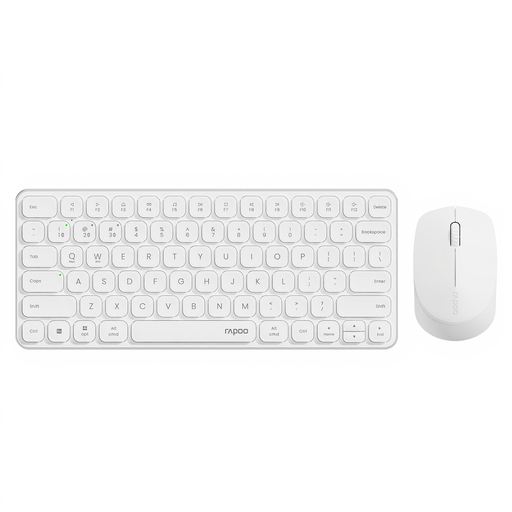
Why it suits this profile: This set is suitable for anyone who regularly switches between up to four devices and wants to use both Bluetooth and 2.4GHz.
The connection supports 2.4GHz and Bluetooth 5.0/4.0. The product information mentions indicator lights for the active device and Caps Lock, making it easier to keep track when switching.
Pairing with up to four devices, Windows and Mac shortcut keys, low-profile scissor keys and adjustable mouse DPI from 800 to 2400.
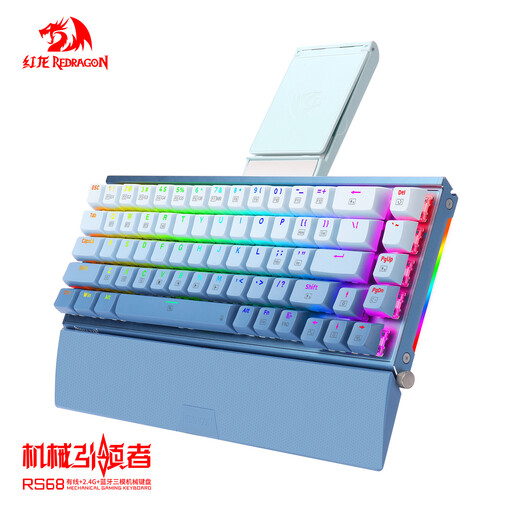
Why it suits this profile: This option is ideal for users who value mechanical keys, an aluminium casing and customisation alongside wireless operation.
According to the product information, the tri-mode connection offers several connectivity options. Check the exact layout in advance and make sure the mechanical noise level is suitable for a shared workspace.
Tri-mode connectivity, hot-swappable PCB, RGB lighting, aluminium casing and a detachable wrist rest according to the product description.
For a fixed workstation, an office keyboard and mouse with quiet keys and a reliable USB connection is often sufficient. If you work with multiple systems, choose a model with both Bluetooth and a device-switch button. Students who are often on the move will generally get more use from a TKL or compact model than from a heavy full-size keyboard.
An ergonomic keyboard and mouse should primarily suit your posture, hand size and working hours. Consider the height of the keyboard, the shape of the mouse and whether you can keep your wrists in a neutral position. An accessory can help with this, but it cannot replace a properly set-up desk.
We have put together a complete, up-to-date list of products that fully meet these strict selection criteria and the applicable European safety regulations.
No. Check whether your laptop supports Bluetooth or has a free USB port for the receiver. Also check the operating system and keyboard layout. For tablets and smartphones, Bluetooth is often the most practical option.
This varies by model, connection and usage. Product listings may specify a particular battery life, but this is not a fixed guarantee for every user. Switch the set off when you have finished using it and remove loose batteries before storing it for an extended period.
That depends on the mechanism and layout. Scissor keys are often low-profile and suitable for office work; mechanical keys can provide more feedback, but may produce more noise. Also check the position of your wrists, key travel and whether shortcut keys are included before ordering.
