
Vandaag of morgen in huis

Kwaliteit gegarandeerd

Welkomstaanbiedingen ontgrendelen: GRATIS bezorging | Tot 80% korting | Gratis 30 dagen JoyPlus-proefperiode
Download de app
A clean desk, free from cable clutter: the promise of a wireless keyboard and mouse is appealing. Whether you're working from home, at the office, or constantly switching between devices, the right set can significantly boost your productivity and comfort. But the market is flooded with models making lofty promises. Before you invest, it's important to recognise the common pitfalls that often lead to buyer's remorse.
Manufacturers use clever marketing to promote their products, but some claims are less impressive in practice. Pay attention to the following points:
To avoid a bad purchase, focus on the objective specifications that truly matter for your use case.
The way your devices connect is crucial for stability and ease of use.
A comfortable set is more than just a curved shape. Pay attention to the details:
Below are some popular choices, tailored to specific user profiles. We've selected them based on their specifications and how they avoid the pitfalls mentioned earlier.
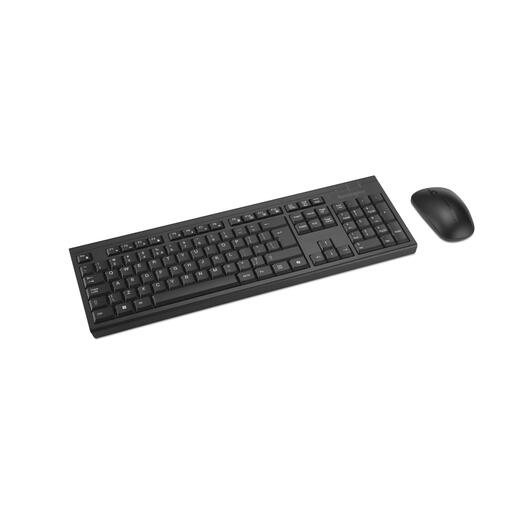
Why This Fits Their Persona: A complete, rechargeable set that works right out of the box. Ideal for those seeking a reliable and functional office keyboard and mouse without any fuss. The spill-resistant design is a practical bonus for the home office.
The battery life is clearly stated (up to 4 months) and is rechargeable, preventing unexpected battery costs. It's a standard full-size design, without vague "universal ergonomics" claims.
Rechargeable via USB, made with at least 60% recycled materials, and features silent mouse clicks. A sustainable and practical choice.
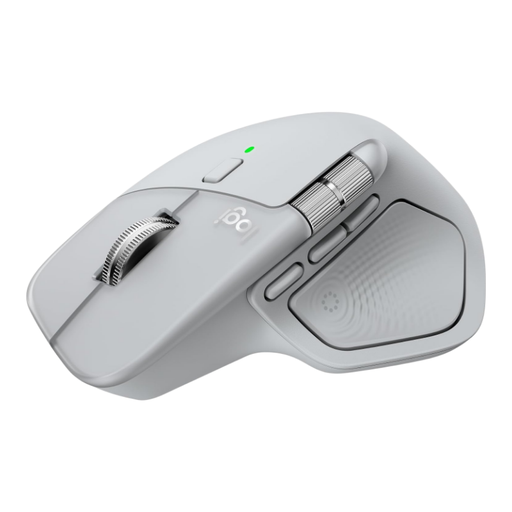
Why This Fits Their Persona: This Logitech mouse is designed for power users who seamlessly switch between up to 3 devices. The combination of a Logi Bolt USB receiver and Bluetooth 5.1 provides the flexibility and stability needed for a complex workflow.
Logitech's multi-device technology is well-established and reliable. The battery life is clearly specified (up to 70 days), and its ergonomic shape is specifically designed for right-handed users, not marketed as a vague 'universal' solution.
The MagSpeed electromagnetic scroll wheel and extensive customisation options via software offer an unparalleled productivity boost for demanding users.

Why This Fits Their Persona: Perfect for open-plan offices or a quiet home workspace. This mouse is designed for silent clicking and scrolling, ensuring you don't disturb colleagues or housemates. Its compact, symmetrical design is suitable for both left- and right-handed users.
This product focuses on a concrete, measurable feature: silent operation. The 36-month battery life is impressive, but the specifications clarify it relies on replaceable batteries, presenting a clear trade-off.
Extremely quiet clicks and a very long battery life. The smart connectivity automatically switches between RF and Bluetooth, enhancing ease of use.
We have compiled a complete, up-to-date list of products that fully meet our stringent selection criteria.
This depends heavily on the model and your usage. A rechargeable wireless mouse or keyboard with backlighting may need charging every few weeks. Models without backlighting on replaceable AA or AAA batteries can last for over a year. Always check the manufacturer's specifications and keep in mind that these figures are often based on 2-4 hours of use per day. With a full workday, the battery will drain faster.
Not necessarily better, but different. A Bluetooth keyboard is more convenient because it doesn't occupy a USB port, which is ideal for modern laptops and tablets. A set with a 2.4 GHz RF dongle often provides a more stable connection with less latency, which may be preferable for a stationary desktop computer. Many premium models, like the Dell Prem Collab Keyboard KB900, offer both options for maximum flexibility.
DPI stands for 'Dots Per Inch' and measures the sensitivity of the mouse sensor. A higher DPI value means the cursor on your screen travels a greater distance for a small physical movement of the mouse. For standard office work and web browsing, a value between 800 and 1600 DPI is more than sufficient. Many mice, like the Trust Zaya, have a button to adjust the DPI on the fly, allowing you to tailor the sensitivity to your task.
