
Vandaag of morgen in huis

Kwaliteit gegarandeerd

Welkomstaanbiedingen ontgrendelen: GRATIS bezorging | Tot 80% korting | Gratis 30 dagen JoyPlus-proefperiode
Download de app
A wireless keyboard and mouse set keeps your desk tidier and is useful for working from home, studying or everyday laptop use. However, making the wrong choice can quickly become frustrating. You might end up with a keyboard featuring an unfamiliar layout, a mouse that becomes uncomfortable after a short time or a wireless connection that is not suitable for your devices.
Joybuy Product Recommendation Officer helps you assess the key differences. Pay particular attention to the following pitfalls before buying a wireless keyboard with mouse.
Dutch online shops offer both QWERTY and AZERTY keyboards. A UK QWERTY keyboard has a different Enter key and layout from a Belgian AZERTY model. So do not just check the product title; also look at the specification under “keyboard layout” or “language”.
For users in the Netherlands, a QWERTY keyboard is usually the obvious choice. If you are used to a Belgian office or laptop keyboard, AZERTY may be the better option.
A 2.4GHz wireless set generally works with a small USB receiver. This is practical for a PC or laptop with a spare USB port, but less flexible with tablets and smartphones. A Bluetooth keyboard and mouse can connect directly, provided the device supports Bluetooth.
Want to switch between a desktop, laptop, tablet and phone? Look for a multi-device keyboard and mouse with multiple Bluetooth channels, or a combination of Bluetooth and 2.4GHz.
A quiet mouse click does not automatically mean that the keyboard is whisper-quiet too. Check whether the product information separately mentions quiet keys, a low-profile scissor-switch design and silent-click buttons on the mouse.
A quiet keyboard and mouse combination is particularly useful in a shared study, library or open-plan office. Bear in mind that the noise level also depends on the surface, your typing habits and how firmly you click.
Pay attention to these practical differences:
According to the product specifications, the Rapoo 9010M supports 2.4GHz and Bluetooth 4.0/5.0 and can be used with up to four devices. This makes this type of set interesting for users who regularly switch between devices.
A full-size keyboard usually includes a numeric keypad. This is useful for spreadsheets and administration, but takes up more desk space. A compact model fits better next to a laptop or in a small student room.
Also check:
Mac shortcuts do not work identically on every model. Some sets have functions designed for both Windows and macOS, but check this in the product description before ordering.
A set powered by AA or AAA batteries does not need a charging cable, but does require new batteries from time to time. Manufacturers sometimes state a battery life of up to around twelve months. This is an indication based on usage and depends on how frequently the set is used, the connection mode and the settings.
A rechargeable mouse avoids disposable batteries, but must be charged in good time. Also check whether the keyboard is rechargeable or uses separate batteries.
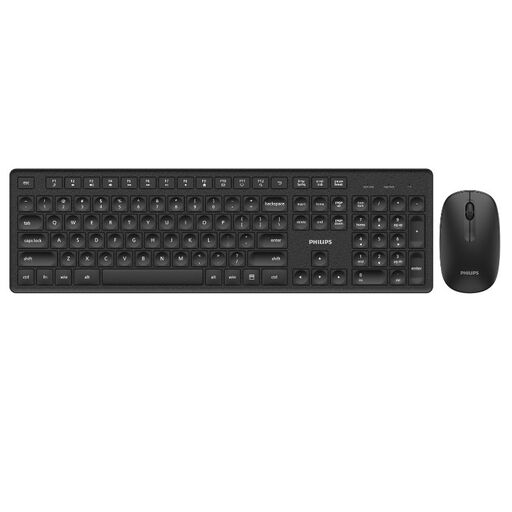
Why it suits this profile: A straightforward wireless set for homeworkers and students looking for a full-size QWERTY keyboard with a USB receiver.
The product name specifies the UK QWERTY layout and 2.4GHz connection. Before buying, check that this layout matches your current keyboard.
Full-size design, QWERTY layout and a wireless receiver for PC or laptop.

Why it suits this profile: Suitable for professionals who want to use one keyboard and mouse with a laptop, desktop, tablet and smartphone.
The set combines 2.4GHz with Bluetooth 4.0/5.0 and supports up to four devices according to the product specifications. This makes you less dependent on a single USB port.
Low-profile scissor keys, silent-click mouse, adjustable 800–2400 dpi and support for Windows, Mac, Linux and Chrome OS.
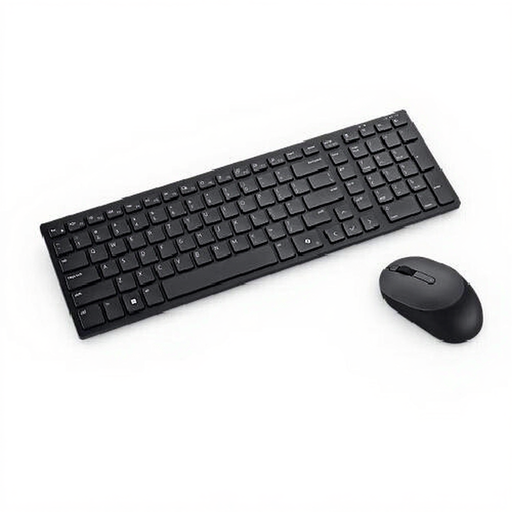
Why it suits this profile: An office-focused choice for users who value quiet operation, Bluetooth and a numeric keypad.
The RF and Bluetooth 5.1 connection options are clearly stated. However, pay attention to the Belgian AZERTY layout before buying this set for a Dutch keyboard.
Plunger keys, numeric keypad, Bluetooth 5.1, RF receiver and a mouse with 4020 dpi according to the product specifications.
Not everyone prefers the same mouse shape. A standard mouse suits many desks, while a vertical design offers a different hand position. The Logitech MX Vertical is a separate ergonomic wireless mouse with Bluetooth and 2.4GHz via a Unifying receiver, an adjustable sensor of up to 4000 dpi and a rechargeable battery.
According to the product description, this model has a 57-degree angle and is designed for a handshake-like grip. This does not guarantee personal comfort; fit, hand size and posture remain decisive factors. View the Logitech MX Vertical if you want to pair a separate mouse with an existing keyboard.
We have put together a complete, up-to-date list of products that fully meet these strict selection criteria and the applicable European safety regulations.
Not automatically. A set with a USB receiver requires a suitable USB port. For Bluetooth, the laptop must support Bluetooth and the operating system must be compatible. Also check that the supplied receiver works with both the keyboard and the mouse.
This varies by model and usage. Some product descriptions state a battery life of up to around twelve months. Heavy typing, intensive mouse use and a permanent connection can reduce the actual battery life. A rechargeable mouse has different running costs from a set using AA or AAA batteries.
No. “Quiet” usually refers to reduced noise when pressing keys or mouse buttons. The key action, space bar and contact with your desk may still be audible. So look for separate mentions of quiet keys and silent-click mouse buttons.
