
Vandaag of morgen in huis

Kwaliteit gegarandeerd

Welkomstaanbiedingen ontgrendelen: GRATIS bezorging | Tot 80% korting | Gratis 30 dagen JoyPlus-proefperiode
Download de app
A wireless keyboard gives you a clutter-free desk and more freedom when working with a PC, laptop, tablet or mobile phone. However, the wrong choice can quickly become frustrating. For example, a keyboard might not work with your device, have a different layout, or run out of battery after a short time.
So don't just focus on looks or terms like "gaming" and "quiet". Instead, check the connection, layout, size and how the keyboard is powered.
Not every QWERTY keyboard has the same key layout. A Dutch or European model can differ from a QWERTY US model, for example with the Enter key, Shift key and punctuation marks. If you touch-type or use special characters often, you'll notice this straight away.
So check before you buy:
A wireless keyboard can work via Bluetooth, a 2.4GHz USB receiver, or both. A USB receiver is practical for a desktop or laptop with a free USB port. Bluetooth is more convenient for tablets, mobile phones and devices without a USB-A port.
Also pay attention to the number of devices. A standard model is usually designed for one connection. A multi-device keyboard can switch between several devices, but check how many connections are actually supported.
A rechargeable keyboard is convenient, but the battery life depends on the lighting, connection method and how intensively you use it. With a model that has RGB lighting or white backlighting, the battery can drain faster. A keyboard that uses disposable batteries doesn't need charging breaks, but does require replacements.
So don't just look at a battery life claim. Also check:
A full-size keyboard usually includes a separate numeric section. This is handy for spreadsheets, accounting, administration and programming with lots of numbers. A wireless keyboard with a numeric keypad does take up more space.
Compact models, such as a 75% or 80% layout, typically leave out the numeric keypad but often keep the arrow keys and function keys. This makes them suitable for smaller desks and gaming setups. A compact keyboard is less practical if you regularly enter long sequences of numbers.
Mechanical keys aren't automatically better for everyone. They can be enjoyable for gaming, programming and users who want clear feedback, but the noise can be distracting in an office or during a video call.
Always check the official compatibility list. A model for Mac may have different function keys than a keyboard for Windows. For a keyboard for Surface Pro, you also need a compatible connection and the correct Surface model.
With multi-device models, the combination of Bluetooth and a USB receiver is practical. For example, you can connect a laptop via the receiver and a tablet via Bluetooth. Also check whether your device supports USB-A, USB-C or only Bluetooth.
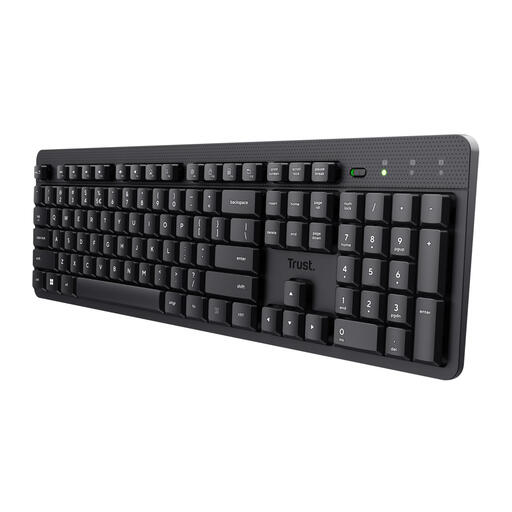
Why this fits the profile: A full-size model for home working and the office, with a numeric keypad and quiet membrane keys.
The product information clearly states a US QWERTY layout, USB receiver and batteries. So there's no confusion about Bluetooth or a built-in battery.
Full-size format, numeric keypad, quiet keys and a spill-resistant casing according to the product description.
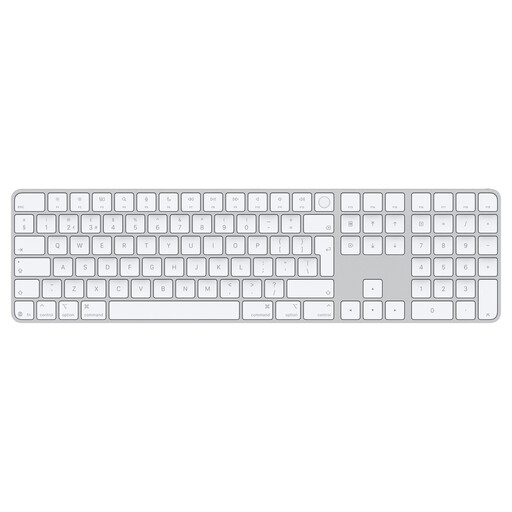
Why this fits the profile: Aimed at users with a Mac featuring Apple silicon who want a low-profile, lightweight and rechargeable keyboard.
Compatibility is specifically described for macOS 11.4 or later with Apple silicon. This makes it clear which Mac models this keyboard is intended for.
Bluetooth, USB-C charging, QWERTY layout and Touch ID according to Apple's product description.
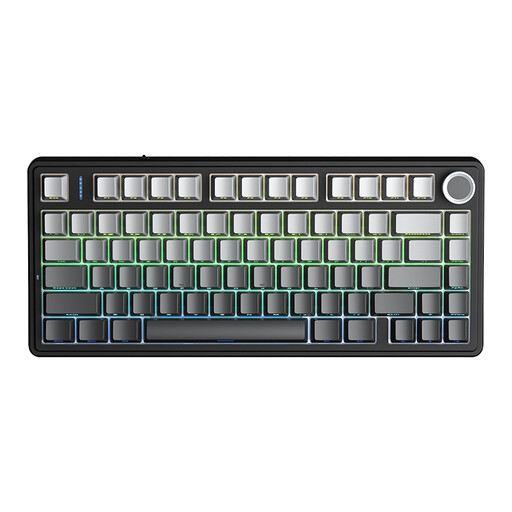
Why this fits the profile: For gamers and programmers who want a compact mechanical keyboard with multiple connection options.
The specifications mention Bluetooth, 2.4GHz and USB as three connection options. The battery is also rechargeable and the switches are hot-swappable.
75% layout with 81 keys, 4000mAh battery, RGB lighting and a programmable button according to the product data.
Choose a Bluetooth keyboard if you mainly work with tablets, mobile phones or modern laptops. A model with a USB receiver is suitable for a fixed workstation. For multiple devices, a combination of Bluetooth and 2.4GHz is more flexible.
If you work with numbers a lot, go for a full-size model with a numeric keypad. For a small workspace, a compact 75% model fits better. Gamers can look for mechanical switches, RGB lighting, hot-swap functionality and a stable wireless connection. For office work, quiet keys, a low actuation and a clear layout are often more important than lighting.
Always check the exact model with a Surface Pro. A keyboard for Surface Pro may connect magnetically, but that doesn't automatically mean every generation is supported.
We've put together a full, up-to-date list of products that fully meet these strict selection criteria and comply with current European safety regulations.
That depends on the model. Some keyboards support macOS and Windows, but the function keys and key legends may differ. Check the compatibility information and, if possible, choose a model with Bluetooth if you use multiple operating systems.
A rechargeable keyboard means you don't have to buy disposable batteries regularly. On the other hand, you need to charge the device and the battery life can decrease when the lighting is constantly on. Look at the charging port, included cable and stated battery conditions.
The lifespan depends on build quality, usage, cleaning and battery type. Mechanical switches can be replaceable if the model is hot-swappable. With any keyboard, it's wise to avoid liquids, heat and hard knocks, and to follow the manufacturer's safety instructions.
