
Vandaag of morgen in huis

Kwaliteit gegarandeerd

Welkomstaanbiedingen ontgrendelen: GRATIS bezorging | Tot 80% korting | Gratis 30 dagen JoyPlus-proefperiode
Download de app
A tidy desk without cable clutter often starts with purchasing a wireless keyboard. However, the market is flooded with models that promise the world. Before you invest in a new model, it's wise to know where the pitfalls lie. Many marketing claims conceal design flaws that only become apparent after a few months of use.
Here are the most common problems and how to avoid them:
compact keyboard looks sleek, but the lack of a numeric keypad can be a deal-breaker for those who work extensively with numbers. Conversely, a full-size keyboard can take up unnecessary space on a small desk. The layout – QWERTY or AZERTY – is also a detail that is often overlooked.To find a model that suits your needs, it's important to check a few technical specifications. These determine the user experience more than any marketing term.
The way your keyboard connects is crucial for stability and flexibility.
gaming keyboard, where every millisecond counts. The downside is that you sacrifice a USB port and must not lose the dongle.Bluetooth keyboard connects directly to your device without a dongle. The main advantage is its versatility. Many models are a multi-device keyboard, meaning you can switch between your laptop, tablet, and phone with the press of a button. Pay attention to the Bluetooth version; Bluetooth 5.0 or higher offers a more stable and energy-efficient connection than older versions.The feel and sound of the keys largely determine typing comfort.
compact keyboard or a keyboard and mouse set for general use.mechanical keyboard has a separate, physical switch under each key. This provides distinct feedback (a 'click' or 'bump') with each press, which many people find more satisfying to type on. They are extremely durable and popular among gamers and programmers. There are different types of switches (linear, tactile, clicky), each offering a different feel and sound.Always check the layout and form factor before making a purchase.
Based on these criteria, we have selected a number of models that suit different user profiles.
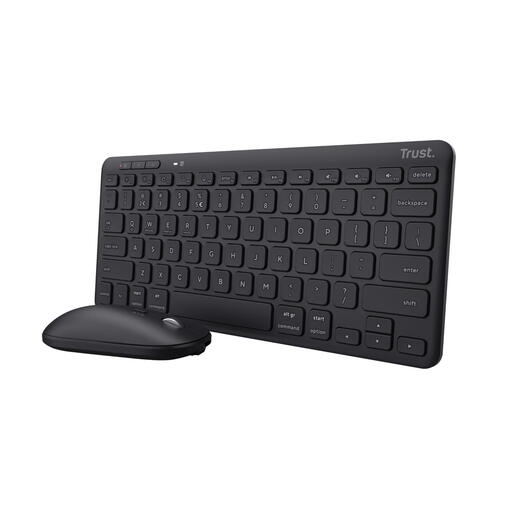
Why This Fits Their Persona: This set is ideal for those who seamlessly switch between work and personal life. The combination of a compact keyboard and mouse keeps the desk tidy, while the multi-device function makes it easy to switch between a laptop, tablet, and phone.
It offers both a stable 2.4GHz RF connection and Bluetooth, so you're not dependent on a single connection type. The rechargeable battery eliminates the need to constantly replace batteries.
Can connect to 3 devices simultaneously. The quiet scissor-switches are pleasant for shared workspaces. According to the manufacturer, the set is made of 84% recycled plastic.

Why This Fits Their Persona: For those who demand performance and personalization. This mechanical keyboard is 'hot-swappable', meaning you can replace the switches without soldering. Ideal for gamers and hobbyists who want to fine-tune their typing experience to the smallest detail.
The 10,000 mAh battery capacity is substantial, bypassing the pitfall of a rapidly draining battery (even with RGB lighting). The tri-mode connectivity (wired, 2.4GHz, Bluetooth) guarantees a stable connection for any situation.
Fully customizable thanks to the hot-swappable PCB. The TFT screen and metal rotary knob provide quick access to settings. The 'gasket-mounted' structure with multiple layers of damping ensures a pleasant typing sound.

Why This Fits Their Persona: This is a workhorse. A full-size keyboard with a numeric keypad, designed for reliability and functionality in the office. No frills, just a solid keyboard that does what it's supposed to do.
It focuses on one reliable connection method: 2.4GHz RF. This avoids the pairing issues that can sometimes occur with Bluetooth. The spill-proof design addresses a common cause of defects.
A spill-proof membrane protects the electronics from liquid spills. The AES 128-bit encryption ensures a secure connection, which is a plus in a business environment.
We have compiled a complete, up-to-date list of products that fully meet these strict selection criteria and local regulations.
The difference lies in the placement of the letters. On a QWERTY keyboard, the first six letters on the top row start with Q, W, E, R, T, Y. This is the standard in many countries. On an AZERTY keyboard, these are A, Z, E, R, T, Y. The positions of punctuation marks are also different. Check which layout you are used to in order to type comfortably.
This depends heavily on the model and your usage. A simple keyboard without backlighting can indeed last for months or even longer on a set of batteries. A gaming keyboard with bright RGB lighting and a high polling rate may need to be recharged every few days to weeks. Models with a large, rechargeable battery (e.g., 4000 mAh or more) offer a good middle ground.
For most casual games, a modern Bluetooth keyboard (version 5.0+) is sufficient. For competitive games where reaction speed is essential, a 2.4GHz RF connection is generally recommended. This connection typically has lower and more stable latency. Many gaming keyboards offer both options, so you can choose.
