
Vandaag of morgen in huis

Kwaliteit gegarandeerd

Welkomstaanbiedingen ontgrendelen: GRATIS bezorging | Tot 80% korting | Gratis 30 dagen JoyPlus-proefperiode
Download de app
A tangle of cables on your desk not only looks messy but also limits your flexibility. Whether you're switching between your laptop, tablet, and PC, or simply want a sleek, minimalist workspace, a great wireless keyboard is the solution. But with so many options, the choice can be overwhelming.
As a Joybuy Product Recommendation Officer, I'm here to help you make the right decision. In this article, we'll provide practical tips and highlight several popular models to help you find a keyboard that fits your needs, whether you're a professional, gamer, or remote worker.
Before we dive into the products, here are a few key considerations to help you filter through the options.
How a keyboard connects is crucial. Most wireless models use one of these two technologies:
For those who work with multiple devices, a multi-device keyboard is a game-changer. With a single press of a button, you can switch between your laptop, tablet, and phone. Many of these keyboards are compatible with both Mac and Windows, making them exceptionally versatile.
The type of keys determines the typing experience and sound.
A rechargeable keyboard with a built-in battery can be charged via a USB cable, often while you continue to use it. This is convenient and more sustainable in the long run. Models with replaceable batteries (usually AA or AAA) can last for months, but you'll need to keep spare batteries on hand.
Based on specifications and functionality, we have selected three compelling wireless keyboards for different users.
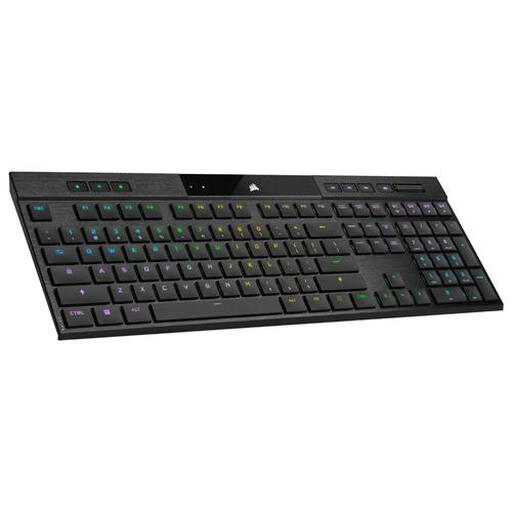
Why It Stands Out The Corsair K100 AIR combines an ultra-slim design with the performance of mechanical keys. With three connection options (USB, RF, and Bluetooth), it is a highly flexible keyboard for both serious gamers and professionals seeking a premium experience.
Pros
Who Is It For? For the user who refuses to compromise on style, performance, and functionality. Ideal for gamers and demanding professionals looking for a high-end gaming keyboard that also excels at productivity.
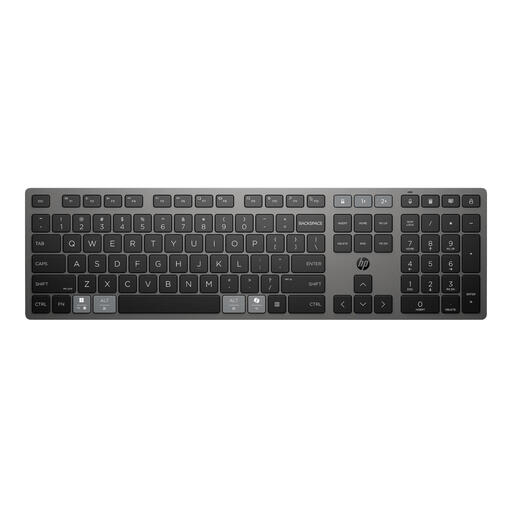
Why It Stands Out This keyboard from HP is designed for maximum productivity. Its most striking feature is the charging technology. According to HP, the battery charges in just 3 minutes for up to 2 months of use. The ability to seamlessly switch between three devices makes it a workhorse for the modern (home) office.
Pros
Who Is It For? Perfect for professionals and remote workers who constantly switch between a laptop, tablet, and desktop. If you're looking for a reliable, efficient, and low-maintenance keyboard for Mac and Windows, this is a strong contender.

Why It Stands Out The AJAZZ AK980 V2 is a dream for customisation enthusiasts. It's a wireless mechanical keyboard with hot-swappable switches, meaning you can replace the switches without soldering. The massive 10,000mAh battery, built-in TFT screen, and convenient volume knob make this a unique and feature-rich model.
Pros
Who Is It For? For the keyboard enthusiast, the gamer who wants to customise everything, and the tech lover looking for a keyboard with unique features. If you enjoy experimenting with different switches and want a keyboard that is truly your own, the AK980 V2 is an exciting choice.
If your ideal match isn't here or you just want to compare more choices, many other models are available to suit different needs and budgets.
? Explore our full range of Bluetooth Wireless Keyboards here.
1. What is the advantage of a wireless mechanical keyboard? A mechanical keyboard provides clear, tactile feedback with every keystroke. Many users find this more pleasant and it can help improve typing speed and accuracy. Additionally, the individual switches are highly durable and rated for millions of keystrokes.
2. Can I use a wireless keyboard for gaming? Absolutely. Modern wireless keyboards, especially those with a 2.4 GHz RF connection, have very low latency (delay) comparable to wired models. A gaming keyboard like the Corsair K100 AIR is specifically designed for competitive gaming.
3. How do I connect a multi-device keyboard to multiple devices? This is usually very simple. You pair the keyboard via Bluetooth or the dongle to your different devices (e.g., your laptop, tablet, and PC). The keyboard has dedicated buttons (often F1-F3 or separate device keys) that allow you to switch to the device you want to control with a single press. Consult the manual of your specific model for the exact instructions.
