
Vandaag of morgen in huis

Kwaliteit gegarandeerd

Welkomstaanbiedingen ontgrendelen: GRATIS bezorging | Tot 80% korting | Gratis 30 dagen JoyPlus-proefperiode
Download de app
A wireless keyboard gives you more space on your desk and eliminates cables between your PC, laptop or tablet. Even so, it is not wise to focus solely on price, design or terms such as “quiet” and “gaming”. The wrong layout, limited compatibility or an awkward connection can cause daily frustration.
Pay particular attention to these three common pitfalls:
First, check the layout. A US QWERTY keyboard uses an ANSI layout and may have a different Enter key, Shift key and character arrangement from a Dutch keyboard. Programmers and users accustomed to an American layout may actually prefer this.
Also check the operating system. A keyboard for PC and laptop will often support Windows, but that does not automatically mean that all function keys work with macOS, Android or iPadOS. For a keyboard for Mac, macOS compatibility and the correct Command and Option functions are important. For a keyboard for Surface Pro, you should also check the exact model.
There are three common options:
A keyboard for multiple devices often has dedicated buttons for switching between, for example, a laptop, tablet and smartphone. Check how many devices can actually be paired at the same time and which connection is used for each.
A quiet wireless keyboard usually has membrane or scissor keys. These are often low-profile and lightweight. Mechanical keys offer more pronounced tactile feedback and are appealing to gamers, programmers and enthusiasts who want customisable switches. However, they can be noisier, depending on the switch type.
Also consider the size:
With an RGB keyboard, check whether the lighting can be adjusted or switched off. Lighting also affects battery life. A battery-powered model is ready to use again as soon as the batteries are replaced; a rechargeable keyboard avoids recurring battery costs, but needs to be connected to a USB-C cable in good time.
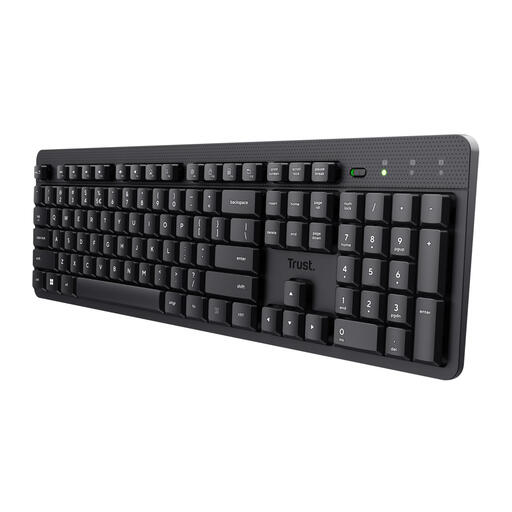
Why it suits this user profile: A practical choice for home workers and office users looking for a full-size keyboard with a numeric keypad, without the additional features of a mechanical model.
The product information specifies quiet low-profile membrane keys, a USB receiver and a US QWERTY layout. This makes it clear in advance what you are and are not getting.
Full-size design, numeric keypad, multimedia shortcut keys, spill-resistant housing and a range of up to 8 metres according to the product description.
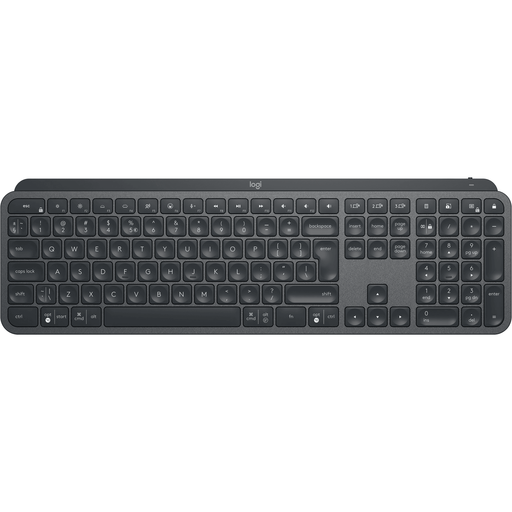
Why it suits this user profile: Suitable for professionals who work across multiple systems and value a low-profile design, backlighting and rechargeable power.
According to the product information, it connects via Bluetooth or Logi Bolt, and the keyboard features Easy-Switch for up to three devices. However, make sure you are using the correct receiver.
Full-size layout with numeric keypad, adjustable backlighting, USB-C charging and support for Windows, macOS, Android and iPadOS, among others.
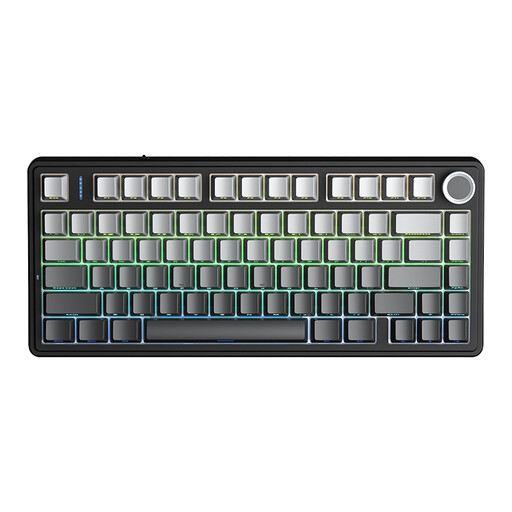
Why it suits this user profile: A mechanical wireless keyboard for gamers and users who want compact dimensions, customisable switches and multiple connection options.
The 75% layout frees up space without removing the arrow keys. The tri-mode connection offers Bluetooth, 2.4 GHz and USB, so you are not tied to a single connection method.
Hot-swappable 3- or 5-pin switches, RGB lighting, a 4000mAh battery and a multifunction dial according to the product description.
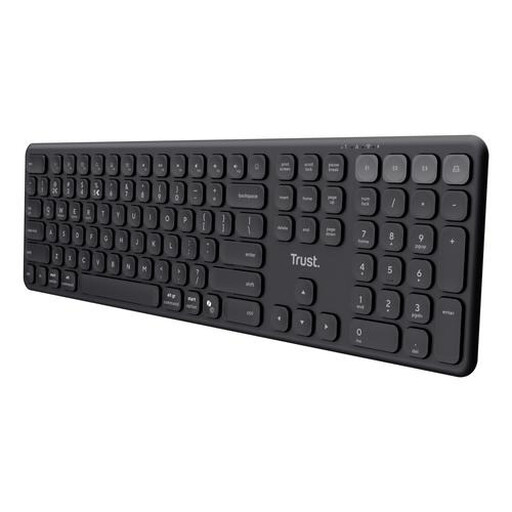
Why it suits this user profile: Convenient for flexible workers who want to use one keyboard with a PC, laptop, tablet and smartphone.
The connection consists of one USB receiver and three Bluetooth channels. This design allows you to switch between four paired devices.
Full-size design with numeric keypad, quiet scissor keys, USB-C charging and compatibility with Windows, macOS, iOS, Android and ChromeOS.
A US QWERTY keyboard is not automatically suitable for every Dutch user. Check your operating system’s language settings and make sure the physical characters match those you use in your everyday work.
For Apple users, the Apple Magic Keyboard with Touch ID for Mac models with Apple Silicon - Dutch is designed for Macs with Apple silicon and macOS 11.4 or later. The product information lists Bluetooth, a rechargeable battery, USB-C and a tenkeyless QWERTY layout. View the Apple Magic Keyboard product details if Touch ID and a compact Mac setup are important to you.
If you use a Surface Pro, check the generation and connection. The Microsoft Surface Pro Keyboard QWERTY - Dune uses a magnetic Smart Connect connection and, according to the product specification, is suitable for Surface Pro 8, 9, 10 and 11. This is not a universal Bluetooth keyboard for every laptop. View the Microsoft Surface Pro Keyboard for full compatibility information.
Yes. Some models use a USB receiver with a radio connection. The Trust Ody II, for example, works via the supplied receiver. You do not need Bluetooth, but you do need a suitable USB port.
This varies by product and usage. Lighting, Bluetooth, 2.4 GHz and intensive typing all affect battery life. A model with disposable batteries can generally be used again immediately after they are replaced. A rechargeable keyboard needs to be charged periodically via USB-C. When buying, check whether the stated battery life applies with or without the lighting switched on.
It can be, but pay attention to the switch type and noise level. Mechanical switches often provide more feedback, while membrane and scissor keys are generally quieter. In a shared space, a quiet wireless keyboard is usually more practical. For gaming, programming or customisation, hot-swappable mechanical switches may be particularly appealing.
We have put together a complete, up-to-date list of products that fully meet these strict selection criteria and the applicable European safety regulations.
