
Vandaag of morgen in huis

Kwaliteit gegarandeerd

Welkomstaanbiedingen ontgrendelen: GRATIS bezorging | Tot 80% korting | Gratis 30 dagen JoyPlus-proefperiode
Download de app
A wireless keyboard keeps your desk tidy and works comfortably with a laptop, desktop computer, tablet or smartphone. However, there can be significant differences between models. A low price, for example, may come with an awkward layout, limited compatibility or batteries that run out sooner than expected.
The Joybuy Product Recommendation Officer selects products based on verifiable specifications. So don’t just focus on colour, lighting or terms such as “professional”. Pay particular attention to the connection, layout, size and power source.
A QWERTY US wireless keyboard uses the ANSI layout. Among other differences, it has a different-shaped Enter key and places certain punctuation marks differently from some European variants. Always check the language and layout in the product description.
A US layout can be practical if you do a lot of programming, use English-language software or are already familiar with this arrangement. When processing Dutch text, symbols such as @, " and ? may not be where you expect them to be.
There are three common options:
For Bluetooth models, always check which operating systems are supported. With a USB receiver, a USB-A port is not guaranteed on modern, compact laptops either.
A quiet wireless keyboard often uses membrane or scissor keys with a low profile. This makes it suitable for working from home, meetings and shared offices. Mechanical switches generally provide more tactile feedback, but they can be louder. According to some brands’ own product information, dampening layers can reduce noise; this does not guarantee that every mechanical keyboard will be quiet in every environment.
A wireless gaming keyboard may offer features such as RGB lighting, programmable keys, N-key rollover and low wireless latency. These features are particularly useful for gamers and users who want to set up macros. They are not essential for standard office work.
A full-size keyboard usually has a separate numeric keypad. This is useful for accounting, spreadsheets, administration and product codes. A wireless keyboard with a numeric keypad does take up more room, though: models measuring around 42 to 45 centimetres in width are common.
Compact 75% or 80% models often leave out the numeric section, while generally retaining the arrow keys and some of the function keys. This gives you more room for your mouse, but may require key combinations for Home, End and other functions.
Pay attention to the difference between a model that uses standard batteries and a rechargeable wireless keyboard. Battery-powered models are ready to use if you have spare batteries, but they involve recurring costs and waste. An integrated rechargeable battery can be charged via USB-C, but you need to take charging time and long-term wear into account.
Claims about battery life, such as “months”, depend on the lighting, connection and how the keyboard is used. According to manufacturers’ own specifications, battery life can be considerably longer on a keyboard without backlighting than on one with backlighting.
Membrane keys are often light and relatively quiet. Scissor keys are more like laptop keys and are suitable for precise, quiet typing. Mechanical keys are worth considering if you want a more pronounced keystroke, replaceable switches or customisation options.
Also check the keyboard’s height, adjustable feet and width. An adjustable typing angle can help you adapt its position to your desk, but it cannot replace good posture or a suitable wrist rest.
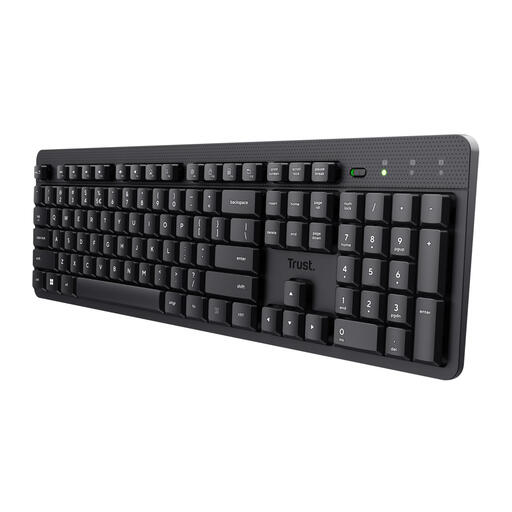
Why it suits this profile: This full-size model is designed for everyday typing, with a US QWERTY layout, numeric keypad and USB receiver. According to the product description, the low-profile membrane keys are designed for soft, virtually silent typing.
The connection, layout and power source are clearly specified. Bear in mind that this model runs on batteries and does not have Bluetooth or mechanical switches.
Full-size ANSI/QWERTY layout, numeric keypad, multimedia functions and a splash-resistant design according to the product details.
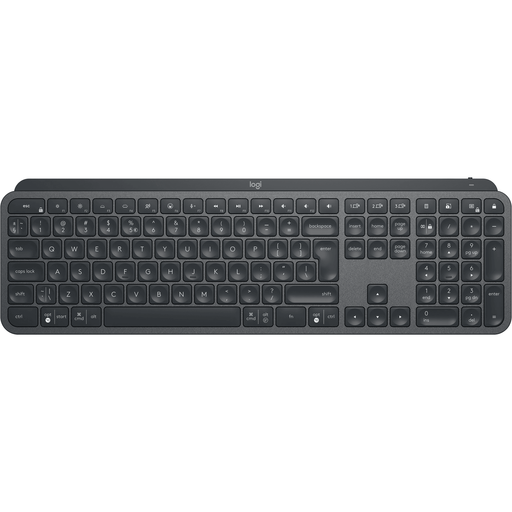
Why it suits this profile: Designed for office professionals and creative users, this full-size model offers Bluetooth and a wireless radio connection, plus Easy-Switch for up to three devices.
The connection options and compatible systems are clearly described. Do check that you are using the correct receiver for the wireless radio connection.
Rechargeable battery, backlighting, numeric keypad and support for multiple operating systems according to the product specifications.
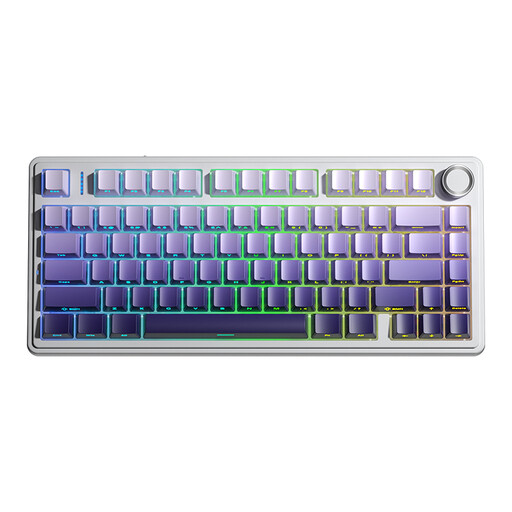
Why it suits this profile: This mechanical wireless keyboard is aimed at gamers and users who want to combine a compact size, RGB lighting and multiple connection options.
The F75 Pro supports Bluetooth, 2.4 GHz and USB. The 75% layout saves desk space but does not have a numeric keypad. Also check that the mechanical noise is suitable for your workspace.
Hot-swappable mechanical switches, 4000mAh rechargeable battery, RGB lighting and a mode with cable, Bluetooth or USB receiver.
We have put together a complete, up-to-date list of products that fully meet these strict selection criteria and the applicable European safety regulations.
No. A model with a USB receiver requires a suitable USB port. For Bluetooth, your laptop, tablet or smartphone must support Bluetooth and be compatible with the keyboard. Also check the operating system, particularly with iOS, Android, macOS and ChromeOS.
This varies from product to product. Lighting, the connection method and the number of hours you use it each day all have an impact. Manufacturers provide an expected battery life under specific conditions. A battery-powered model does not need to be paused for charging, while a rechargeable model can be powered via USB-C. Also check whether you can continue typing while it is charging.
It can be, particularly if the keyboard has a 2.4GHz connection, mechanical switches, anti-ghosting and rollover features. For competitive gaming, a wired connection may be preferable because it offers greater predictability. For casual gaming, a good wireless gaming keyboard is often more practical, provided that its layout and compatibility suit your computer.
