
Vandaag of morgen in huis

Kwaliteit gegarandeerd

Welkomstaanbiedingen ontgrendelen: GRATIS bezorging | Tot 80% korting | Gratis 30 dagen JoyPlus-proefperiode
Download de app
A wireless keyboard might seem like a straightforward purchase at first. But many disappointments only become apparent after a few weeks of use. The wrong layout, an unreliable connection or a battery that runs out sooner than expected can make a keyboard awkward for everyday work or gaming.
For shoppers in the Netherlands, these three pitfalls are especially important:
A QWERTY keyboard with a US layout can work perfectly well with Windows and macOS, but its physical key layout is still different from that of a Dutch keyboard. So don’t just check whether it says “QWERTY”; look for the specific variant, such as US ANSI or UK ISO.
The size determines how many keys are available:
A compact keyboard saves desk space, but may take some getting used to. Programmers and anyone who regularly uses navigation keys may prefer to consider a 75% or 96% model.
A Bluetooth keyboard is suitable for laptops, tablets and smartphones, as long as the device supports Bluetooth. A USB receiver is usually more practical for a desktop PC without a reliable Bluetooth connection.
A tri-mode keyboard typically combines:
That gives you flexibility when choosing a keyboard for a PC and laptop, but always check which devices are actually supported. For example, a model might work with Windows and macOS but not offer all its features on iOS or games consoles.
With a mechanical keyboard, each key press is registered by an individual switch. Linear switches generally feel smooth and consistent, tactile switches provide a noticeable bump, and clicky switches tend to be louder. For a shared office or working from home, quiet low-profile or membrane keys are often more practical.
A hot-swappable keyboard lets you replace compatible switches without soldering. Check whether the model supports 3-pin or 5-pin switches, and don’t use excessive force when changing them.
RGB lighting is mainly a style and usability feature. On a keyboard with RGB lighting, the lighting can reduce battery life. Claims about colour reproduction, battery life or sound dampening come from the manufacturer’s product description, so treat them as product specifications rather than a universal guarantee for every user.
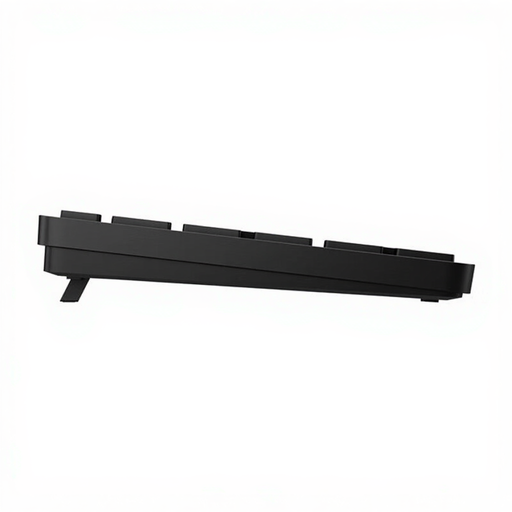
Why it suits this type of user: This full-size model is designed for home use and general office work. It has a numeric keypad, a US QWERTY layout and a USB receiver for wireless use with a PC or laptop.
The product specifications state the QWERTY layout, a range of up to 10 metres and that batteries are included. So you can see at a glance that this isn’t a Bluetooth or rechargeable model.
Full-size layout, 19 shortcut keys and, according to the manufacturer, battery life of up to 20 months, depending on use.
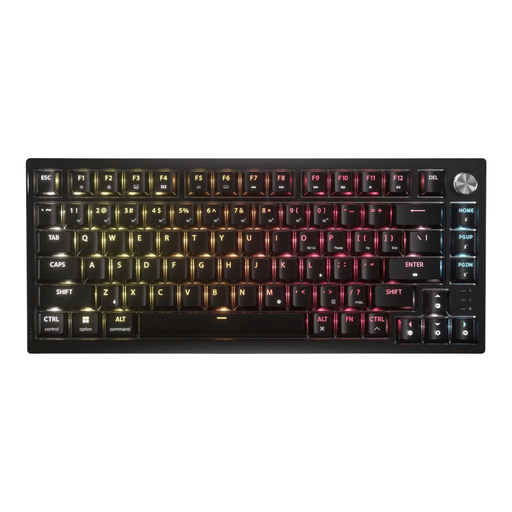
Why it suits this type of user: This 75% model combines a mechanical design with wireless flexibility. It’s a good fit for anyone who works and games at the same desk and values customisable keys and media controls.
The three connection modes are specified: 2.4GHz, Bluetooth and USB. The US version is also listed as having PBT double-shot keycaps, so check which regional variant you’ve selected.
Hot-swappable PCB, per-key RGB, a volume dial and stated battery life of up to 266 hours with RGB lighting switched on.
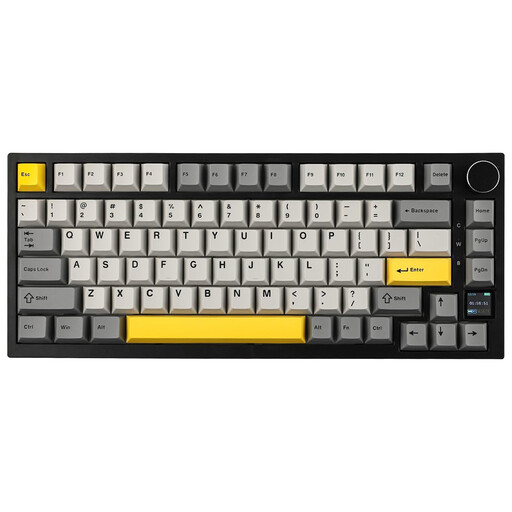
Why it suits this type of user: The 82-key layout keeps the arrow and function keys but leaves out the numeric keypad. That makes it practical for gaming, programming and smaller desks.
The product information explicitly lists Bluetooth 5.1, 2.4GHz and USB-C. It also specifies hot-swappable switches, Windows and macOS compatibility, and a US QWERTY layout.
4000mAh battery according to the product specifications, TFT display, RGB lighting, volume dial and sound-dampening material.
We’ve put together a complete, up-to-date list of products that meet these strict selection criteria and the applicable European safety regulations.
Not necessarily. Check whether the laptop supports Bluetooth or has a spare USB port for the receiver supplied with the keyboard. Also check the operating system and available features. Basic typing often works across a wide range of devices, but software for macros, RGB or key customisation may be limited to Windows or macOS.
It varies by model and use. RGB lighting, a 2.4GHz connection and intensive use generally consume more power than Bluetooth or having the lighting switched off. Manufacturers often state a maximum battery life; treat this as a guide and check whether it was measured with the lighting on or off.
That depends on the switches and noise level. Linear or quiet switches can be suitable for an office, while clicky switches are clearly audible. A low-profile membrane or scissor-switch model is often a safe choice for shared spaces. Also check the layout: a US QWERTY keyboard may feel different from the Dutch keyboard you’re used to.
