
Vandaag of morgen in huis

Kwaliteit gegarandeerd

Welkomstaanbiedingen ontgrendelen: GRATIS bezorging | Tot 80% korting | Gratis 30 dagen JoyPlus-proefperiode
Download de app
A wireless keyboard may seem simple to choose, until you realise that models vary considerably in layout, connectivity, size and battery type. A low price says little about whether a keyboard is suitable for your workspace. A compact keyboard may save space, for example, but lack a numeric keypad. A mechanical keyboard can be comfortable to type on, but may also be noisier than you would like in a shared working environment.
As a Joybuy Product Recommendation Officer, I filter the most important product specifications and compare them with common purchasing pitfalls. This helps you compare more effectively and avoid making the wrong choice.
Always check whether you need a QWERTY keyboard or QWERTZ keyboard. Dutch users are generally accustomed to QWERTY, while a German model places the Y and Z keys differently. Symbols, punctuation marks and the position of special keys may also vary.
Also look out for terms such as US layout, Dutch layout or EU layout. A physical keyboard with US lettering can work with Dutch language settings, but the symbols printed on the keys may not always match what you enter on screen.
A Bluetooth keyboard is convenient for a laptop, tablet, iPad or smartphone. For a desktop PC, a model with a 2.4GHz receiver may be more practical, particularly if the computer does not support Bluetooth. Some models offer both options and can also be used as a wired keyboard via USB-C.
Check whether the receiver is included, how many devices you can pair and whether you can switch between devices. A keyboard that only works with a specific receiver offers less flexibility when switching between a computer and tablet.
RGB lighting, a display, a volume dial and programmable keys can be useful, but they often increase the price and power consumption. For administrative work, a numeric keypad may be more important than lighting. For gaming, a compact design with mechanical switches and low response latency may be a better fit.
So start by considering how you will use the keyboard. A feature is only valuable if you use it regularly.
A full-size keyboard generally has a separate number pad. This is useful for spreadsheets, bookkeeping and administrative data entry. A compact keyboard takes up less desk space, but may omit the numeric keys or some of the function keys.
A 75% keyboard is a size between the two. It usually retains the arrow keys and a function row, but is narrower than a full-size model. This leaves more room for your mouse without removing all the essential navigation keys.
On a mechanical keyboard, each key has its own individual switch. Linear switches feel smooth and consistent, while tactile switches provide a noticeable bump as you press them. Clicky switches also produce a distinct clicking sound. Manufacturers may use terms such as “creamy sound” or “thocky”; these describe the sound and typing experience, not universal guarantees of quality.
A hot-swappable keyboard allows you to replace switches without soldering. Check whether the model supports 3-pin switches, 5-pin switches or both. This is particularly relevant if you want to customise the key feel later.
A built-in battery needs to be recharged regularly, but can often be used easily via USB-C while charging. Models with AAA batteries can operate for a long time without a cable, but require spare batteries. Actual battery life depends on the lighting, connection mode and intensity of use.
Pay attention to the wording “up to”. According to the manufacturer’s product information, such a figure applies under specific conditions. With RGB lighting switched on, battery life is generally shorter than with the lighting switched off.
Check the operating system, available ports and device size. A keyboard designed for iPad may use a case, trackpad or Smart Connector, and is therefore not automatically suitable for a Windows PC. With Apple models, you should also check compatibility with the correct iPad model or a Mac with Apple Silicon.
For prolonged typing, height, adjustable feet and wrist position are more important than appearance. A low-profile design may be suitable for office work, while mechanical keyboard enthusiasts may prefer a taller case.
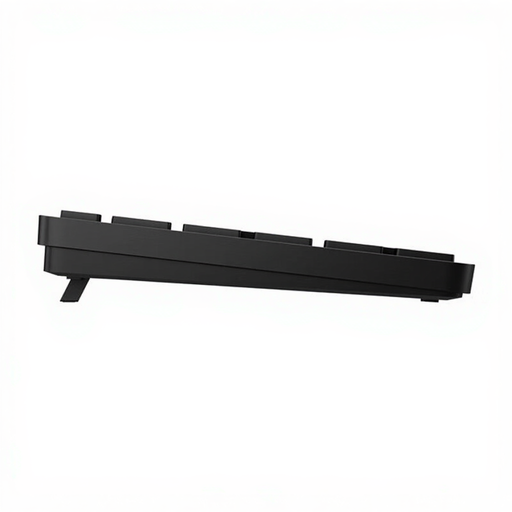
Why it suits this profile: This full-size model has a numeric keypad, a USB receiver and programmable shortcut keys. That makes it a good fit for homeworkers and anyone looking for a practical switch to wireless.
The product information clearly states QWERTY, USB Type-A, a range of up to 10 metres and a numeric keypad. However, check that your computer has a suitable USB port.
Full-size layout, 19 shortcut keys and, according to the product description, battery life of up to 20 months depending on use.
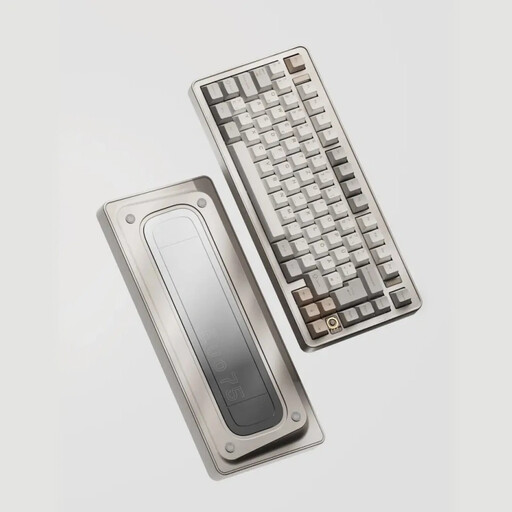
Why it suits this profile: The anodised aluminium 75% case, three connection modes and VIA compatibility are ideal for users who want to fine-tune their keyboard.
The specifications explicitly mention 2.4GHz, Bluetooth and USB-C, as well as hot-swap support for 3-pin and 5-pin switches. Check beforehand that the US layout suits the way you intend to use it.
8000mAh battery according to the product specification, an aluminium case and support for customisable switches.
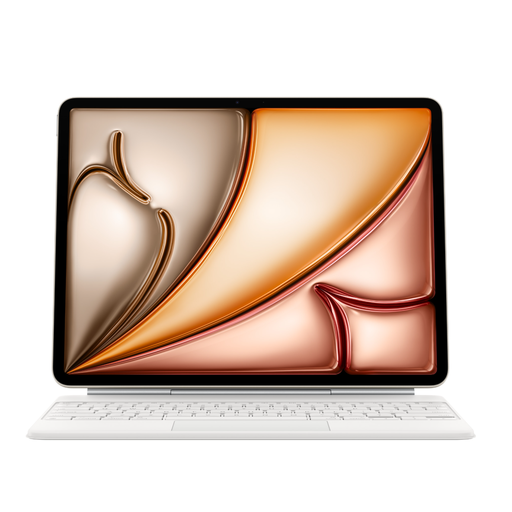
Why it suits this profile: This keyboard is designed for iPad Air users who want to type and navigate on the go with an integrated trackpad.
The product description states compatibility with iPad Air, a USB-C pass-through port and a protective case. Before buying, check the exact screen size and iPad version.
Large glass trackpad, 14 function keys and a scissor mechanism with a 1 mm key travel according to the product information.
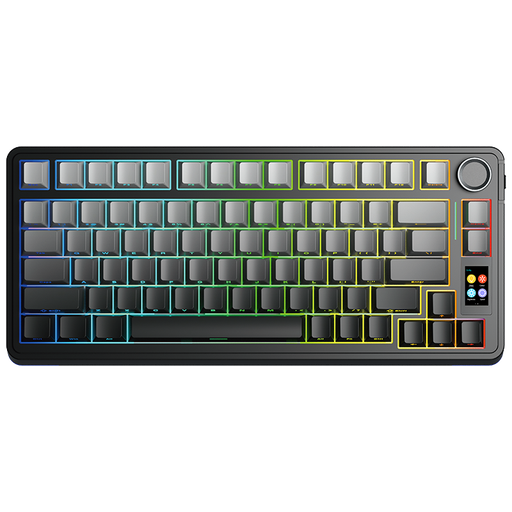
Why it suits this profile: This model combines a 75% layout with tri-mode connectivity, a rotary dial, TFT display and hot-swappable switches.
The product name and description mention Bluetooth, 2.4GHz and USB-C. This allows you to match the connection method to your PC, laptop or mobile device. Check software support for your operating system.
RGB lighting, a programmable rotary dial according to the product description and support for replacing switches.
We have compiled a complete, up-to-date list of products that fully meet these strict selection criteria and the applicable European safety regulations.
Enable Bluetooth on your laptop and put the keyboard into pairing mode. For a 2.4GHz model, insert the supplied USB receiver into an available port. Then follow the manufacturer’s instructions. Some keyboards can be used and charged via USB-C.
This varies from one model to another. An AAA-battery keyboard may operate for a long time according to the manufacturer, while a built-in battery is usually charged via USB-C. RGB lighting, intensive use and an active wireless connection can reduce battery life. Therefore, treat a stated “up to” figure as an indication under specific conditions.
It can be, but pay attention to the sound of the switches. Linear or silent switches are generally less noticeable than clicky variants. Also check the size, whether it has a numeric keypad and the layout. For a shared workspace, a compact model without bright lighting may be more practical.
