
Vandaag of morgen in huis

Kwaliteit gegarandeerd

Welkomstaanbiedingen ontgrendelen: GRATIS bezorging | Tot 80% korting | Gratis 30 dagen JoyPlus-proefperiode
Download de app
A wireless keyboard gives you more space on your desk and is handy if you switch between a PC, laptop, tablet or smartphone. But there’s a wide range to choose from. A low price can come with limited connectivity, an awkward layout or batteries that run out sooner than expected.
So, watch out for these three common pitfalls:
A Bluetooth keyboard is handy for laptops, tablets and smartphones, as you usually won’t need a spare USB port. A 2.4GHz connection with a USB receiver can be appealing for a gaming keyboard, especially when a stable connection and quick response time matter.
A tri-mode keyboard typically combines Bluetooth, 2.4GHz and a wired USB-C mode. For example, you can use Bluetooth with a tablet, 2.4GHz with a PC and a cable when the battery runs flat. Check that the right receiver is included and that your operating system is supported.
A full-size keyboard usually has a number pad, making it practical for admin, spreadsheets and entering lots of numbers. A compact keyboard in 60%, 75%, 80% or 96% size saves space, but often uses key combinations for functions that have their own keys on a standard model.
Also pay attention to the layout. A US QWERTY keyboard has a different Enter key and layout from a Dutch ISO keyboard. Check for Dutch characters and the position of punctuation marks before you decide.
A mechanical keyboard uses individual switches. Linear switches generally feel smooth and consistent, tactile switches provide a noticeable bump, and clicky switches make a distinct clicking sound. For a shared home office, a quieter model may be more practical than a loud clicky keyboard.
For a wireless gaming keyboard, anti-ghosting, rollover, a stable 2.4GHz connection and a reliable battery are all worth considering. RGB lighting is mainly a visual feature and often affects battery life. With a hot-swappable keyboard, you can replace compatible switches without soldering. Check whether the model supports 3-pin switches, 5-pin switches or both.
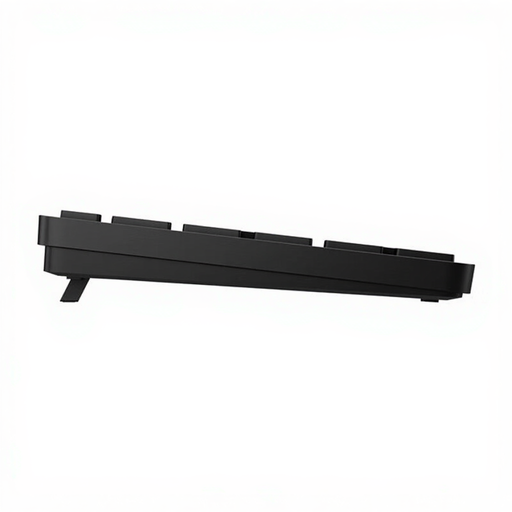
Why it suits this type of user: This full-size model is designed for home use and connects wirelessly via a USB receiver. The number pad and programmable shortcut keys are handy for everyday office work.
The specifications state a range of up to 10 metres, a USB receiver and battery life of up to 20 months, depending on use. There’s no RGB lighting to use extra battery power.
Full-size layout, number pad, 19 shortcut keys and Windows 11 support, according to the product information.
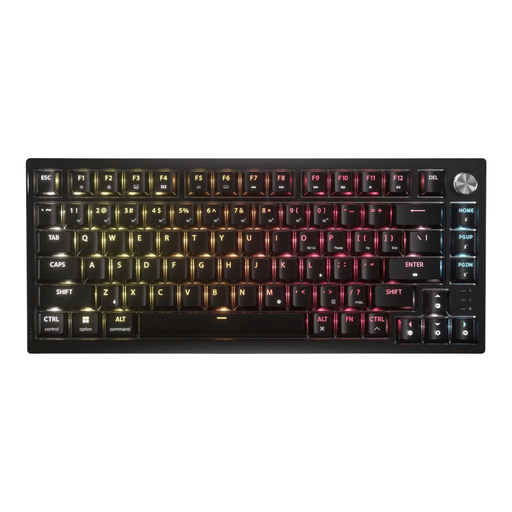
Why it suits this type of user: This 75% model combines a mechanical design with 2.4GHz, Bluetooth and USB connectivity. It’s a good fit for anyone who games and works with one compact keyboard.
The product information lists a hot-swappable PCB, sound dampening and a US ANSI QWERTY layout. Check the layout if you’re expecting a Dutch keyboard.
Tactile MLX Fusion switches, PBT keycaps, programmable RGB lighting and stated battery life of up to 266 hours with the lighting on.
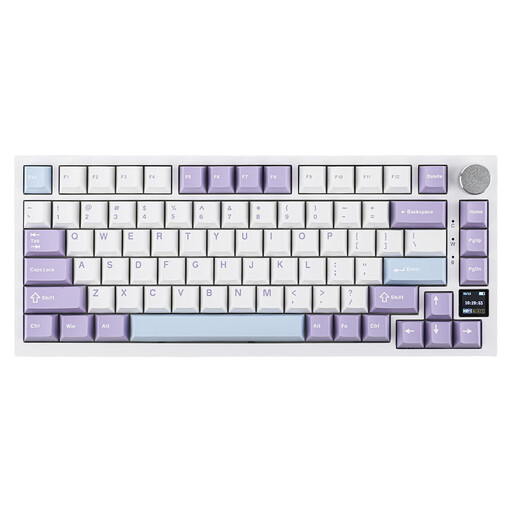
Why it suits this type of user: The 82-key layout keeps the arrow and function keys while taking up less desk space. That makes it a good fit for gamers, programmers and people working from home.
The product information lists all three connection options. The TFT display shows details including battery status and connection mode, so you’re less reliant on key combinations.
4000mAh battery according to the product specifications, hot-swappable switches, RGB lighting, a volume knob and compatibility with Windows and macOS.
We’ve put together a comprehensive, up-to-date list of products that meet these strict selection criteria and current European safety regulations.
Not necessarily. Check whether your laptop supports Bluetooth or has a spare USB port for the receiver. Also check the operating system and stated compatibility. A model designed for PCs and laptops may have additional limitations when used with tablets, smartphones or consoles.
It varies by model and how you use it. Lighting, 2.4GHz connectivity and intensive typing generally use more power than Bluetooth or using the keyboard without lighting. Treat the stated battery life as a guide. If the model uses replaceable batteries, it’s sensible to keep spares handy; for models with built-in batteries, USB-C charging is more practical.
It can be, but pay attention to the switch type and noise level. Linear or dampened tactile switches are usually more suitable for shared spaces than clicky switches. If quiet typing is your priority, you could also consider a low-profile membrane or scissor-switch keyboard. Always check the layout, size and available connection options before you order.
