
Vandaag of morgen in huis

Kwaliteit gegarandeerd

Welkomstaanbiedingen ontgrendelen: GRATIS bezorging | Tot 80% korting | Gratis 30 dagen JoyPlus-proefperiode
Download de app
A wireless keyboard and mouse set may seem simple to choose: check the price, make sure it comes with a USB receiver and you’re done. In practice, most problems only become apparent after purchase. For example, a keyboard may have a US layout when you expect Dutch keys. Or a set may support Bluetooth, but not the number of devices you use every day.
As a Joybuy Product Recommendation Officer, I review the key product specifications of the available models without presenting marketing claims as guaranteed results. Below, you’ll find what to look out for and which set suits your work setup.
A quiet keyboard and mouse reduce typing and clicking noise, but generally do not make it completely inaudible. The noise level also depends on how hard you type, your desk surface and the construction of the keys.
So pay attention to the technology used. A low-profile keyboard with a scissor mechanism usually feels flatter than a mechanical model. This can be comfortable during long working days, but is less suitable if you are looking for deep key presses or programmable mechanical switches.
Some sets work exclusively with a 2.4GHz USB receiver. This is practical for a laptop or desktop computer with a spare USB-A port, but less flexible for tablets and phones. A Bluetooth keyboard and mouse can connect directly, but your device must support Bluetooth.
Also check whether the mouse and keyboard can be switched separately. With some multi-device models, support for multiple devices applies to both components; with other sets, the connection is limited to a single receiver.
This is an important point for users in the Netherlands. A US/QWERTY layout differs from the commonly used Dutch or international layout. The labels on the physical keys determine how easily you can find the keys you need, while your operating system determines the language setting.
If you work frequently with numbers, punctuation or keyboard shortcuts, you’ll quickly notice a different layout. So check the product image and specifications before buying, not just the title.
For a fixed workstation, a USB receiver is often sufficient. For a multi-device keyboard and mouse, a combination of 2.4GHz and Bluetooth offers greater flexibility. For example, you can connect a desktop computer via USB and pair a laptop or tablet via Bluetooth.
Bluetooth 5.0 can provide an efficient connection on compatible devices, but the overall experience depends on your computer’s Bluetooth version and settings. “Supports four devices” also does not mean that you can actively type on all four at the same time; usually, you switch between saved connections using a key or button.
A keyboard for Windows and Mac does not always use the same keyboard shortcuts. Check whether the set has dedicated Windows and Mac functions. Linux and Chrome OS are also listed as compatible systems for some models, but media keys may work differently depending on the operating system.
According to the product information, the Rapoo 9010M is offered for Windows, Mac, Linux and Chrome OS. The manufacturer also states that it has dual-system shortcut keys. This information is based on the product specifications and not on an independent test.
Most wireless sets run on AA or AAA batteries. Check which batteries are required and whether they are included. A stated battery life, such as “up to approximately twelve months”, depends on usage and settings.
For the mouse, the DPI setting is relevant. An adjustable range of 800 to 1600 DPI is generally intended for office work. Some models offer up to 2400 DPI. A higher DPI is not automatically more convenient: the most important thing is whether you can control the cursor comfortably on your screen size.
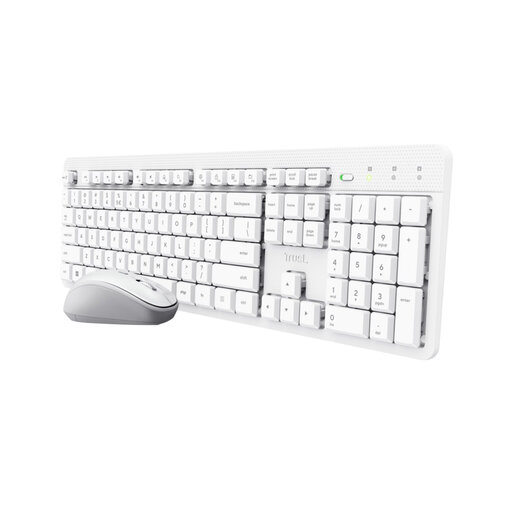
Why it suits this profile: This set uses a single USB receiver and is intended for working from home, studying and office work without Bluetooth pairing.
The connection is clearly described as wireless via a single USB receiver. However, check the US/QWERTY layout before ordering.
Quiet keys and mouse buttons, adjustable mouse speed from 800–1600 DPI and a stowable magnetic receiver.

Why it suits this profile: Suitable for users who want to control a laptop, tablet, phone and desktop computer from a single workstation.
The product information lists 2.4GHz and Bluetooth 4.0/5.0, plus switching between up to four paired devices.
Low-profile scissor mechanism, quiet mouse clicks, support for Windows, Mac, Linux and Chrome OS, and an adjustable mouse range of 800–2400 DPI.

Why it suits this profile: A practical choice for long office hours when a numeric keypad, wrist rest and quiet operation are important.
The product specification explicitly lists a US/QWERTY layout, 2.4GHz receiver and separate battery power.
Full-size keyboard with numeric keypad, integrated wrist rest, quiet keys and adjustable mouse sensitivity of 1000/1400/1800 DPI.
We’ve put together a complete, up-to-date list of products that fully meet these strict selection criteria and the applicable European safety regulations.
That depends on the model. Check whether both operating systems are explicitly listed. The Rapoo 9010M states support for Windows and Mac, as well as Linux and Chrome OS. For Mac, also check that the correct keyboard shortcuts are available.
Switch on the keyboard and mouse, activate pairing mode and open the Bluetooth settings on your computer, tablet or phone. Select the correct device and confirm the pairing. With a USB set, insert the receiver into a spare USB port and switch on both devices.
Battery life varies depending on the model, battery type and intensity of use. Product listings sometimes state a maximum duration, but this is not a fixed guarantee for every user. Switch off the set when you have finished and remove the batteries if you will not be using the device for an extended period. This helps reduce the risk of leakage and unnecessary power consumption.
