
Vandaag of morgen in huis

Kwaliteit gegarandeerd

Welkomstaanbiedingen ontgrendelen: GRATIS bezorging | Tot 80% korting | Gratis 30 dagen JoyPlus-proefperiode
Download de app
A clean, cable-free desk starts with a good wireless setup. But the search for the perfect wireless keyboard and mouse can be frustrating. The market is flooded with models that make lofty promises but often fall short in practice. Before making a purchase, it's crucial to know what to look for to avoid common pitfalls.
As a Product Recommendation Officer at Joybuy, I filter through the specs and marketing claims so you can make an informed decision. In this guide, we'll discuss the most common purchasing mistakes and the key features you should pay attention to.
Many buyers base their choice on appearance or price, only to run into functional problems after a few weeks. These are the three most common pitfalls:
To avoid a bad purchase, focus on the technical specifications that directly impact your user experience. Pay close attention to the following three points.
A wireless keyboard and mouse connects via one of these two technologies, or a combination of both.
Models that offer both options provide the most flexibility.
The type of switch under the keys determines the typing experience, sound, and lifespan.
For those who spend long days at the computer, an ergonomic keyboard with a split design or wrist rest can make a significant difference in comfort.
Always check the layout and size before you buy.
Based on these criteria, we have selected a few products that suit different user profiles.

Why This Fits Their Persona: Ideal for those who switch between a work laptop, personal computer, and tablet. This set is designed for hassle-free multitasking. The silent mouse is a bonus for shared workspaces or working from home.
This set tackles the "multi-device myth" by reliably switching between 4 devices via Bluetooth and 2.4GHz. The mouse has a genuinely silent click, avoiding vague "silent" claims.
Connects with 4 devices simultaneously. The mouse features adjustable DPI (up to 2400) for precision across different screens.
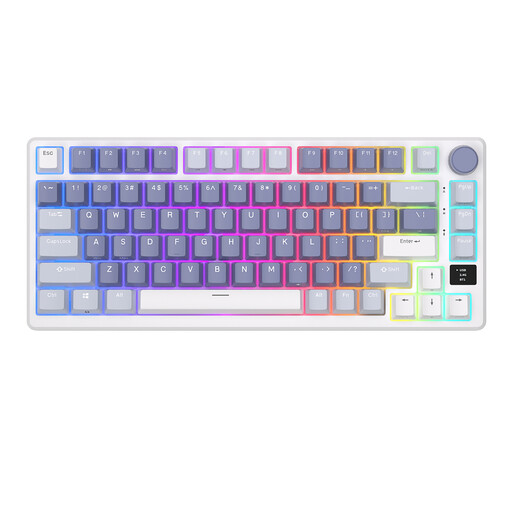
Why This Fits Their Persona: For the user who demands performance and personalisation. This keyboard is aimed at gamers and hobbyists who want to fine-tune their typing experience, from the switches to the lighting.
This is not a standard office keyboard. It's a hot-swappable mechanical model, meaning you can replace the switches without soldering. This gives you complete control over the typing feel and sound.
Tri-mode connectivity (2.4Ghz, Bluetooth, USB-C), an OLED screen for status updates, and a volume knob. The gasket-mount construction provides a dampened and pleasant typing sound.
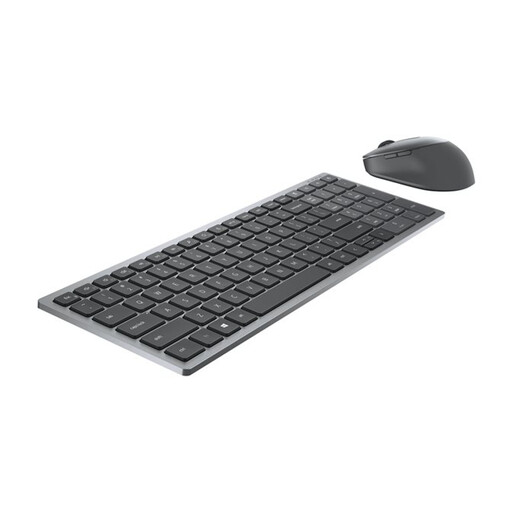
Why This Fits Their Persona: For professionals working in an (international) environment where the Belgian AZERTY layout is standard. This set from Dell offers a reliable, business-grade solution.
This product prevents the most common mistake: accidentally buying the wrong keyboard layout. The product name and specifications clearly state that it is a Belgian AZERTY layout.
Dual connectivity (RF and Bluetooth 5.0) for flexible use. According to Dell, the battery life is up to 36 months, which keeps maintenance costs low.
We have compiled a complete, up-to-date list of products that fully meet these strict selection criteria.
Battery life varies enormously. Models that run on replaceable AA or AAA batteries can last from 1 to 3 years, depending on the brand and usage. Rechargeable sets often have a shorter cycle (a few weeks to months) but save on the cost and waste of disposable batteries in the long run. Features like keyboard backlighting will significantly shorten battery life.
That depends on your usage. If you type a lot or game, the improved feedback, precision, and durability can justify the investment. The typing experience is considered more pleasant by many. For occasional use or if you need the quietest possible environment, a standard membrane keyboard is often a perfectly fine and more affordable choice.
Yes, that is one of the major advantages of a multi-device Bluetooth keyboard. Most modern models can be paired with at least three devices simultaneously. A dedicated button on the keyboard then allows you to instantly switch between typing an email on your laptop and replying to a message on your phone. However, always check the specifications to see how many devices are supported and how the switching mechanism works.
