
Vandaag of morgen in huis

Kwaliteit gegarandeerd

Welkomstaanbiedingen ontgrendelen: GRATIS bezorging | Tot 80% korting | Gratis 30 dagen JoyPlus-proefperiode
Download de app
A wireless keyboard keeps your desk tidy and gives you more freedom to move around. But not every model suits every situation. A quiet keyboard for working from home needs different features from a wireless mechanical keyboard for gaming or programming.
Most disappointing purchases come down to three things:
So don’t just check the appearance. Look at the technical details and think about how and where you’ll use it.
A full-size keyboard usually has a numeric keypad, arrow keys and a full function row. That’s useful for spreadsheets, accounts and admin work. A wireless keyboard with a numeric keypad does take up more space, though.
Compact models in 60%, 75%, 80% or 96% layouts omit certain keys or combine their functions with the Fn key. A compact keyboard leaves more room for your mouse, but check whether you need the keys that are missing. A 75% model often retains the arrow keys and function row, but doesn’t have a separate numeric keypad.
For US QWERTY, also check whether the layout is ANSI or US International. The physical layout and your operating system’s language settings need to match.
A membrane or scissor-switch keyboard usually has a low-profile design, making it suitable for quiet workspaces. The Trust Ody II, for example, uses quiet low-profile membrane keys. The Trust Vaiya has scissor-style keys with a laptop-like feel.
A wireless mechanical keyboard uses individual switches. It may appeal to people who want a particular feel, feedback or replaceable switches. On hot-swappable models, you can replace compatible 3- or 5-pin switches without soldering. Check whether the included switches are linear, tactile or clicky. Clicky switches can be disruptive in a shared space.
RGB lighting, programmable keys and a volume dial are useful extras, but they’re not essential for typing. Choose them only if you’ll actually use them.
A USB receiver is handy for a PC or laptop with a spare USB port. Bluetooth is more convenient for tablets, smartphones and some consoles. A tri-mode keyboard typically combines Bluetooth, 2.4 GHz and a USB cable. This lets you switch between mobile use, office work and gaming.
Check the following:
A rechargeable wireless keyboard means you won’t have to replace batteries regularly. If the model uses replaceable batteries, an on/off switch is useful for saving power.
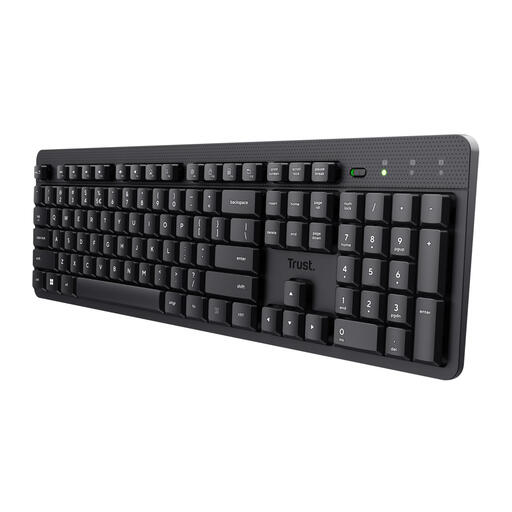
Why it suits this user: This full-size model is designed for quiet office work, working from home and admin tasks where a numeric keypad comes in handy.
The product information specifies a US QWERTY layout, quiet membrane keys and a USB receiver. So it isn’t a mechanical model and doesn’t connect via Bluetooth.
Full-size layout, numeric keypad, multimedia shortcuts and a spill-resistant design, according to the product specifications.
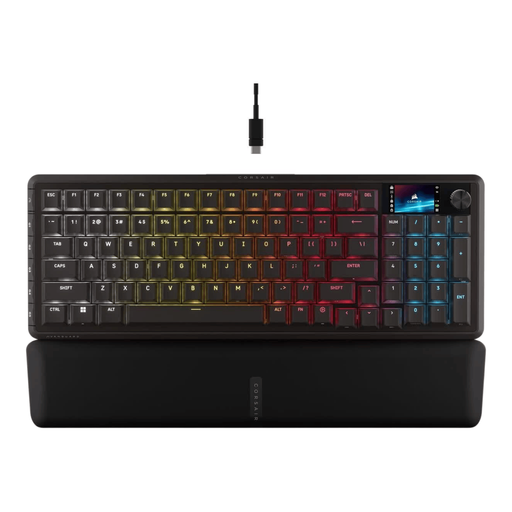
Why it suits this user: This wireless gaming keyboard combines a compact 96% layout with a numeric keypad, mechanical switches and several connection options.
The connections are listed separately as 2.4 GHz, Bluetooth and USB-C. The switches are hot-swappable, and the US ANSI QWERTY layout is clearly specified.
96% layout with numeric keypad, programmable G-keys, per-key RGB, a rotary dial and a built-in rechargeable battery, according to the product specifications.
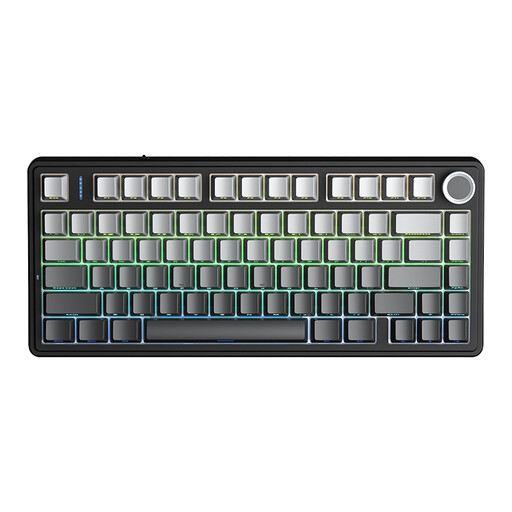
Why it suits this user: A good choice for gamers, programmers and creatives who want to save desk space and prefer the feel of mechanical keys.
The 75% layout makes the size clear. The product specifications also list Bluetooth 5.0, 2.4 GHz and USB as connection options; check console compatibility before buying.
Hot-swap support for 3- and 5-pin switches, RGB lighting, programmable macros and a 4000 mAh rechargeable battery, according to the product information.
We’ve put together a complete, up-to-date list of products that meet these strict selection criteria and the relevant European safety requirements.
No. A model with a USB receiver needs a spare USB port and support from your operating system. Bluetooth keyboards work only if your laptop supports Bluetooth. Also check that the layout, such as US QWERTY, matches your preferences.
Battery life depends on the key mechanism, build quality, battery type and how you use the keyboard. With replaceable batteries, battery life varies according to the battery type and usage. For a rechargeable wireless keyboard, RGB lighting and your chosen connection affect power consumption. Check the product specifications and charge the keyboard according to the instructions provided.
It can be, but pay particular attention to how noisy the switches are. Linear or quiet switches are generally better suited to shared workspaces than clicky versions. If quiet typing is your priority, you could also consider a quiet membrane or scissor-switch keyboard.
