
Vandaag of morgen in huis

Kwaliteit gegarandeerd

Welkomstaanbiedingen ontgrendelen: GRATIS bezorging | Tot 80% korting | Gratis 30 dagen JoyPlus-proefperiode
Download de app
A wireless headset makes listening to music, following podcasts and taking calls on the go much easier. Yet the choice is vast and many models look similar on paper. A low price can be tempting, but the wrong fit, limited battery life or a disappointing microphone can quickly make the product impractical.
The following points will help you assess marketing claims more critically and choose a model that suits your everyday use.
Manufacturers often quote the maximum playback time. That measurement usually applies under specific conditions, for example with noise cancelling switched off, at a moderate volume and with a fully charged battery. With active noise cancellation, during calls or at high sound quality, the actual usage time can be lower.
So look out for:
A headset with long battery life is especially handy during train journeys, workdays and holidays. Just check which measurement conditions apply to the stated figure.
A noise cancelling headset uses microphones and electronics to reduce ambient noise. The result varies depending on the situation. Constant sounds, such as engine noise on a plane or train, are generally easier to suppress than voices or sudden noises.
Also check whether the model has a transparency mode or ambient mode. This lets you hear surrounding sounds without taking the headset off. That's useful in the office or during a walk. Don't use noise cancelling in traffic or while cycling if you need to hear important environmental sounds.
An over-ear headset completely covers your ear. That can be comfortable during long listening sessions, but the model takes up more space and can feel warmer. An on-ear headset rests on your ear and is often lighter and more compact, but the pressure on your ears varies from person to person.
With in-ear earbuds, the fit is especially important. Check whether multiple sizes of ear tips are included. A good seal affects not only comfort, but also sound isolation and the performance of ANC. For sport, compact sport earbuds with a suitable splash-water rating are more practical than a non-water-resistant headset.
Bluetooth 5.2, 5.3 or 5.4 doesn't automatically mean better sound quality. Your smartphone's compatibility, the audio codecs used and the software all play a part. AAC and SBC are common on iPhone and Android devices.
With multipoint, a headset can be connected to two devices at once, for example your laptop and phone. Check the product specifications to see if this feature is actually listed. Switching between devices can vary by brand and operating system.
Compare the figures in the same way. With True Wireless earbuds, you need to distinguish between:
A charging case is convenient, but it's also an extra item you need to carry and charge. An over-ear model usually doesn't have a case with an extra battery, but can offer a longer usage time per charge.
An IPX4 rating means a product is protected against splashing water according to the relevant test conditions. IPX5 offers protection against low-pressure water jets. Neither means you can submerge the earbuds or swim with them.
With a Samsung Galaxy Buds4 Pro, for example, look out for the stated IP57 rating and the warning to avoid submersion. With a headset that isn't water-resistant, such as some on-ear models, using it in the rain or during intense exercise is less suitable.
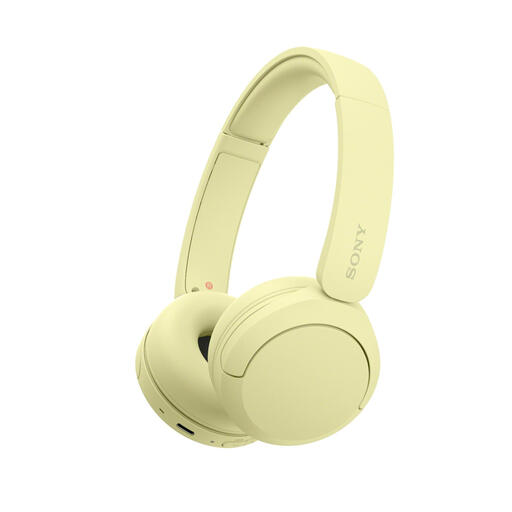
Why this fits the profile: This lightweight on-ear model is designed for everyday listening, calls and travel. The product specification lists a weight of 147 grams, a microphone and multipoint connection.
The features are straightforward: Bluetooth, button controls and USB-C charging. Noise cancelling isn't assumed as a key feature, so you can buy specifically for basic use.
147 grams, microphone, multipoint and a battery life of up to 50 hours as stated in the product listing. Check the current specifications at the time of purchase.
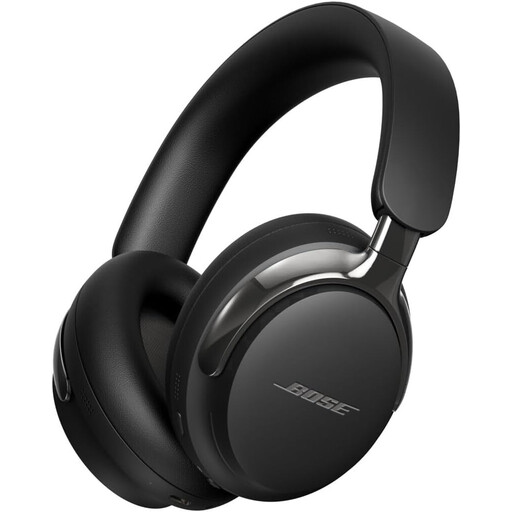
Why this fits the profile: This over-ear model is aimed at listeners who value active noise cancellation, spatial audio and both wireless and wired connections.
The listing mentions a transparency mode and a detachable cable alongside ANC. This means you're not solely reliant on Bluetooth or a charged battery.
Bluetooth 5.4, 3.5mm and USB-C audio, a range of approximately 9.14 metres and a stated statutory warranty of at least two years.
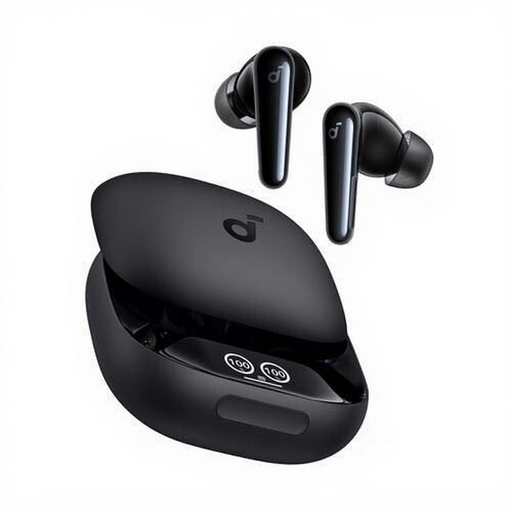
Why this fits the profile: According to the product specification, these True Wireless earbuds are designed for calls, music, sport and everyday use. The compact case makes them easy to carry.
The IPX5 rating makes the earbuds suitable for splashes according to the listing, but not for swimming. The six microphones and included extra ear tips provide clear checkpoints for calls and fit.
Up to 10 hours of continuous audio playback according to the product specification, USB-C case, touch controls and dynamic drivers.
Use this quick checklist before ordering:
We've put together a full, up-to-date list of products that fully meet these strict selection criteria and comply with current European safety regulations.
Switch on the headset and hold down the Bluetooth or power button until the pairing light flashes. Then open the Bluetooth settings on your iPhone or Android phone and select the product name. With wireless earbuds, the first pairing often happens via the charging case. Consult the manual if the name doesn't appear or if a previously connected device connects automatically.
The lifespan depends on the battery, hinges, ear cushions and how you use it. A battery gradually degrades through charge cycles. Store the product in a dry place, avoid extreme heat and charge it with a suitable cable or adapter. A model with replaceable ear cushions or an included cable can remain practical for longer, even when the battery has less capacity.
After purchase, the electricity costs for charging are usually minimal. However, accessories such as replacement ear tips, ear cushions or a replacement case can add extra costs. So check which parts are available separately and whether the manufacturer requires software or app features for certain settings.
