
Vandaag of morgen in huis

Kwaliteit gegarandeerd

Welkomstaanbiedingen ontgrendelen: GRATIS bezorging | Tot 80% korting | Gratis 30 dagen JoyPlus-proefperiode
Download de app
A wireless headset may seem easy to choose at first glance. However, models vary considerably in comfort, battery life, connectivity and protection against moisture. A low price can be tempting, but unclear product specifications or a poor fit may mean you hardly use the device.
Pay particular attention to these common pitfalls:
Over-ear headphones cover the whole ear. This can be comfortable when travelling, working or listening for long periods, but the model is often larger and warmer. On-ear headphones, such as the Sony WH-CH520, rest on the ear and are generally lighter and easier to carry.
In-ear earbuds are compact and come with a charging case. Fit is important: if the silicone tips do not seal properly, the sound may seem less full and more background noise may get through. For exercise, sports earbuds with a secure fit or ear hooks are practical. A neckband model can also be an alternative to completely wireless earbuds.
Do not just look for “long battery life”; look for separate figures for:
For example, the JBL Wave Buds 2 offer up to 8 hours of Bluetooth playback and up to 40 hours with the charging case when ANC is switched off. According to the product information, 10 minutes of charging provides up to 3 hours of additional playback. This is useful for commuting, but actual battery life depends on volume, settings and usage.
A headband model does not require a charging case. The Sony WH-CH520 is listed in the product information with a battery life of up to 50 hours, while the technical specifications table states 40 hours. Therefore, check the current product specifications on the product page before placing your order.
If you make regular calls, a headset with a microphone and a clear description of its microphone functions will be useful. With Bluetooth headphones, also look out for:
A newer Bluetooth version does not automatically mean better sound. A stable connection and suitable codec support are at least as important. Listening to music, making calls and gaming may also have different requirements.
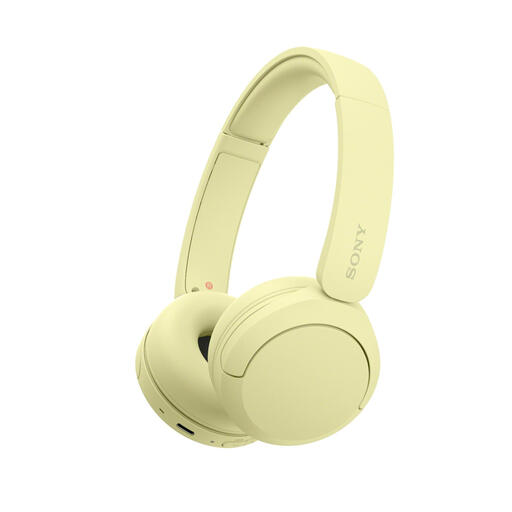
Why it suits this profile: At 147 grams, this lightweight on-ear model is suitable for everyday listening, studying and travelling without the bulk of an over-ear design.
The product information mentions Multipoint, USB-C and a microphone. However, check the stated battery life, as the overview and technical table show different figures.
147 grams, adjustable headband, AAC and SBC codecs, Multipoint and a stated playback time of up to 50 hours in the product description.
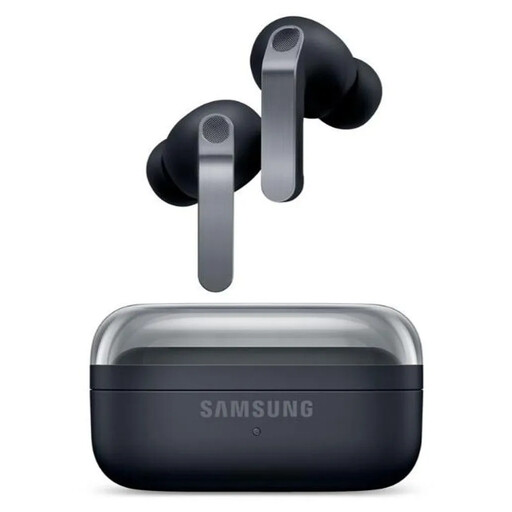
Why it suits this profile: Suitable for users looking for compact in-ear earbuds with ANC, an equaliser and features within the Galaxy ecosystem.
The IP57 rating should not be confused with suitability for swimming. Also check that the features and app support are compatible with your smartphone.
Two-way speakers, ANC, Bluetooth 6.1, 6 microphones, USB-C and wireless charging. The stated playback time is 6 hours with ANC and 7 hours without ANC.
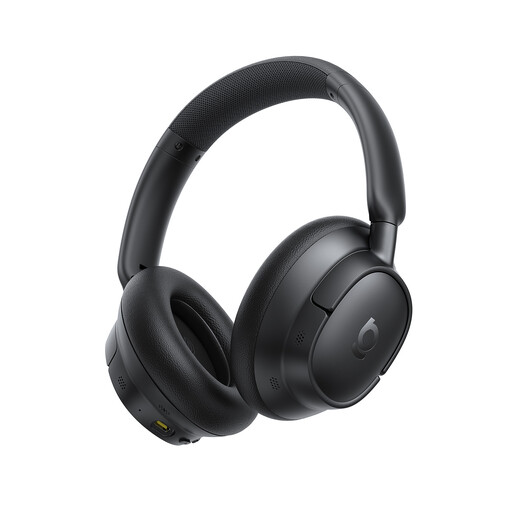
Why it suits this profile: Over-ear ANC headphones are ideal for commuters, travellers and people working from home who prefer long listening sessions and a sturdy headband.
The product specification lists separate playback times with ANC switched on and off. This makes it easier to compare the long battery-life claim with how you use the headphones.
According to the product information, up to 80 hours without ANC and 55 hours with ANC, support for Hi-Res and LDAC, plus five microphones.
We have put together a complete, up-to-date list of products that fully meet these strict selection criteria and the applicable European safety regulations.
Switch on Bluetooth on your smartphone, open the Bluetooth settings and put the headphones or earbuds into pairing mode. Then select the product name from the list. Features such as Google Fast Pair and Microsoft Swift Pair can speed up the process on compatible devices. If you experience problems, consult the manual and check whether the device is already connected to another source.
Lifespan depends on charging cycles, heat, moisture, use and storage. Keep earbuds in their charging case and do not charge a battery in a damp environment. Do not use over-ear or on-ear headphones in the rain unless water resistance is specified. Listening at a lower volume and cleaning the headphones regularly can help ensure comfortable use.
ANC itself does not incur any additional costs, but it usually reduces battery life. This means you will need to charge the device more often. Consider the price of any accessories, such as replacement ear cushions or charging cables. Also check whether an app is required for settings, firmware updates or access to certain features.
