
Vandaag of morgen in huis

Kwaliteit gegarandeerd

Welkomstaanbiedingen ontgrendelen: GRATIS bezorging | Tot 80% korting | Gratis 30 dagen JoyPlus-proefperiode
Download de app
At first glance, choosing wireless headphones seems straightforward. But models can vary greatly in comfort, battery life, microphones and noise cancellation. A low price may be tempting, but an uncomfortable headband or unreliable connection can soon make everyday use frustrating.
In this guide, we explain which specifications to check in the UK, which marketing claims to treat with caution, and what type of Bluetooth headphones might suit your needs.
Manufacturers often state a maximum battery life, but this figure may depend on the volume, the codec used and noise cancelling. Headphones with active noise cancellation typically use more power than the same model with this feature switched off.
So, check the difference between:
A claim such as “up to 50 hours” is a manufacturer’s guide, not a guarantee for every situation.
Noise-cancelling headphones use microphones and electronics to reduce background noise. How well they work depends on the type of sound, the fit and the seal around your ears. Low, constant sounds such as train or plane noise are often easier to reduce than voices or sudden sounds.
A brand’s own research may state that certain models reduce noise by a specific number of decibels. Treat this as a product specification measured under particular conditions, not a universal guarantee. Also check whether there’s a transparency mode if you’ll be walking outside or need to hear conversations in the office.
Over-ear headphones can be comfortable thanks to their large ear cushions, but sizes and weights vary between models. Lightweight on-ear headphones are easier to carry, but their ear cups don’t fully cover your ears.
Look out for:
Comfortable headphones should feel good beyond the first try-on. Think about train journeys, long stretches of work and phone calls lasting half an hour or more.
Almost all modern Bluetooth headphones work with smartphones, tablets and laptops. However, check whether multipoint is supported. This lets you keep, for example, a phone and laptop connected at the same time and switch between devices.
For home use, Bluetooth may be all you need. For gaming, a 2.4GHz connection can be worth considering because it may offer lower latency. A wired connection, such as 3.5 mm, is useful if the battery runs out or you’re using a device without Bluetooth.
Long battery life is handy for commuting, travelling and everyday use. Compare models on a like-for-like basis. For example, the Sony WH-CH720N is listed as offering up to 50 hours without noise cancelling and 35 hours with noise cancelling. Soundcore Space One models are listed with up to 55 hours of battery life.
According to Baseus, the EH10 NC offers up to 80 hours without ANC and 55 hours with ANC. With claims like these, always check the current product page and make sure the stated figure matches the setting you want to use.
If you want wireless headphones for music and calls, microphone quality, wind noise reduction and microphone placement all matter. A product description may state how many microphones are included, but how clearly you’ll be heard also depends on your surroundings and the phone or laptop you’re using.
If you use your headphones for online meetings, look for a model with clear microphone specifications, physical controls and a stable Bluetooth connection.
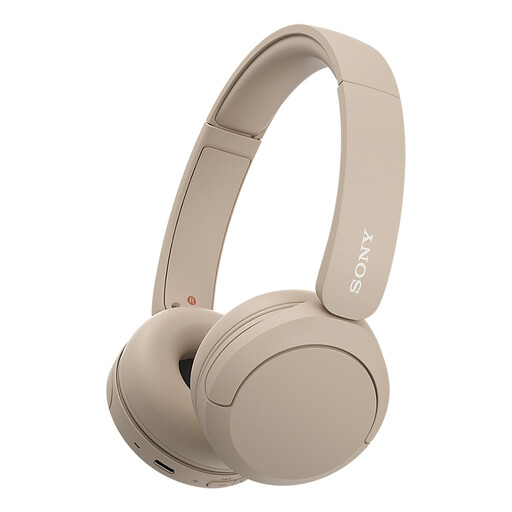
Why it suits this profile: At a stated weight of 147 grams, this compact on-ear model is well suited to everyday listening, travel and phone calls.
The product specifications list battery life, multipoint and a microphone separately. This makes it easier to check the key features instead of judging by looks alone.
147 grams, multipoint connection, USB Type-C and up to 50 hours of battery life according to the product information.
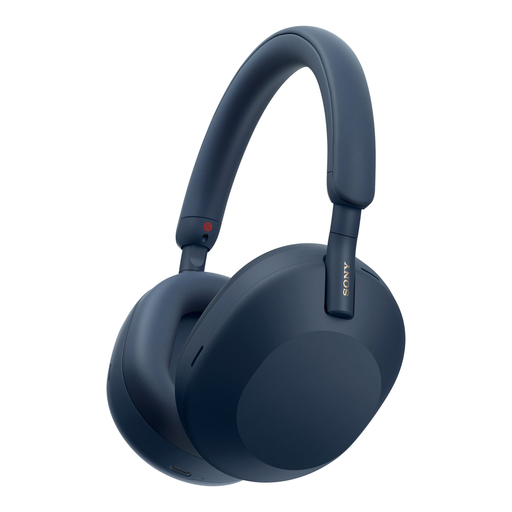
Why it suits this profile: These over-ear headphones combine active noise cancelling, multipoint, a 3.5mm connection and support for AAC, LDAC and SBC.
Battery life is listed separately for use with and without noise cancelling. This gives you a clearer idea of what to expect when travelling or working in the office.
Up to 30 hours with ANC and 40 hours without ANC according to the product specifications, plus multipoint and a detachable cable.
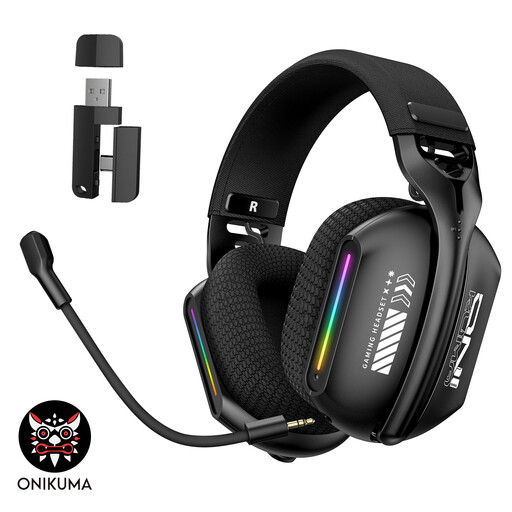
Why it suits this profile: This gaming headset offers Bluetooth 5.3, 2.4GHz wireless and a wired mode, with an adjustable headband and microphone.
The three connection modes mean you’re not reliant on a single wireless connection. Check in advance which modes your PC, laptop or console supports.
Bluetooth, 2.4GHz and a cable in one model, plus a 360° adjustable microphone and USB Type-C charging according to the product information.
We’ve put together a complete, up-to-date list of products that meet these strict selection criteria and the applicable European safety regulations.
Use this quick checklist before ordering a model:
Charge the headphones, switch them on and enable Bluetooth on your phone. Select the model name from the list of available devices. Some models offer Fast Pair, Swift Pair or a brand app to help with the initial pairing. If they won’t connect, remove an old pairing and restart both your phone and the headphones.
Battery life per charge is different from the overall lifespan of the headphones. Battery capacity decreases over time, depending on charging cycles, heat and usage. Store your headphones in a dry place, avoid prolonged exposure to heat and charge them using a suitable USB Type-C cable. Your statutory rights in the UK are separate from any stated battery life per charge.
Active noise cancellation uses additional microphones and processing, which usually reduces battery life. The difference varies by model. Always compare the stated battery life with ANC switched on and off, especially if you use your headphones for long journeys or working days.
