If you regularly record presentations, first check that your headphones, device and recording app can all record and play back properly at the same time. If you mainly want to listen back in a noisy room, look for a comfortable fit and a useful ambient mode; ANC alone tells you nothing about how clearly your voice has been recorded. When buying, also check the version on offer and the applicable CE marking.
Who is this buying guide for?
Anyone recording themselves to listen back
When practising, you switch between speaking, recording and listening back. So check that your microphone works as an input on the device and in the app you use. Microsoft Support explains how to set up a microphone in Windows and play back a test recording.
Anyone listening back in a noisy room
You want to assess your pronunciation and delivery without constantly turning up the volume. Look for a comfortable fit and the option to let in ambient sound. VeiligheidNL points out that a good fit can help you listen at a lower volume.
Anyone practising for longer sessions in the evening
You may wear your headphones for a long time, so you want to listen comfortably without losing sight of your surroundings or the volume. VeiligheidNL advises taking into account how often and how long you listen, as well as the volume.
What should you look for when buying?
Start by asking whether you mainly want to assess your own recording or listen back in a quiet setting. Then check for the features and fit that suit your needs.
| What to consider |
What should you check? |
Who is this especially important for? |
| Listening back to your own recording |
Select the microphone and audio output in your recording app, then make a test recording at a normal speaking volume. |
If I record my presentation again, I want to be able to listen back to it and assess it on my own device. Around 33% of consumers give top priority to clear recordings of their own voice and immediate playback. |
| Listening comfortably in a noisy room |
Try the fit and, if available, switch between noise isolation and ambient sound. VeiligheidNL recommends a good fit so you don't have to listen at such a high volume. |
When there's background noise at home, I want to follow speech without constantly turning up the volume. Around 25% of consumers prioritise listening back in comfort. |
| Comfort and listening volume |
Assess the pressure from the headband and ear cushions, and keep the volume at a sensible level when listening repeatedly. VeiligheidNL also recommends paying attention to how long and how often you listen. |
During longer evening sessions, I want headphones that feel comfortable to wear and let me listen at a suitable volume. Around 25% of consumers give top priority to wearing comfort and listening at a sensible volume. |
| Device connection |
Check that your device and recording app support the microphone and playback features you need. Compare battery life only under the stated settings, and check what's included with the product. |
If I switch between my laptop and phone, I want to know whether recording and pairing work with my devices. Around 17% of consumers prioritise device connectivity and practical buying considerations. |
How to avoid common buying mistakes
-
Confusing ANC with a good recording of your voice
Noise cancellation affects what you hear; it doesn't tell you how clearly the microphone records your voice.
Before choosing headphones for this purpose, make a short speech recording using the device and app you actually plan to use.
-
Looking at maximum battery life without considering the settings
JBL states that the Live 770NC offers up to 65 hours with Bluetooth on and ANC off, compared with up to 50 hours with ANC on.
Only compare battery life figures when the stated settings match how you intend to use the headphones.
-
Turning up the volume to drown out room noise
According to VeiligheidNL, a good fit can help you listen at a lower volume.
Check the fit and keep the volume at a sensible level, even when you listen to a recording several times.
-
Assuming there's a fixed warranty period
The Government of the Netherlands states that there is no fixed statutory warranty period in the Netherlands, and that your legal rights apply alongside any additional warranties.
Keep your proof of purchase and contact the seller if there's a problem with a faulty product.
Brands to compare
Jabra
Jabra positions the Evolve3 85 as a headset for voice-focused applications.
- Jabra lists adaptive ANC and AI-powered voice isolation for this model. These are manufacturer claims, not a guarantee of the quality of your presentation recording.
- The EU Declaration of Conformity lists model HSC210W. Check that the version on offer matches it.
Sony
According to Sony Netherlands, the WH-CH720N is a closed-back over-ear headphone with an ambient sound mode.
- The ambient sound mode could be useful if you want to hear what's going on around you while practising.
- These features don't tell you how clearly your voice will be recorded or how the fit will feel to you.
JBL
JBL describes the Live 770NC as an over-ear model with ANC and Smart Ambient.
- JBL states that battery life is up to 65 hours with Bluetooth on and ANC off, and up to 50 hours with ANC on. These are manufacturer figures under the stated conditions.
- Smart Ambient and the stated battery life don't tell you how your recording will sound or how the model will work in your practice space.
Sennheiser
According to Sonova Consumer Hearing, the MOMENTUM 5 Wireless is an over-ear range with ANC, designed for listening.
- The product information describes the model and its ANC feature.
- The stated features don't prove that this model is better suited to voice recording than a voice-focused headset.
Joybuy products for practising presentations
These product choices are suited to listening back and practising with headphones or a headset. Check that the microphone and playback are compatible with your device, and review the features of the version on offer.
 No image available
Sennheiser MOMENTUM 4 Wireless, white
If you mainly want to listen back, consider whether the fit and controls suit your practice sessions. Test the microphone separately if you also plan to record.
The product name describes wireless over-ear headphones with ANC, a stated battery life of 60 hours and four microphones.
View on Joybuy
 No image available
Bose QuietComfort Ultra Bluetooth headphones, black
If you're considering this model for practising presentations, check that the connection and microphone input work with your device and recording app.
The product name specifies Bluetooth and the colour black.
View on Joybuy
 No image available
Jabra Evolve2 75, USB-A, MS Teams, black
If you're considering a headset for recording and listening back, first make a test recording using the connection and app you plan to use.
The product name specifies USB-A and MS Teams.
View on Joybuy
 No image available
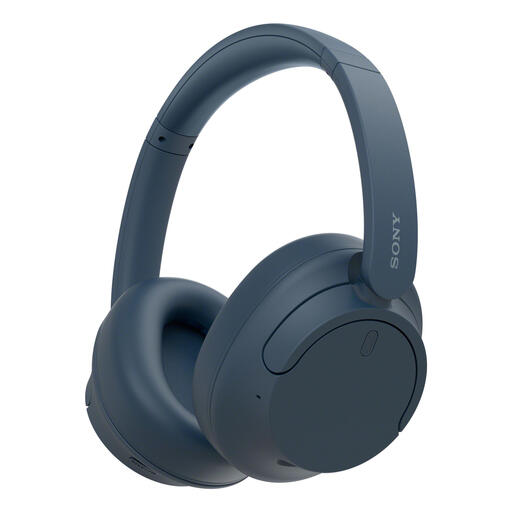
Sony WH-CH720N, blue
If you want to let in ambient sound while listening back, the stated ambient sound mode could be useful. Try the controls and fit for yourself.
The product name lists ANC, Bluetooth, a stated battery life of up to 35 hours and quick charging. Sony Netherlands also lists an ambient sound mode.
View on Joybuy
 No image available
HyperX Cloud III S Gaming Headset, black and red
If you want to use this model for presentations, check before buying that the microphone and playback features you need work with your device.
The product name identifies this model as a gaming headset in black and red.
View on Joybuy
Frequently asked questions
Can I record my presentation on a Windows PC while listening in stereo with any Bluetooth headphones?
No, don't assume this will work without testing it. Microsoft Support states that, on the Windows setup described, stereo playback while using a microphone requires Windows 11 version 24H2 or later and built-in Bluetooth LE support on the PC. Select the right input in Windows and make a test recording.
How can I hear what's going on around me while practising?
Try an ambient mode, or practise without headphones if you want to keep hearing your housemates or your own voice clearly. Sony lists this mode for the WH-CH720N, while JBL calls it Smart Ambient on the Live 770NC. See how useful it is in your room.
What can I do if my voice recording sounds too quiet on my laptop?
Check which microphone is selected as the input, start a test, play it back and adjust the input volume if necessary. These are Microsoft Support's instructions for Windows; they don't guarantee that a particular headset microphone will sound good.
Does a wireless headphone sold in the Netherlands need to have a CE marking?
For equipment covered by the relevant radio equipment requirements, the Dutch Authority for Digital Infrastructure states that only products with a CE marking may be sold in Europe. Check the version on offer; a brand name or sales listing alone isn't proof that a specific product complies.
Am I automatically entitled to exactly two years' statutory warranty on headphones in the Netherlands?
No. According to the Government of the Netherlands, there is no fixed statutory warranty period in the Netherlands; you're entitled to a product that works properly for as long as you can reasonably expect it to. If there's a problem with the product, contact the seller.


