
Vandaag of morgen in huis

Kwaliteit gegarandeerd

Welkomstaanbiedingen ontgrendelen: GRATIS bezorging | Tot 80% korting | Gratis 30 dagen JoyPlus-proefperiode
Download de app
A wireless headset may seem easy to choose at first. But models vary considerably in comfort, connectivity, microphone quality and battery life. A low price or a long list of features doesn’t automatically mean a product is right for the way you use it.
For your commute, you’ll need different features from those you’d look for in a gaming headset. If you mainly exercise, fit and water resistance are likely to matter more. For online meetings, a good microphone and stable Bluetooth connection are more important than RGB lighting.
A higher Bluetooth number, such as Bluetooth 5.4, mainly tells you about compatibility and connection technology. It doesn’t automatically guarantee better sound. So check codec support, driver size, fit and intended use too.
A Bluetooth headset for music doesn’t necessarily need the same connection as a gaming headset. For gaming, a dedicated 2.4GHz connection with low latency may be more suitable. Bluetooth is often more convenient for smartphones and tablets.
The term noise cancelling can refer to active noise cancellation, passive sound isolation or ENC microphone noise reduction. These are different features:
So a headset with a microphone and ENC isn’t automatically a noise-cancelling headset for train journeys.
A stated battery life often applies to a specific test setting. RGB lighting, a 2.4GHz connection, high volume and phone calls can all affect how long the battery lasts. Also check whether the stated time is for a single charge or includes the charging case.
Pay attention to charging, too. USB-C charging is convenient because you can often use the same cable for other devices, but charging times and fast-charging features vary by model.
An over-ear headset fully encloses your ears. This can be comfortable during longer work sessions or gaming, but the model is larger and may feel warmer. Soft ear cushions and an adjustable headband are therefore important.
In-ear earbuds are small and easy to carry around. Their fit depends largely on the earbuds supplied. Check whether they come with several sizes of silicone tips. For exercise, wireless earbuds with a suitable IP rating may be more practical.
Pay attention to the difference between, for example, IPX4 and IPX7. IPX4 means protection against splashes according to the stated rating; it doesn’t make a product suitable for submersion. Never use a charging case in water unless the manufacturer explicitly says it’s safe to do so.
Before buying, check which connections your device supports. Some gaming headsets connect to a PC or console via a USB transmitter, while Bluetooth is intended for smartphones and tablets.
The ONIKUMA GT806 product information lists three modes: 2.4GHz wireless, Bluetooth and wired via USB-C. It also states that Bluetooth won’t connect directly to a PS4, PS5 or PC without a separate Bluetooth adapter. The 2.4GHz mode is recommended for these devices.
A larger driver, such as a 50mm driver, can contribute to an immersive listening experience, but it doesn’t tell you on its own how the sound will come across to you. Also consider the frequency range, equaliser options and how well the headset seals around your ears.
For gaming, low latency is important to keep picture and sound better in sync. A noise-cancelling microphone can make voices clearer, but your surroundings, software and microphone position still have an effect.
If you mainly listen to music, look for HiFi stereo sound, an adjustable equaliser and support for a suitable audio codec. Always check the technical description rather than relying on a marketing term alone.
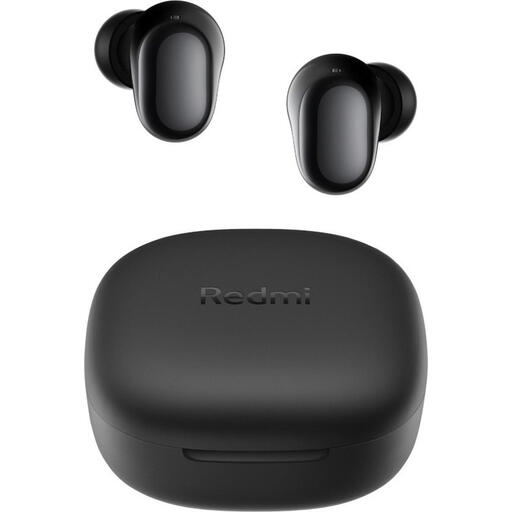
Why this suits this profile: These compact wireless earbuds are designed for everyday use, calls and listening on the go, without having to carry around a bulky headset.
The specifications list a 7.5-hour battery life separately from the maximum 36 hours with the charging case. They also state that the earbuds are IPX4 rated; the case isn’t water-resistant.
Bluetooth 5.4, USB-C charging port, 10mm dynamic drivers and a weight of 3.6 grams per earbud.
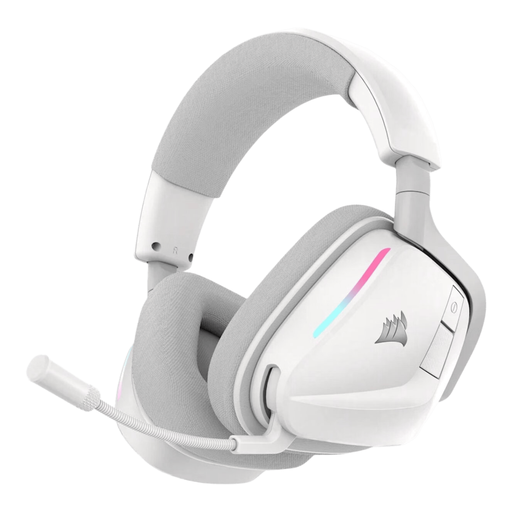
Why this suits this profile: This RGB gaming headset is designed for gamers looking for a combination of wireless flexibility, a microphone and software-based audio settings.
The product information distinguishes between 2.4GHz RF and Bluetooth 5.3. This lets you choose the connection to suit gaming or mobile devices, rather than using one mode for everything.
50mm neodymium drivers, stated battery life of up to 70 hours via 2.4GHz, USB-C fast charging and a bendable omnidirectional microphone.
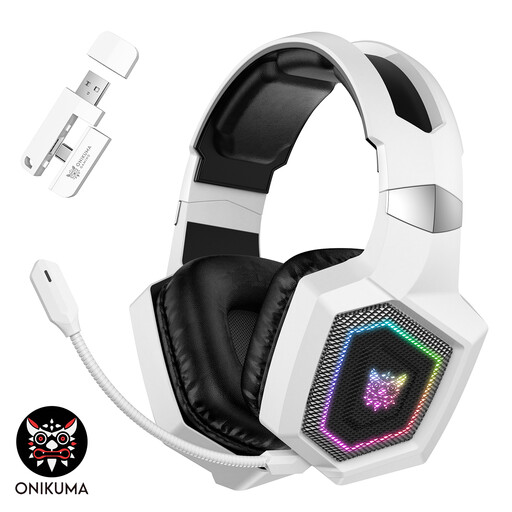
Why this suits this profile: This over-ear model is aimed at gamers who want to switch between 2.4GHz, Bluetooth and a wired USB-C mode.
The product page states latency of less than 30 ms with the 2.4GHz connection and separately notes that RGB lighting uses the battery more quickly. The headset isn’t waterproof.
50mm drivers, a detachable microphone, stated battery life of up to 40 hours in 2.4GHz mode and up to 60 hours with the lighting off.
Use this quick checklist:
We’ve put together a complete, up-to-date list of products that meet these strict selection criteria and the applicable European safety regulations.
Switch on Bluetooth on your phone, put the headphones into pairing mode and select the product name from the list of available devices. If your model comes with a USB transmitter, you’ll usually use the dongle with a PC, console or laptop. Check the manual if Bluetooth and 2.4GHz need to be activated separately.
It depends on battery use, charging habits, hinges, ear cushions and storage. Don’t use the headphones while they’re charging, avoid heat and store them somewhere dry. A model with replaceable or separately available ear cushions can be practical if you use it often.
The built-in battery is charged via USB and uses relatively little energy during use. Features such as RGB lighting, active noise cancellation and a powerful wireless connection can drain the battery more quickly. Turn off the lighting or extra features when longer battery life matters more than appearance.
