
Vandaag of morgen in huis

Kwaliteit gegarandeerd

Welkomstaanbiedingen ontgrendelen: GRATIS bezorging | Tot 80% korting | Gratis 30 dagen JoyPlus-proefperiode
Download de app
Choosing wireless headphones might seem straightforward at first. But marketing claims, unclear battery figures and a poor fit can easily lead to a disappointing purchase. For example, a model advertised with “noise cancelling” may mainly reduce low hums, while voices and traffic remain clearly audible. And a long battery life doesn’t always mean they’ll be comfortable to wear for a full working day.
Use this guide to compare Bluetooth headphones or wireless earbuds based on what matters in everyday use: comfort, battery life, microphones, water resistance, wireless connectivity and how you plan to use them.
Manufacturers usually quote maximum playback time at a particular volume, often with active noise cancelling switched off. For example, the Baseus EH10 NC is listed in its product description as offering up to 80 hours without ANC and up to 55 hours with ANC. With earbuds, you should also distinguish between playback time per charge and total playback time including the charging case.
So always check:
A claim such as “up to -45 dB” or “up to -50 dB” isn’t a universal guarantee for every environment. According to the brands’ own information, the results depend on your surroundings, the fit and the settings you use. ANC, or active noise cancelling, generally works best on constant sounds such as aircraft engines, train noise or ventilation.
For conversations, cycling traffic and unexpected sounds, transparency mode or open-ear headphones may be more practical. Treat ANC as a useful feature, but not your only deciding factor.
Over-ear headphones go around your ears and can be comfortable for travelling or working, but they’re larger and warmer. In-ear earbuds are compact and easy to carry, but the fit varies considerably from person to person. Open-ear models let in ambient sound and can be useful for everyday wear, as long as you follow local traffic rules and take care in your surroundings.
Bluetooth versions 5.3, 5.4 or 6.0 mainly tell you about the wireless connection; they don’t, by themselves, indicate how good the headphones sound. Also check which codecs are supported, such as AAC, SBC or LDAC. According to product information, LDAC can transmit more audio data than standard Bluetooth codecs, but your playback device must support it too.
If Hi-Fi audio matters to you, also check:
For headphones for calls, multiple microphones and a system to reduce background noise are useful specifications. However, they don’t guarantee that your voice will be perfectly clear on every street or train. Also check where the microphones are positioned and whether the controls let you answer calls directly.
A model with five or six microphones may appeal if you attend online meetings, but also check compatibility with your phone, laptop and meeting app.
An IP code describes protection against dust and water according to a standardised classification. IPX4, for example, means protection against splashes, not submersion. IP55 and IP68 offer different levels of protection, so always check the specific product conditions.
For sports earbuds, a secure fit, sweat resistance and easy-to-use buttons are often more important than an extensive touch-control system. Let earbuds dry after intensive use, and don’t charge a wet device.
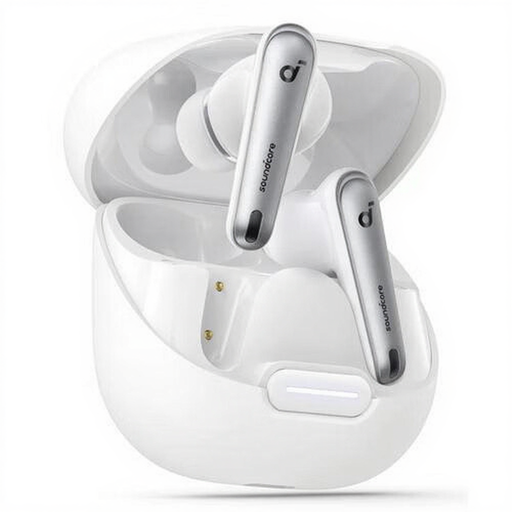
Why it suits this profile: These compact in-ear earbuds are designed for everyday listening and calls. The set includes extra ear tips, so you can find the right fit.
The product description lists IPX4, Bluetooth 5.3 and 10 hours of playback per charge. This makes the key details clearer than a general claim about ease of use alone.
Six microphones, LDAC support, USB-C and a charging case.

Why it suits this profile: Designed for listeners who value adjustable noise cancelling, advanced audio technology and clear calls.
According to Soundcore, its noise cancelling adjusts to your surroundings. The product information also lists six microphones and a charging case, making the practical details easy to check.
Up to 10 hours per charge, up to 40 hours with the case and USB-C fast charging.
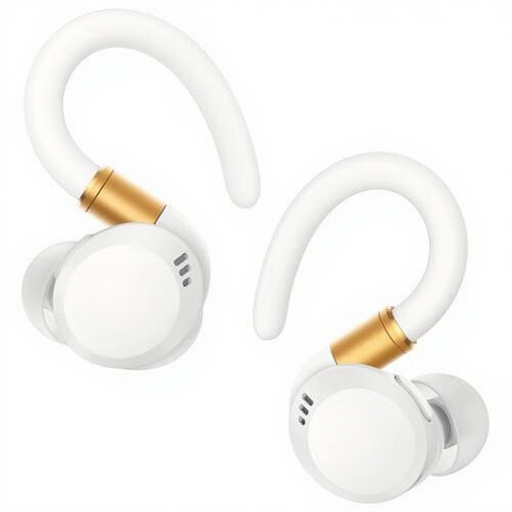
Why it suits this profile: According to the specifications, the ear hooks and IP68 rating make this model suitable for sport and active everyday use.
The secure design means you don’t have to rely on a standard in-ear fit alone. Be sure to check the current conditions for using the IP rating.
Up to 12 hours of playback, a charging case, buttons and support for AAC and SBC.
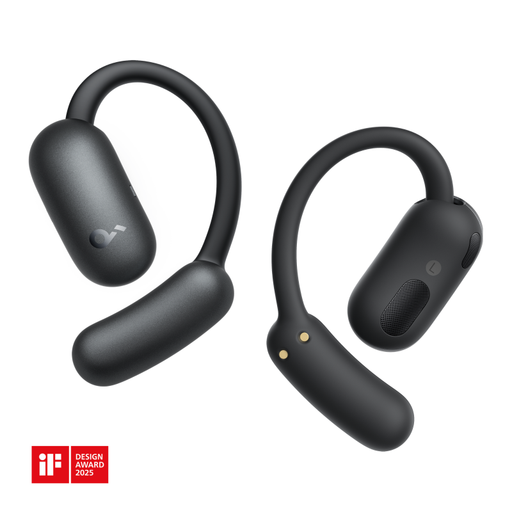
Why it suits this profile: The open-ear design is intended for calls, music, sport and everyday use without blocking the ear canal.
You’re choosing not to prioritise maximum isolation or ANC. The listed IP55 rating and two microphones make its practical features clear.
Bluetooth 5.4, buttons, a weight of 85 grams and a charging station.
We’ve put together a full, up-to-date list of products that meet these strict selection criteria and the applicable European safety regulations.
Charge the headphones first, then open your phone’s Bluetooth settings. Put the device into pairing mode and select its name from the list. Some models pair automatically when you open the case. If the connection doesn’t work, remove the old pairing and try again.
Lifespan depends on charging cycles, heat, moisture, volume and everyday use. A lithium battery loses capacity over time. Don’t leave your headphones completely flat for long periods or in a hot car. Use the supplied or a suitable USB-C charger, and stop using the device if it swells, leaks or becomes unusually hot.
You won’t need a separate cable, but you will need to charge them regularly. Charging costs are generally low; the main practical difference is battery wear and the possibility of needing a replacement. If you’d rather not manage a battery, you could also consider wired headphones or wired earphones with a microphone.
