
Vandaag of morgen in huis

Kwaliteit gegarandeerd

Welkomstaanbiedingen ontgrendelen: GRATIS bezorging | Tot 80% korting | Gratis 30 dagen JoyPlus-proefperiode
Download de app
A wireless headset may seem simple to choose: connect via Bluetooth, switch on your music and you’re ready to go. In practice, models vary considerably in comfort, battery life, microphone quality and connectivity options. A low price can be appealing, but unclear compatibility or a poor fit can quickly lead to disappointment.
This buying guide helps you compare your options with confidence. You’ll find key considerations for music, calls, travel, work and gaming, along with a selection of models suited to different uses.
A manufacturer may measure maximum playback time with features such as active noise cancellation switched off, at a moderate volume and using a specific connection. With noise cancellation, phone calls or a 2.4GHz gaming connection, actual battery life may be shorter.
So pay attention to:
Noise-cancelling headphones use microphones and electronics to reduce ambient noise. The result depends on the fit, the type of sound and the mode being used. Low, constant sounds such as train or aeroplane noise are generally handled differently from voices or sudden sounds.
Also check whether a transparency mode is available. When you’re near traffic or cycling, you need to be able to hear your surroundings. Do not use headphones while driving or operating machinery.
Over-ear headphones completely cover your ears, but may feel heavier or warmer. On-ear models are often lighter and more compact, but rest directly on your ears. Also check that the headphones work with your phone, laptop, console or dongle.
A Bluetooth connection is not always suitable for gaming. To reduce latency, gaming models often use a 2.4GHz USB receiver. Also check whether your chosen console supports this connection.
For music, podcasts and calls, Bluetooth headphones are practical. Multipoint can be useful if you want to stay connected to a laptop and smartphone at the same time. Not every model supports this, so check the feature separately.
A wireless headset for gaming may offer both Bluetooth and 2.4GHz. For example, the Trust GXT 491 Fayzo lists both wireless connections and also provides a 3.5mm socket. This gives you greater flexibility when using a PC or console.
For daily commuting, 20 to 30 hours may be enough. If you travel frequently or don’t want to recharge regularly, look for models with a stated playback time of 40 hours or more. Bear in mind that volume, codec, noise cancellation and the type of connection all affect actual battery life.
Look out for conflicting information in a product listing. With some models, the battery life stated in the product description differs from that in the technical table. Before buying, check the current specifications and the cable included.
Headphones with a microphone are suitable for calls, online meetings and gaming. The number of microphones alone does not tell you everything about voice clarity. Also look at microphone noise reduction, the microphone’s position and whether it can be detached.
A lower weight can be more comfortable during extended use. The Sony WH-CH520 is listed in the product information as weighing 147 grams. An over-ear model such as the Sony WH-CH720N is listed at 192 grams. However, the right choice also depends on the pressure of the headband and the shape of the ear cushions.
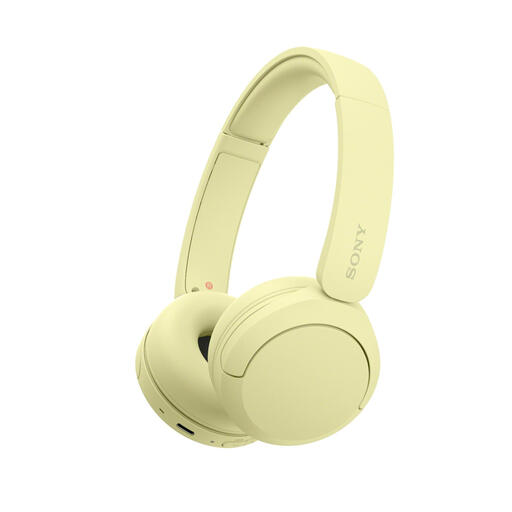
Why it suits this profile: This on-ear model is lightweight, with a stated weight of 147 grams, and is designed for everyday use, travel and calls. Multipoint allows you to connect to a phone and laptop.
The product information mentions a compact design, physical controls and a microphone. However, check the current battery information, as the product details and technical table may differ.
Bluetooth, USB-C, microphone, Multipoint and a stated weight of 147 grams.
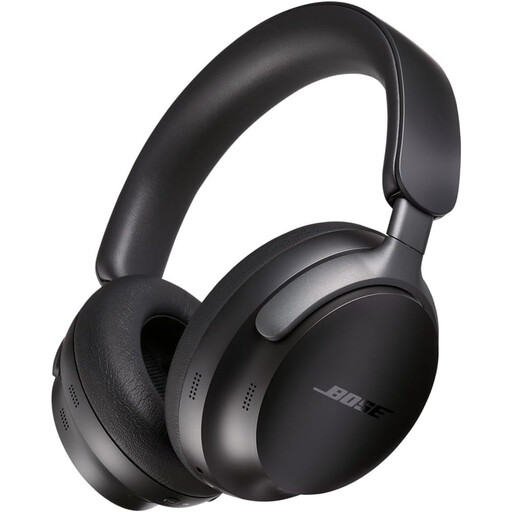
Why it suits this profile: These over-ear headphones are designed for listening to music, travelling and extended use. The product details mention active noise cancellation, Multipoint and an audio cable included in the box.
The cable provides an alternative when the battery is flat. The stated battery life is 24 hours, which is clearer than a general claim about extended listening.
Active noise cancellation, Bluetooth 5.3, Multipoint, app control and a foldable design with carry case.

Why it suits this profile: According to the product information, this is a gaming headset that can be used both wirelessly and with a cable, for PC, PS4 and PS5. The detachable microphone and range of connections make it suitable for gaming and calls.
The combination of 2.4GHz, Bluetooth and a 3.5mm cable reduces reliance on a single connection. Check your console’s connection before buying.
Up to 22 hours of stated playback time, 50mm drivers, virtual 7.1 audio and a detachable microphone.
We’ve put together a complete, up-to-date list of products that fully meet these strict selection criteria and the applicable European safety regulations.
Switch on the headphones and hold down the Bluetooth button for a few seconds. Then open the Bluetooth settings on your phone and select the product name. When pairing for the first time, the manufacturer’s app may offer additional settings. If the connection doesn’t work, remove the old pairing and try again.
Their lifespan depends on the battery, hinges, ear cushions and how they are used. Store the headphones in a dry place, avoid heat and charge them with a suitable cable. A battery loses capacity over time, so the stated playback time is a guideline for a new or well-maintained product.
Yes, active noise cancellation uses extra power. How much this affects battery life varies by model. So compare battery life with ANC switched on and off. Fast charging can be useful if you often use your headphones while out and about.
