
Vandaag of morgen in huis

Kwaliteit gegarandeerd

Welkomstaanbiedingen ontgrendelen: GRATIS bezorging | Tot 80% korting | Gratis 30 dagen JoyPlus-proefperiode
Download de app
Wireless headphones may seem easy to choose at first. But impressive claims about battery life, noise cancelling and sound quality can hide a less suitable purchase. The right choice depends on how you’ll use them: will you mainly listen at home, travel by train, work in an office, exercise or play games?
As a Joybuy Product Recommendation Officer, I sift through the most important product specifications and use cases to help you assess marketing claims more effectively.
Long battery life sounds appealing, but always check the conditions under which it was measured. Noise cancelling, high volume and phone calls can all affect how long the battery lasts. With earbuds, there is often a difference between the battery life of each earbud and the total listening time, including the charging case.
Pay attention to the charging method, too. A USB-C port is practical, while fast charging can come in handy when you’re short of time on the go. For example, according to its product information, the Marshall Major V offers more than 100 hours of playback and up to 15 hours of use after 15 minutes of charging. Check the latest product specifications before you order.
Noise-cancelling headphones use active electronics to reduce background noise. How well they work can vary depending on your surroundings. Low, constant sounds such as train or aeroplane noise are generally a different challenge from voices or sudden sounds.
Be aware of the difference between:
According to the product information, the Sony WH-CH720N has adjustable noise cancelling via the Sony Headphones Connect app. This is a verifiable feature; how much difference you notice will depend on the fit, your surroundings and your personal preference.
Over-ear headphones go around your ears and can be comfortable for travelling or longer listening sessions. On-ear headphones sit on your ears and are often more compact, but they may put more pressure on your ears over time. Wireless earbuds are light and easy to carry, but the fit can vary considerably from one person to another.
So check:
For exercise, the right IP rating matters. A product rated IP54 is not the same as a fully waterproof model. According to the product information, the Baseus Bowie MC1 is not waterproof, while the Edifier X1 Lite has an IP54 rating. Use these models only in the conditions specified.
Almost all Bluetooth headphones work with smartphones, tablets and laptops that support Bluetooth audio. The Bluetooth version isn’t the only factor that determines how up to date a model is; compatibility, codec support and your devices’ software also play a part.
Multipoint Bluetooth is useful when you want to connect to, for example, a laptop and phone at the same time. It makes it easier to switch between a video call and a phone call. Check that multipoint is supported with your devices and the features you want to use.
A specification such as 20 Hz–20 kHz describes the stated frequency range. On its own, it doesn’t tell you what a pair of headphones will sound like. Driver size, tuning, design and fit also affect your listening experience.
A larger driver doesn’t automatically mean better sound reproduction. Consider the product as a whole and think about what you prefer: neutral sound, extra bass, clear voices or a low weight.
Headphones with a microphone are suitable for phone calls, online meetings and gaming. Call clarity can vary depending on the number of microphones, noise filtering, microphone placement and software.
For gaming, a gaming headset with a 2.4GHz dongle may offer lower latency than Bluetooth alone. According to the product information, the Turtle Beach Stealth 500 combines 2.4GHz connectivity with Bluetooth 5.2. Its flip-up microphone mutes the sound when you move it upwards.
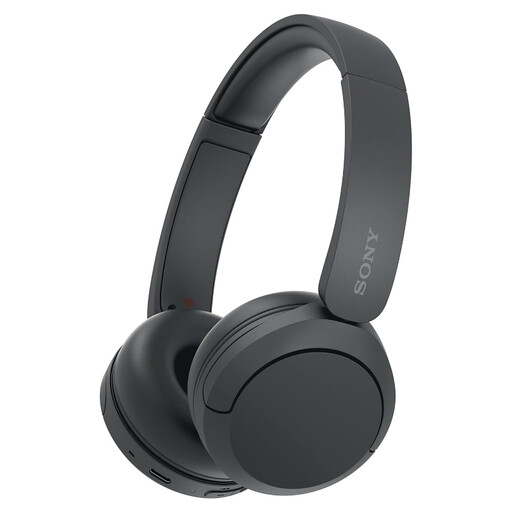
Why it suits this profile: This lightweight 147-gram on-ear model is suitable for everyday listening, calls and travel, without the bulk of an over-ear design.
The product specifications list an adjustable headband, a microphone and a multipoint connection. Do check that you don’t need noise cancelling, as this feature isn’t listed.
147 grams, Bluetooth, USB-C, microphone and multipoint. According to the product information, the stated battery life is up to 50 hours.
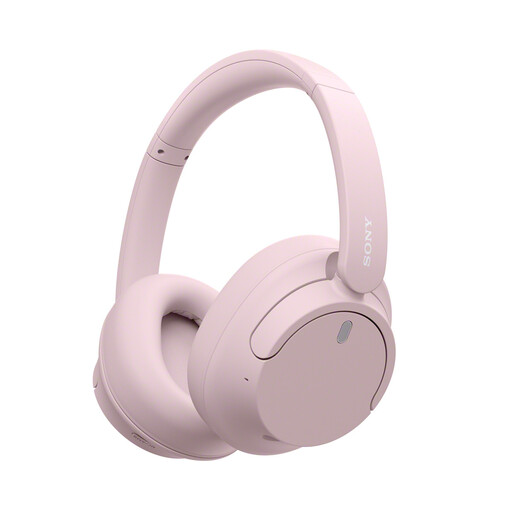
Why it suits this profile: The over-ear design, active noise cancelling and multipoint connection make it a good fit for travel, working from home and listening in busy environments.
The product information gives separate battery life figures with and without noise cancelling. This makes it easier to assess the battery claim in the right context.
Active noise cancelling, multipoint, USB-C, dynamic drivers and a stated weight of 192 grams.
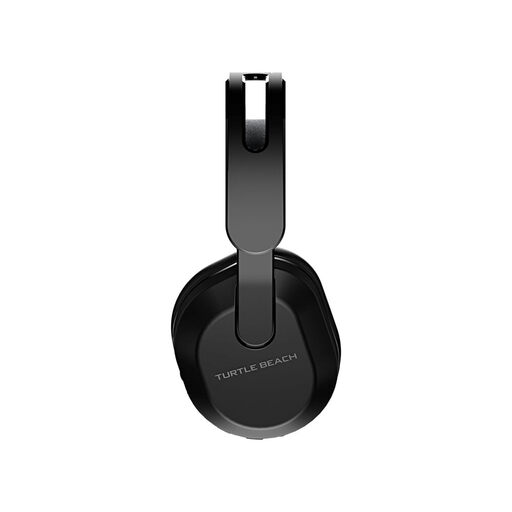
Why it suits this profile: Designed for gamers looking for a wireless connection, low latency, a gaming headset with a microphone and support for multiple platforms.
The combination of 2.4GHz via dongle and Bluetooth 5.2 clearly separates gaming from mobile use. The flip-to-mute microphone means there’s no need for extra controls.
40mm drivers, up to 40 hours of battery life according to the product information, 2.4GHz, Bluetooth 5.2 and a flip-up microphone.
We’ve put together a complete, up-to-date list of products that meet these strict selection criteria and the applicable European safety regulations.
Switch on Bluetooth on your phone, put the headphones into pairing mode and select the product name from the list of available devices. Some models have a companion app for extra settings, firmware updates or an equaliser.
Battery life per charge varies by model and settings. Noise cancelling, volume and calls all affect battery life. The product’s overall lifespan also depends on charging habits, storage, moisture and wear to the ear cushions or battery. So check not only the stated battery life, but also whether the ear cushions, cables or other parts can be replaced.
Yes, provided the model has a comfortable fit, a stable connection and a suitable microphone. Multipoint Bluetooth is useful if you want to stay connected to your laptop and phone at the same time. For long meetings, over-ear headphones can offer more isolation; for shorter calls, lightweight on-ear headphones are often more practical.
