
Vandaag of morgen in huis

Kwaliteit gegarandeerd

Welkomstaanbiedingen ontgrendelen: GRATIS bezorging | Tot 80% korting | Gratis 30 dagen JoyPlus-proefperiode
Download de app
A pair of wireless headphones can seem instantly appealing on paper. Bluetooth, active noise cancellation, dozens of hours of battery life and smart controls all sound useful. However, individual marketing claims do not always tell you how a model performs in everyday life. Headphones for train journeys, for example, need to offer something different from a model designed for running, video calls or long working days.
The key question is therefore not which feature sounds most impressive, but which combination of wearing comfort, connection, battery life and intended use suits you best.
The stated playback time usually depends on the settings you choose. With noise-cancelling headphones, battery life may differ from when noise cancellation is switched off. Volume, phone calls and charging via a case also affect how often you need to recharge.
So pay attention to the difference between:
A model with exceptionally long battery life is not automatically practical if it feels heavy or lacks good controls.
An IPX4 rating does not mean that you can fully submerge a pair of headphones. This designation indicates limited protection against splashing water. If you plan to use them for sport or in the rain, check which IP rating is actually stated in the product specifications.
Also note the difference between:
According to the product information, some models are suitable for sweat or splashing water. That does not mean they are suitable for swimming, showering or prolonged exposure to rain.
A pair of noise-cancelling headphones uses active noise cancellation to reduce surrounding noise. According to product descriptions from Apple, Bose and other brands, this can help with distracting sounds while travelling or working. However, performance depends on the fit, the type of sound and your surroundings.
Open-ear headphones work differently. The speakers sit outside or beside the ears rather than sealing the ear canal, allowing you to stay more aware of your surroundings. This can be useful in the office or while out walking, but it also means that ambient noise remains more clearly audible.
The design has a major impact on comfort and sound isolation.
As well as the wearing style, check the weight, the adjustability of the headband and whether different ear tips or stability bands are included.
A recent Bluetooth version can contribute to an efficient and stable connection, but your actual experience also depends on your phone, laptop and distance. The range includes models with Bluetooth 5.3 and Bluetooth 5.4.
If you switch between a laptop and smartphone, multipoint pairing is useful. However, check that this feature is genuinely listed in the specifications. Bluetooth headphones do not automatically support every advanced function on every device.
Headphones with a microphone are suitable for calls, online meetings and voice assistants. Do not just look at the number of microphones; also consider how the microphone is positioned. A retractable microphone can be useful for work calls, while built-in microphones keep a product more compact.
Specifications such as two, three or four microphones can be checked, but on their own they do not tell you everything about speech clarity in windy conditions or busy spaces. Treat claims about call noise reduction as information provided by the brand, and set your expectations according to your own environment.
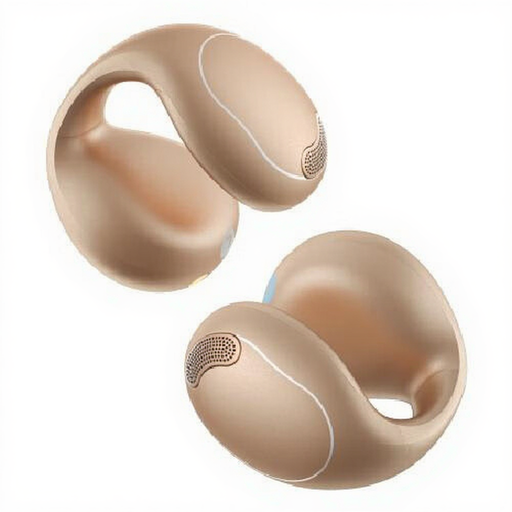
Why it suits this profile: The open-ear design is intended for calls, music, sport and everyday use without ear tips inside the ear canal.
The product specifications list Bluetooth 5.4, two microphones and IPX4. This makes the key basic information clearer than a standalone claim about “sports use”.
Open-ear design, button controls, a weight of 60 grams and a charging dock according to the product information.
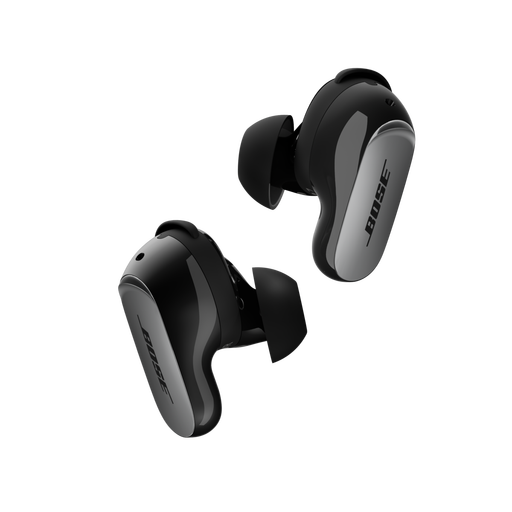
Why it suits this profile: According to the product description, this in-ear model is designed for travelling, working, listening to music and making calls.
The set comes with three sizes of ear tips and stability bands. This helps you check the fit before drawing conclusions about isolation or comfort.
Bluetooth 5.3, multipoint pairing, active noise cancellation and up to six hours of playback per charge according to the product information.
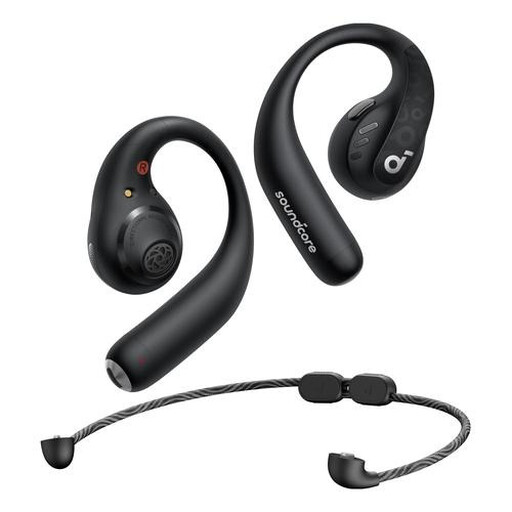
Why it suits this profile: The ear hooks are designed for sport, movement and everyday use where a secure position is important.
The fit is not determined by a single silicone tip alone. The ear hooks, button controls and IPX5 rating are relevant details for active use.
Bluetooth 5.3, IPX5, four microphones and up to 14 hours of playback according to the stated product specifications.
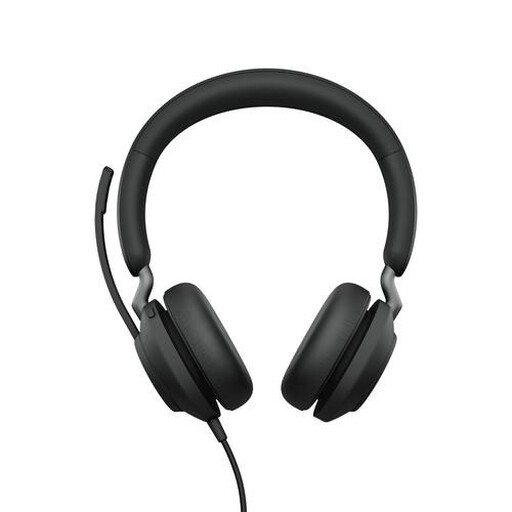
Why it suits this profile: This wireless headset is designed for professional calls and combining calls with music.
The stated battery life, USB-A adapter and Teams button make its intended use clear. However, check in advance that your computer has a suitable connection.
Bluetooth 5.0, a range of up to 30 metres and up to 37 hours of battery life according to the product details.
We have put together a complete, up-to-date list of products that fully meet these strict selection criteria and the applicable European safety regulations.
Choose open-ear headphones if you want to listen to music while remaining relatively aware of your surroundings. For train journeys, aeroplanes and noisy offices, a model with ANC may be a better choice. If you mainly use your headphones for sport, pay close attention to the fit, ear hooks and water resistance.
The following points are also relevant for music and calls:
Switch on Bluetooth on your smartphone, put the headphones into pairing mode and select the product name from the list of available devices. When connecting for the first time, you may need to use an app or confirm the connection on screen. If in doubt, consult the manual for the specific model.
This varies from one product to another. The stated playback time usually applies to a full charge and may change depending on the volume, calls and noise cancellation. With earbuds, the capacity of the charging case also counts. Check both figures before buying.
Yes, many models have a built-in microphone. Call quality depends on the number of microphones, their positioning, the Bluetooth connection and background noise. For intensive home working or online meetings, a wireless headset with a dedicated microphone may be more practical than compact wireless earbuds.
