
Vandaag of morgen in huis

Kwaliteit gegarandeerd

Welkomstaanbiedingen ontgrendelen: GRATIS bezorging | Tot 80% korting | Gratis 30 dagen JoyPlus-proefperiode
Download de app
A pair of wireless headphones may seem easy to choose at first glance. Yet many buyers fall for the same marketing tricks: an impressive number of battery hours, “spatial audio” with no explanation and noise cancellation that supposedly works equally well in every situation. Comfort often only becomes clear after a long train journey or a full day at work.
With this guide, you can compare the key features of Bluetooth headphones, wireless earbuds and a gaming headset. The recommendations are based on verifiable product information, including connections, battery life, design, microphones and water resistance.
Manufacturers often state a maximum battery life. This figure does not always apply when noise cancellation, RGB lighting or a low-latency connection is active. So check:
A model with long battery life is particularly practical if you travel frequently or often forget to charge your headphones. With daily use, a shorter stated battery life may still be sufficient.
Active noise cancellation, also known as ANC, uses microphones and electronics to reduce ambient sound. Its effectiveness varies depending on the type of noise and the fit. Low, consistent sounds such as train engines are generally a different use case from voices in an office.
Also look for a transparency mode. This lets you hear ambient sound without taking out your in-ear earbuds. It is useful during a conversation, when listening for an announcement or when working from home.
A newer Bluetooth version does not automatically mean better sound quality. More important factors include the devices supported, connection stability and whether a suitable connection is available. For gaming, a 2.4GHz dongle may offer lower latency than a standard Bluetooth connection.
Also check whether a gaming headset works directly with your PlayStation, PC, Mac or smartphone. The connection method may vary from one platform to another.
Over-ear headphones fully cover your ears and can be comfortable during travel, working from home and long listening sessions. The downside is their larger size and greater weight. An in-ear earbud is lighter and easy to carry, but the fit varies considerably from person to person.
When choosing wireless earbuds, look out for:
For sports headphones, protection against splashes is also important. An IPX4 rating means protection against splashing water, not immersion. Always check the official IP specification before choosing a product for intense exercise or rainy conditions.
Bluetooth headphones are convenient for smartphones, tablets and laptops. A 3.5mm connection remains useful when you do not want to use battery power or need to connect to older equipment. Some models support both wireless and wired listening.
For gaming, check in particular:
Headphones with a microphone are not automatically suitable for video calls. The number of microphones, their positioning and compatibility with apps all help determine the practical experience.
Only compare battery life when the testing conditions are comparable. For example, according to the product information, the ONIKUMA GT806 offers up to 60 hours in music and video mode without lighting, and up to 40 hours when gaming via 2.4GHz. The same information states that the RGB lighting uses more power.
Wireless earbuds usually come with a charging case. So look at the total usage time, charging time and any fast-charging function. Keep headphones dry, clean the ear cushions regularly and store earbuds in their case. A battery is a consumable component; actual usage time often decreases over time.
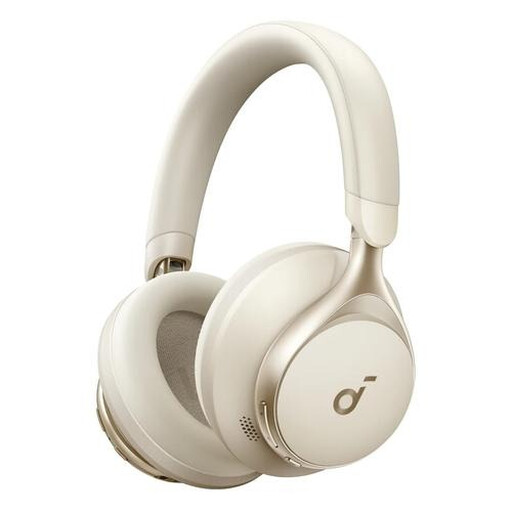
Why it suits this profile: These over-ear headphones combine Bluetooth with a 3.5mm connection, making them suitable for music, calls, working from home and travel.
The product information lists both wireless and wired connections. The stated battery life of up to 55 hours is therefore complemented by an option that does not require a battery.
40mm dynamic drivers, foldable design, three microphones, and included AUX and USB-C cables.
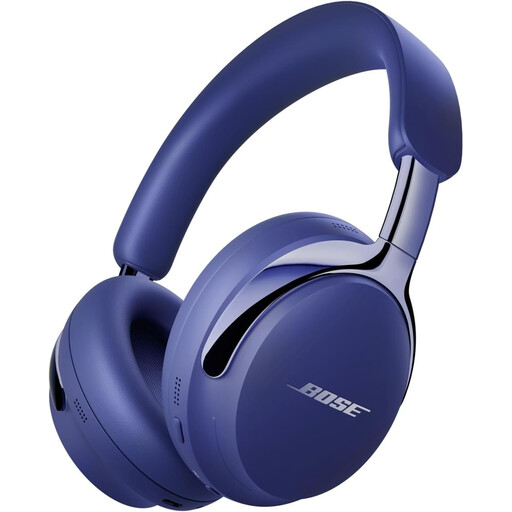
Why it suits this profile: This model is designed for listeners looking for an over-ear design, active noise cancellation and features for video and calls.
According to Bose, the model offers several modes, including one that lets you hear ambient sound. Before buying, check which features you will actually use.
Up to 30 hours of listening according to Bose, built-in microphones and USB-C audio for phone calls and video conferences.
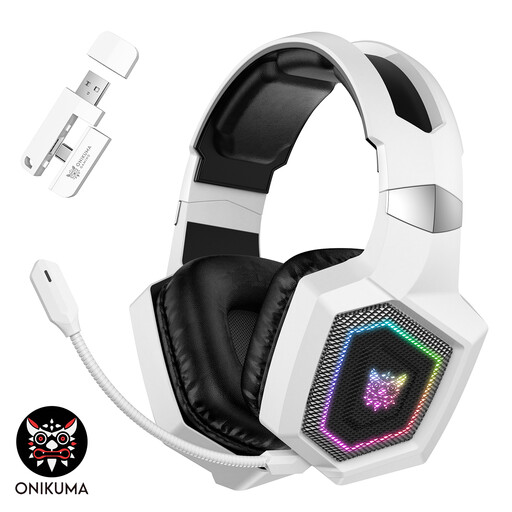
Why it suits this profile: For gamers who need multiple connection options, a microphone and low latency for PC, Mac and consoles.
The product information distinguishes between 2.4GHz, Bluetooth and wired modes. According to this information, Bluetooth does not work directly with PS4 or PS5; the correct dongle or wired mode is required.
50mm drivers, detachable microphone, three connection modes and, according to the product information, latency of less than 30 ms via 2.4GHz.
We have put together a complete, up-to-date list of products that fully meet these strict selection criteria and the applicable European safety regulations.
Turn on Bluetooth on your smartphone, open the Bluetooth headphones or charging case and activate pairing mode. Then select the product name from the list of available devices. If the connection does not work, remove any previous pairing and check that the headphones are sufficiently charged.
This depends on the battery, charging habits and build quality. Battery life per charge varies considerably between wireless earbuds, over-ear headphones and a gaming headset. The battery is usually not designed to be replaced by the user. So choose a model with enough usage time for your routine, and do not leave the device empty or fully heated for extended periods.
It can be, particularly with constant background noise. For conversations and traffic, a transparency mode is at least as important. Also check the microphone quality and wearing style: headphones for music and calls should not only play sound, but also remain comfortable during longer conversations.
