
Vandaag of morgen in huis

Kwaliteit gegarandeerd

Welkomstaanbiedingen ontgrendelen: GRATIS bezorging | Tot 80% korting | Gratis 30 dagen JoyPlus-proefperiode
Download de app
A wireless headset may seem straightforward to choose, until you realise that important differences are not always visible in the product photo. A low price can be appealing, but an uncomfortable fit, limited microphone or missing connection is often only noticed after purchase. Terms such as “noise cancelling” and “long battery life” also mean little without the technical details behind them.
In this guide, you’ll discover what to look for in Bluetooth headphones, which pitfalls to avoid and which type best suits the way you use them in the UK.
Claimed battery life usually depends on volume, the Bluetooth connection, active noise cancellation and other settings. A model that lasts a long time without noise cancelling may offer significantly fewer hours with ANC switched on. Check whether the manufacturer specifies both scenarios.
Pay attention to the charging connection too. USB-C is practical because you may already use the same cable for other devices. Fast charging can be useful when you need to top up your headphones quickly while out and about.
A noise-cancelling headset uses microphones and electronics to reduce ambient sound. The result varies depending on the type of noise, the fit and your surroundings. Low, constant sounds such as train or aeroplane noise are generally a different scenario from voices or sudden sounds.
Also check whether the headphones have a transparency mode or ambient mode. When walking, cycling or travelling, it’s important to remain sufficiently aware of your surroundings. Do not use headphones while driving or in places where you need to stay constantly alert.
Headphones can have excellent specifications but still be unsuitable if the ear cushions pinch or the headband applies too much pressure. Over-ear headphones surround the ears and often provide more passive sound isolation. On-ear headphones rest on the ears and are generally more compact and lighter.
Look out for:
Bluetooth 5.2, 5.3 or 5.4 indicates the Bluetooth generation used, but it does not automatically guarantee greater range or better sound. Also check the supported audio codecs and compatibility with your smartphone, laptop or tablet.
Multipoint is useful for people working from home. According to the product specifications, it allows headphones to be connected to two devices, such as a laptop and a phone. You can then switch more easily between music and a phone call. Check whether this feature needs to be enabled through an app.
Bluetooth is not always the only option for gaming. A gaming headset with a 2.4GHz dongle may provide a different connection from Bluetooth. Also check platform support for PC, PlayStation, Xbox or Nintendo Switch. A 3.5mm cable is a practical backup when a wireless connection is unavailable.
Headphones with a microphone are suitable for online meetings, phone calls and gaming, but the number of microphones does not tell you everything about call quality. Their positioning, voice pickup and software-based noise filtering also play a part.
For frequent calls, an adjustable or detachable microphone and a physical mute button are useful. For a basic wireless headset for office work, a wired connection may be more important than advanced audio codecs.
A built-in battery needs to be charged regularly. Therefore, compare:
Long battery life does not directly reduce the purchase price, but it does mean you need to charge the headphones less often. Actual usage time may differ from the claimed figure.
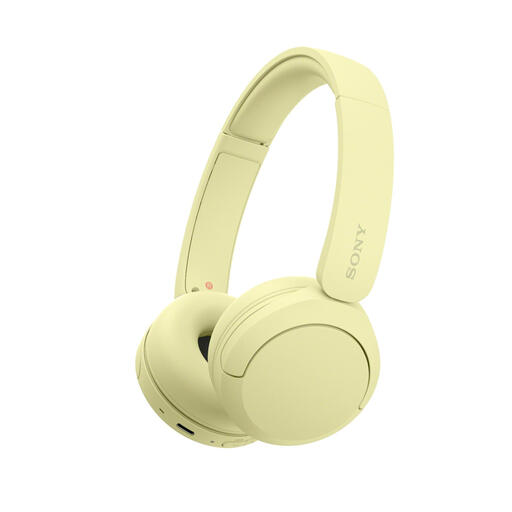
Why it suits this profile: Weighing 147 grams, these lightweight on-ear headphones are designed for everyday use, travelling and straightforward calls.
The specifications mention multipoint, a microphone, USB-C charging and quick pairing. This makes switching between your phone and laptop more straightforward.
147 grams, Bluetooth 5.2, multipoint and a claimed battery life of up to 40 hours according to the product specifications.
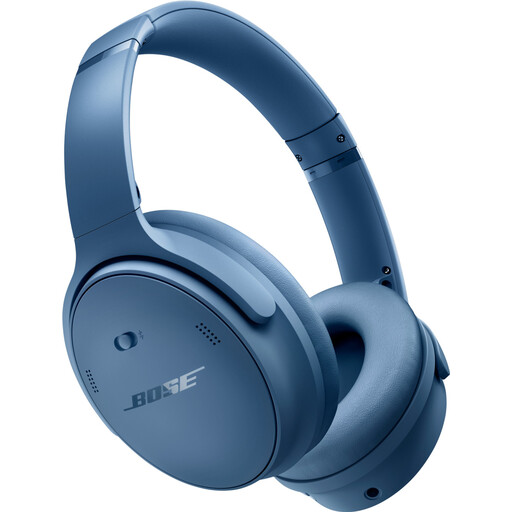
Why it suits this profile: The over-ear design, active noise cancellation and claimed 24-hour battery life are well suited to long listening sessions and travelling.
The product information lists Bluetooth as well as 2.5mm and 3.5mm connections. This provides an alternative when wireless listening is not suitable.
Over-ear fit, active noise cancellation, Bluetooth 5.1 and a weight of 240 grams.
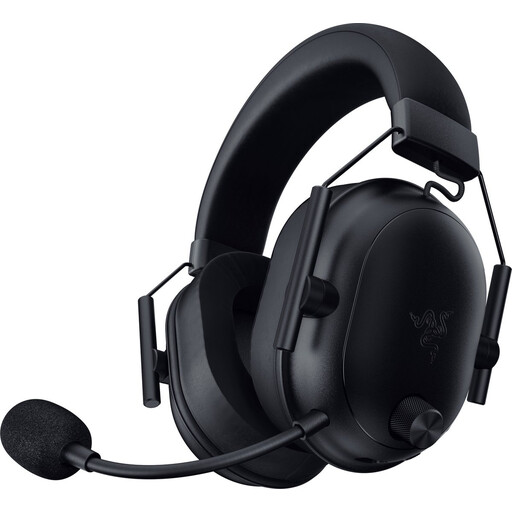
Why it suits this profile: This gaming headset combines Bluetooth with a 2.4GHz connection and is designed for gaming and voice communication.
The product specifications list multiple connection options, platform support and a microphone. However, check in advance that your device is compatible.
Claimed battery life of up to 70 hours, Bluetooth 5.2, 50mm drivers and an included USB-C dongle.
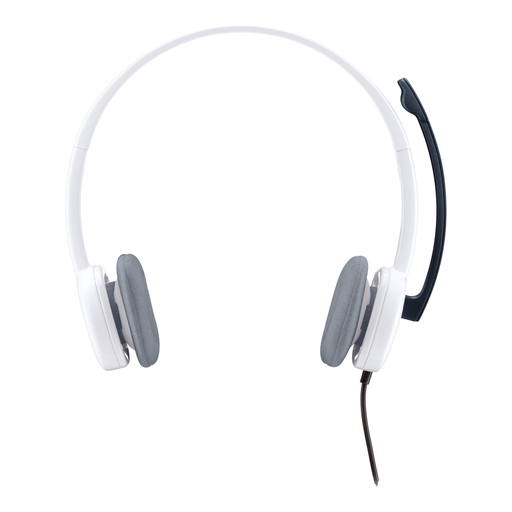
Why it suits this profile: If you mainly make calls via a computer and don’t want to charge a battery, this lightweight wired on-ear headset is a practical choice.
The 3.5mm connection avoids pairing problems and flat batteries. Check whether your laptop has a combined connection or requires a splitter.
80 grams, stereo sound, adjustable noise-cancelling microphone and a 180cm cable.
We’ve put together a complete, up-to-date list of products that fully meet these strict selection criteria and the applicable European safety regulations.
Switch on the headphones and activate pairing mode. Then open your laptop’s Bluetooth settings, select the name of the headphones and confirm the connection. If you’re using a gaming headset with a USB dongle, insert the dongle into a suitable port and follow the instructions. After pairing, check that the correct microphone and speaker are selected in your meeting app.
This depends on usage, the battery, hinges, ear cushions and storage. A longer claimed battery life does not automatically say anything about the product’s overall lifespan. Keep the headphones dry, charge them with a suitable cable and avoid using them at maximum volume for extended periods. Also check the statutory guarantee: consumers in the EU are entitled to at least statutory conformity protection, although the exact rights depend on the product and circumstances.
The headphones use a small built-in battery, and Bluetooth generally consumes little energy. Most power is used when actively listening, making calls and using features such as noise cancellation. Regular charging via USB-C is usually sufficient. If you want to reduce how often you charge them, look for a model with long battery life or a wired backup connection.
