
Vandaag of morgen in huis

Kwaliteit gegarandeerd

Welkomstaanbiedingen ontgrendelen: GRATIS bezorging | Tot 80% korting | Gratis 30 dagen JoyPlus-proefperiode
Download de app
A pair of wireless headphones may seem easy to choose: connect via Bluetooth, turn on your music and you’re ready to go. In practice, models vary considerably in comfort, battery life, microphone quality and features. For example, Bluetooth headphones for train journeys have different requirements from a gaming headset for long sessions.
So don’t focus solely on an impressive number of hours, a noise-cancelling claim or a low price. The product design, connection and specifications determine whether a model suits your everyday use.
Manufacturers usually state battery life as a maximum. Actual results may be lower at high volume, with active noise cancellation, during phone calls or when using additional features. Check whether the stated time applies to the headphones themselves or to earbuds including the charging case.
For example, the Sony WH-CH520 is listed with up to 50 hours of battery life in the product description, while the technical product information states 40 hours. This difference shows why it is sensible to check the full product specifications.
Headphones with noise cancellation use electronics to reduce ambient sound. The effect varies depending on the type of noise, fit and surroundings. Low, constant sounds such as train noise are generally treated differently from voices or sudden sounds.
Claims about ANC performance should be read as brand or product claims. According to Baseus’s product description, the EH10 NC can reduce background noise by up to 45 dB. This does not guarantee that every sound will be filtered to the same extent.
Over-ear headphones surround the ear and can be comfortable for working from home, travelling and longer listening sessions. On-ear headphones rest on the ear and are often lighter and more compact, but they may create more pressure over extended periods.
Wireless earbuds are not automatically more comfortable either. The right fit depends on the shape of your ears, the included ear tips and how securely the product stays in place while walking or exercising.
Choose on-ear headphones if compactness and low weight are important to you. According to the product information, the Sony WH-CH520 weighs 147 grams and has an adjustable headband and soft ear cushions. Fit is a personal matter, but the low weight can be useful for everyday travel.
Over-ear headphones generally provide more space around the ear. However, check the weight and dimensions. The Dyson Zone OE, for example, is listed as weighing 670 grams; this is worth considering if you plan to carry it around frequently.
Bluetooth 5.0, 5.2 or 6.0 mainly indicates the connection standard being used. Also check:
A 3.5mm connection can be useful for gaming. A wired headset does not need a battery and can work without wireless latency. If your PC has separate audio and microphone connections, check whether a splitter cable is required.
Don’t just look at the maximum playback time; also check the charging port and fast-charging function. USB-C is now a widely used connection. The microphone is also important for calls and online meetings. A built-in microphone is practical for everyday use, while an adjustable or detachable microphone is often more convenient for gaming.
Water resistance requires extra attention. An IPX5 rating does not mean that a product is suitable for immersion or swimming. According to the product information, the MINISO MS106 has an IPX5 rating and is intended for conditions involving rain or sweat, but charging in a damp environment is still not recommended.
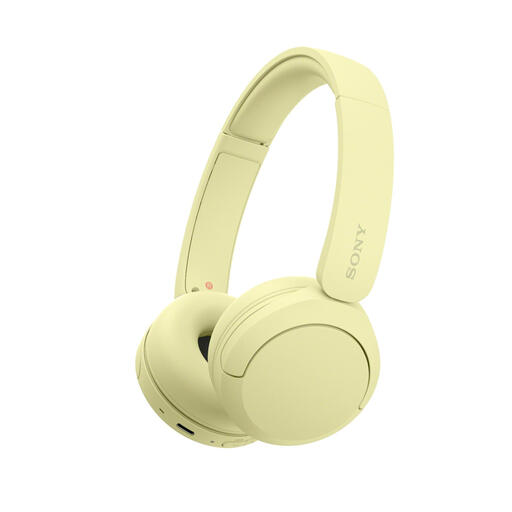
Why it suits this profile: Compact, on-ear wireless headphones for music, calls and commuting. The 147-gram weight and multipoint function are practical for everyday use.
The product information states both a maximum battery life of up to 50 hours and 40 hours in the technical sheet. This transparency makes comparisons easier; the model is not water-resistant.
147 grams, USB-C, microphone, multipoint connection and support for AAC and SBC.
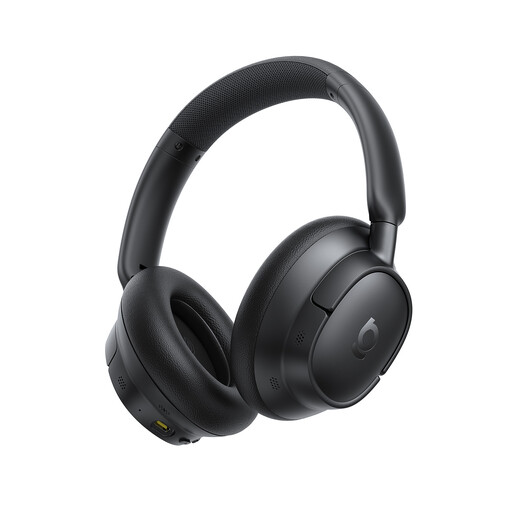
Why it suits this profile: Over-ear Bluetooth headphones for travelling, working and long listening sessions, with active noise cancellation and a high stated battery capacity.
Usage time is broken down: according to the product description, up to 80 hours without ANC and 55 hours with ANC. The claim of up to 45 dB of noise reduction comes from Baseus’s product information.
Over-ear fit, USB-C, multipoint, LDAC according to the product description, and five microphones for calls.

Why it suits this profile: Designed for gamers looking for headphones with a microphone and broad platform compatibility, without having to recharge a wireless battery.
The connection is clear: wired via 3.5 mm. This means there is no battery life to misinterpret. However, check that your device has the correct connection.
50mm drivers, cardioid microphone, 240 grams and compatibility with PC, Mac, PlayStation, Xbox, Switch and mobile devices.
Wireless headphones are convenient when freedom of movement and long battery life are important to you. For the office and travelling, over-ear models often provide a more enclosing fit. An on-ear model is more compact for carrying in a bag.
Wireless earbuds are small and suitable for commuting or sport, but playback time per charge is usually shorter. Also pay attention to the IP rating and fit. For gaming, a wired headset with a microphone may be more practical thanks to its direct connection and no charging interruptions.
We’ve put together a complete, up-to-date list of products that fully meet these strict selection criteria and the applicable European safety regulations.
Turn on the headphones and activate pairing mode. Then open your phone’s Bluetooth settings and select the product name. On some models, Fast Pair or Swift Pair can help with the initial connection. If it doesn’t work, remove a previously saved pairing and try again.
Lifespan depends on the battery, hinges, ear cushions and how the headphones are used. Store the headphones in a dry place, avoid extreme heat and charge them with the supplied or suitable USB-C cable. Don’t use high volume for long periods and only replace the ear cushions with compatible parts.
Power consumption while charging is generally limited. The main practical factor is how often you need to charge them. A model with long battery life, such as the Sony WH-CH520, Baseus EH10 NC or Soundcore Space One mentioned in the product information, requires fewer charging sessions than earbuds with a small battery capacity. Always check the stated usage time under the settings that are relevant to you, such as ANC switched on or off.
