
Vandaag of morgen in huis

Kwaliteit gegarandeerd

Welkomstaanbiedingen ontgrendelen: GRATIS bezorging | Tot 80% korting | Gratis 30 dagen JoyPlus-proefperiode
Download de app
A pair of wireless headphones may seem easy to choose at first glance. Yet appealing terms such as AI-noise reduction, Hi-Res audio and extremely long battery life can create expectations that do not suit every use. The right choice mainly depends on the fit, the environment in which you listen and the features you will actually use.
Long battery life is often highlighted as a key benefit, but always check the conditions under which this figure applies. Manufacturers usually state playback time with active noise cancellation switched off, at a particular volume level or including the charging case.
For example, over-ear headphones may offer dozens of hours of playback, while wireless earbuds may last only a few hours per charge. With earbuds, you should therefore also look at the extra capacity provided by the charging case and the charging time.
Noise-cancelling headphones use microphones and electronics to reduce ambient sound. Their effectiveness varies depending on the type of noise. Low, constant sounds from a train or aeroplane are generally a different scenario from voices, sudden noises or wind.
Claims such as “up to -45 dB” or “blocks 99.7% of ambient noise” come from the product communications of the brand or seller. According to the brand’s own research, such figures may have been measured under specific test conditions. Treat them as product specifications rather than a guarantee for your everyday listening environment.
In-ear earbuds seal the ear canal and can be compact, but the fit varies from one ear to another. Over-ear headphones surround the ear and can be comfortable when travelling or working, although they can feel warmer and take up more space.
Open-ear headphones or ear-clip models let you hear more of your surroundings. This is practical when walking or exercising, but they are generally less suitable if you want complete isolation on a busy train.
Pay attention to three separate figures:
The stated battery life depends on the volume, codec, Bluetooth connection and noise cancellation. A higher figure on the packaging does not automatically mean longer usage in your situation.
Bluetooth 5.3 or Bluetooth 5.4 mainly indicates the generation of the connection technology used. Also check whether the headphones support multipoint, allowing you to connect a laptop and smartphone at the same time, for example.
For sound quality, codecs such as AAC, SBC and LDAC are relevant. Hi-Res audio can be beneficial with suitable source files and devices, but the final experience also depends on the driver, fit and the settings on your phone or streaming service.
An IPX4 rating means protection against splashing water according to the standard IP classification. IPX5 goes a step further by offering protection against water jets, but neither classification makes a product suitable for immersion.
The style of headphones is also important for running or cycling. Open-ear headphones allow ambient sound through, while active noise cancellation is designed to reduce it. Do not use headphones during activities where you need to hear traffic or warning sounds.
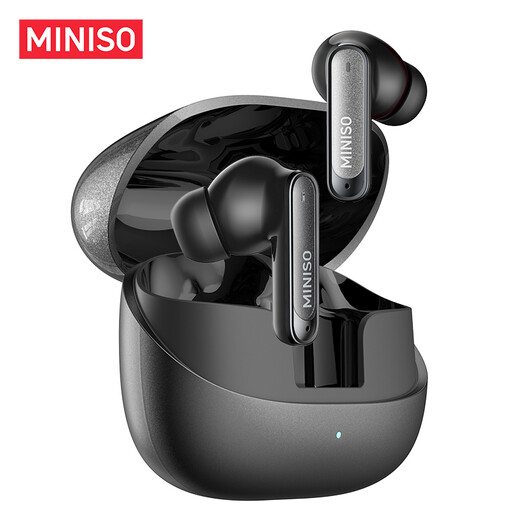
Why it suits this profile: These compact in-ear earbuds are designed for everyday use, the office, studying, sport and phone calls. The product information lists Bluetooth 6.0, IPX5 and total battery life of up to 55 hours.
The specifications state both the playback time and fast-charging information. However, check whether the stated 55 hours includes the charging case.
IPX5, touch controls, 10mm driver and stated battery life of up to 55 hours including the case.
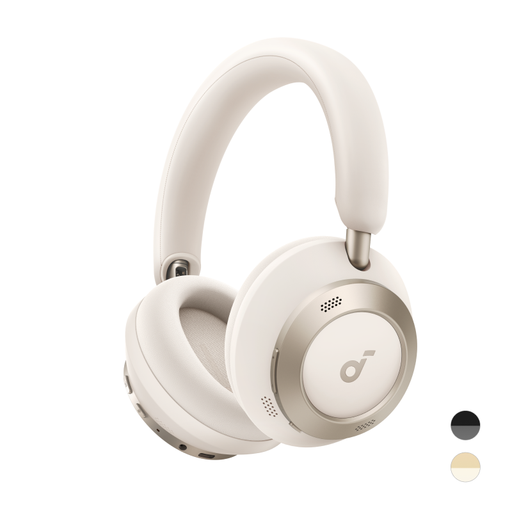
Why it suits this profile: These over-ear headphones are designed for travel, work and extended listening. The product page lists adaptive active noise cancellation, LDAC, Hi-Res Wireless Audio and a foldable design.
The battery information distinguishes between ANC on and off: up to 60 hours without ANC and up to 40 hours with ANC, according to the product specifications.
Foldable design, stated playback time of 60 hours without ANC, LDAC and fast charging for up to 8 hours of playback from 5 minutes of charging.
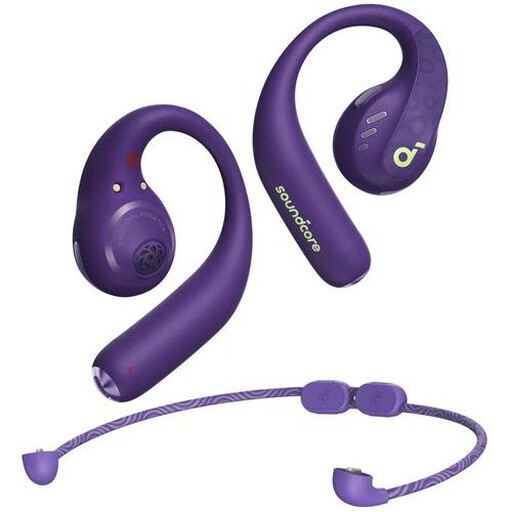
Why it suits this profile: The ear-hook design is intended for sport, calls and everyday use. The product information lists Bluetooth 5.3, IPX5, support for AAC, LDAC and SBC, and up to 14 hours of playback.
The IPX5 rating provides a verifiable indication of protection against sweat and rain. It is still important to store the headphones somewhere dry and clean after use.
Ear hooks for a secure fit, IPX5, on-device buttons and stated playback time of 14 hours.
We have compiled a complete, up-to-date list of products that fully meet these strict selection criteria and the applicable European safety regulations.
Use this quick checklist before ordering:
First, charge the headphones, switch them on and activate pairing mode. Then open the Bluetooth settings on your smartphone and select the product name. When connecting for the first time, you may need to use the brand’s app or manual.
Their lifespan depends on charging habits, storage, temperature and daily use. A battery loses capacity over time. Store the headphones in a dry place, avoid extreme heat and use the supplied or a suitable USB-C cable. The statutory guarantee and any additional terms may vary by product and seller.
Yes, active noise cancellation uses additional electronics and can reduce the stated playback time. Always compare battery life with ANC switched on and off. This makes the difference between compact Bluetooth headphones and a model with long battery life easier to see.
