
Vandaag of morgen in huis

Kwaliteit gegarandeerd

Welkomstaanbiedingen ontgrendelen: GRATIS bezorging | Tot 80% korting | Gratis 30 dagen JoyPlus-proefperiode
Download de app
A wireless headset may seem simple to choose on paper. Yet many consumers pay for features they barely use, or only discover after buying that the headset does not work properly with their phone, laptop or PlayStation. The key differences are not just sound quality, but also wearing comfort, connectivity, microphone performance and battery usage.
A manufacturer may quote a long battery life, but actual usage time depends on factors including volume, Bluetooth or 2.4GHz connectivity, lighting and noise cancellation. For example, the ONIKUMA GT806 is rated for up to 60 hours of music without lighting and up to 40 hours of gaming via 2.4GHz. According to the product information, the RGB lighting uses additional power.
So do not focus on just one impressive number. Also check:
Bluetooth is practical for smartphones, tablets and laptops. For gaming, however, a 2.4GHz dongle may be a better choice because of its connection and latency. In particular, check whether a PS5 headset works directly. For example, the ONIKUMA GT806 states that Bluetooth does not connect directly to PS5 or PS4; you need to use 2.4GHz mode or an additional adapter.
Connections can also vary between wireless headsets with multiple modes. Look for support for:
A label such as 7.1 surround sound often refers to virtual processing in gaming headsets. This can help with spatial positioning, but it does not guarantee sound that everyone will enjoy. Similarly, “noise cancelling” may mean active noise cancellation, while another headset may only offer passive isolation through its ear cushions.
According to the product information, the Trust GXT 491 Fayzo features virtual 7.1 surround sound and passive noise cancellation. The Bose QuietComfort, Sonos Ace and Sennheiser MOMENTUM 4, on the other hand, are listed with active noise cancellation. Compare the full specifications rather than looking only at the feature name.
Over-ear headphones usually surround the entire ear, making them suitable for travelling, working from home and long listening sessions. The downside is their larger size and potentially warmer ear cushions. An on-ear model, such as the Sony WH-CH520, is lighter and more compact, but rests on the ear.
Weight gives you a useful initial indication:
Fit, the headband and the ear cushions are at least as important as the number. An adjustable headband, swivelling earcups and soft cushions can make everyday use more comfortable.
Multipoint Bluetooth allows you to keep two devices connected, such as a laptop and smartphone. The Sony WH-CH520 and Sonos Ace list support for multipoint. However, check whether the feature needs to be activated in an app first. The Sonos Ace states that registration in the Sonos app is required to enable Bluetooth multipoint.
For gaming, a wireless headset with a USB dongle often offers more connection options. According to the product specifications, the Razer Barracuda X supports 2.4GHz via a USB-C dongle, Bluetooth 5.2 and 3.5mm audio. This makes it useful with a range of devices, but check beforehand that the supplied dongle is compatible with your ports.
If you make frequent calls or play games online, you need more than just headphones with a microphone. A detachable microphone is useful for everyday use, while an integrated microphone keeps the design more compact. Also pay attention to the position of the mute button and volume controls.
A long battery life is particularly useful when travelling and during intensive gaming sessions. The Sennheiser MOMENTUM 4 is rated for up to 60 hours of playback. The Razer BlackShark V2 states up to 70 hours, while the HyperX Cloud III S offers up to 120 hours in 2.4GHz mode, according to the product information. These are quoted figures; volume, connectivity and settings can affect actual battery life. USB-C charging is now a convenient standard, but always check whether a cable and adapter are included.
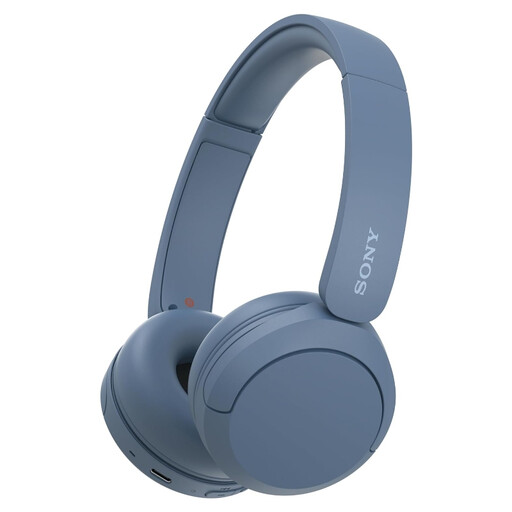
Why it suits this profile: Lightweight Bluetooth headphones for music, podcasts, working from home and everyday travel.
The on-ear design and 147-gram weight make these headphones compact. However, check the stated battery life in the current product specifications.
Bluetooth, microphone, multipoint connectivity and USB-C according to the product listing.
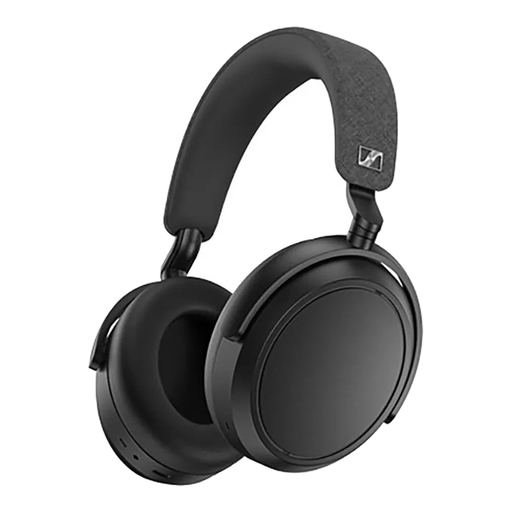
Why it suits this profile: Designed for long listening sessions, travelling and music where comfort and adjustable sound features matter.
The product information mentions active noise cancellation, a transparency mode and an app for EQ settings. This lets you adjust the features to suit how you use them.
Up to 60 hours of quoted playback time, 42mm transducers, Bluetooth and wired use via 3.5mm.

Why it suits this profile: For gamers who play on PC or console and also want to connect their smartphone.
According to the listing, the headset supports both 2.4GHz and Bluetooth and can also be used with a wired connection. This reduces reliance on a single connection type.
Up to 22 hours of quoted playback time, virtual 7.1 surround sound, detachable microphone and compatibility with PS5, PS4 and Windows.
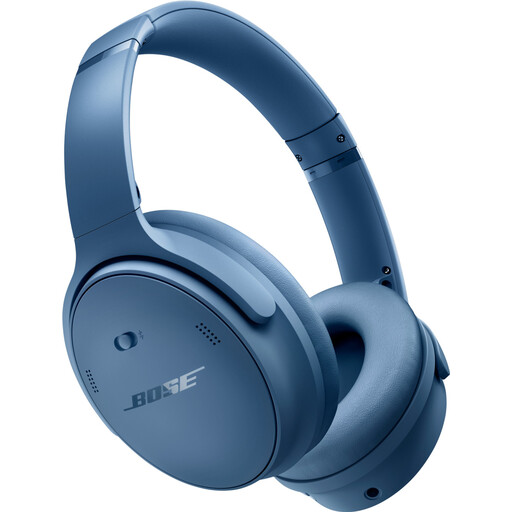
Why it suits this profile: Over-ear headphones for train journeys, flights, the office and longer listening sessions.
The listing distinguishes between noise-cancelling modes and a mode for hearing surrounding sounds. Check these settings before using the headphones outdoors.
Bluetooth 5.1, quoted battery life of up to 24 hours, 3.5mm connection and a weight of 240 grams.
We have compiled a complete, up-to-date list of products that fully meet these strict selection criteria and the applicable European safety regulations.
Turn on the headphones and activate pairing mode. Then open the Bluetooth settings on your smartphone and select the product name. When connecting for the first time, you may need to confirm the connection or use an app. A USB dongle is usually not required for standard Bluetooth use.
Their technical lifespan depends on battery wear, hinges, ear cushions and daily use. A built-in lithium battery loses capacity over time. Store the headphones in a dry place, avoid high temperatures and use a suitable USB-C cable. Replaceable ear cushions can extend the usable life of an over-ear model.
Power consumption is generally limited, but features such as active noise cancellation, RGB lighting and a 2.4GHz connection can drain the battery faster. Charge via USB-C and check the quoted battery life for each usage mode. Switch off the headset when you are not using it to avoid unnecessary charging.
