
Vandaag of morgen in huis

Kwaliteit gegarandeerd

Welkomstaanbiedingen ontgrendelen: GRATIS bezorging | Tot 80% korting | Gratis 30 dagen JoyPlus-proefperiode
Download de app
A pair of wireless headphones may seem simple to choose at first glance. You look at Bluetooth, battery life and price, then click to order. Yet disappointment is often caused by details that are less obvious in product titles. Think of an uncomfortable fit, a microphone that underperforms during online meetings, or noise cancellation that turns out not to suit the way you use it.
This guide helps you compare products with confidence. You’ll learn which specifications matter, which marketing claims to treat with caution and which type of headphones suits music, travel, work, calls, gaming or sport.
A manufacturer may quote a long playback time, but the measurement may apply with active noise cancellation switched off, at a particular volume or only when combined with the charging case. For example, the Soundcore Space One Pro is specified as offering 60 hours without ANC and 40 hours with ANC. That difference matters if you mainly use your headphones on the train or on a plane.
So look out for:
The term ‘noise cancellation’ may refer to active noise cancellation, passive sound isolation or microphone technology for calls. These are different functions. A closed-back over-ear pair of headphones partly blocks sound through its ear cushions. A model with active noise cancellation also uses microphones and electronics to reduce surrounding noise.
According to a brand’s own research, a product may, for example, be claimed to reduce noise by a certain number of decibels. Treat this as a quoted product specification, not a guarantee that you will have the same experience in every environment. The low rumble of a train is often very different from voices in an office.
Bluetooth indicates how the device connects wirelessly, but it does not automatically tell you how music will sound or how stable calls will be. Also check:
A Hi-Res audio pair of headphones can only offer an advantage when your playback device, codec and audio source support it. Without that combination, you will not necessarily hear more detail.
An over-ear pair of headphones surrounds the ear and generally provides more physical isolation and room for larger drivers. This can be comfortable for long train journeys or working from home, but this type is usually less compact.
On-ear models rest directly on the ears. According to the stated specifications, the Sony WH-CH520 weighs 147 grams and has an adjustable headband. This type is light and portable, but often lets more surrounding sound through.
In-ear earbuds are small and suitable for commuting or sport. For sports use, check the IP rating. IPX5 or IP54 does not mean that a product is suitable for swimming. Always compare any claim about swimming or water resistance with the official IP specification.
A comfortable pair of headphones should not only feel soft when you first try it on. Also consider:
For extended use, slow-rebound foam and a pressure-relieving headband are practical features. With a sports model, an ear hook or open-ear design may be more important than maximum isolation.
For headphones used for music and calls, multiple microphones, beamforming or noise filtering are useful specifications. However, they do not guarantee that you will be perfectly clear in every busy street. Also check whether the headphones can connect to your laptop and smartphone at the same time.
For gaming, a wired connection can sometimes be the better choice because of its lower latency. A wireless gaming headset should therefore be assessed for compatibility, connection type and microphone, rather than for surround sound alone. With some models, virtual 7.1 audio only works through specific software.
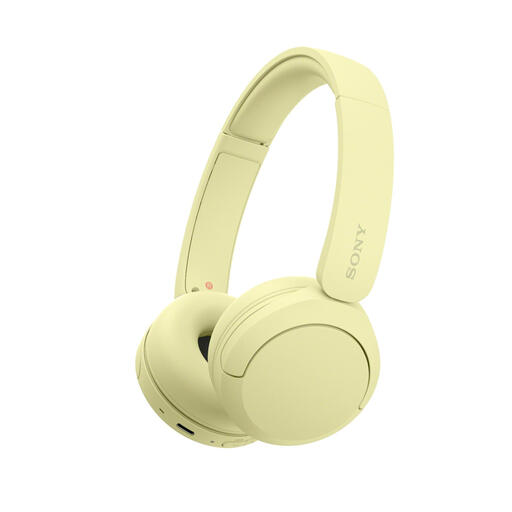
Why it suits this profile: Lightweight on-ear Bluetooth headphones for everyday listening, calls and use on the go. The stated battery life is up to 50 hours, with multipoint for your smartphone and laptop.
The product specifications list the weight, codecs, microphone and multipoint. However, check the current battery-life information, as different product details quote 40 and 50 hours.
147 grams, USB-C, AAC/SBC and multipoint connectivity. Available in several colours.
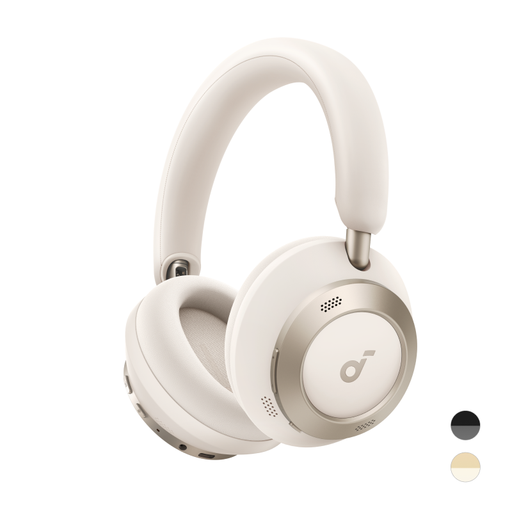
Why it suits this profile: Designed for travellers and home workers looking for foldable headphones, ANC and high-quality Bluetooth audio in one model.
Battery life is listed separately with ANC switched on and off. LDAC, multipoint capabilities and fast charging are also worth checking before purchase.
Up to 60 hours without ANC, 40 hours with ANC, LDAC, three composite diaphragms and 5 minutes of charging for up to 8 hours of playback according to the product information.

Why it suits this profile: A good choice for gamers who do not want to charge a battery and value a 3.5mm connection, physical volume controls and a microphone.
The wired connection prevents battery surprises and potential wireless latency. Check beforehand whether your device has a 3.5mm port or requires an adapter.
50mm drivers, 3.5mm analogue connection, flexible cardioid microphone and a stated weight of 240 grams.
We’ve put together a complete, up-to-date list of products that fully meet these strict selection criteria and the applicable European safety regulations.
Create a short checklist before placing your order:
Also look out for conflicting information on a product page. If the title, technical table and description give different values, use the current specifications on the sales page as your starting point or ask the seller for clarification.
First charge the headphones, switch them on and activate Bluetooth on your smartphone. Put the model into pairing mode and select the product name from the list of available devices. With some models, Google Fast Pair, Microsoft Swift Pair or a brand app can help with the initial connection.
Playback time per charge varies considerably. An over-ear model may offer dozens of hours of playback, while compact earbuds usually last for less time and are recharged using a charging case. Overall lifespan depends on the battery, charging habits, moisture, temperature and daily use. Store your headphones in a dry place and avoid prolonged exposure to heat.
The electricity used for charging is generally limited. The main recurring costs arise when a battery loses capacity over time or accessories such as ear cushions and charging cables need replacing. A wired headset does not require a built-in battery, but may need an adapter when used with newer smartphones or laptops.
