
Vandaag of morgen in huis

Kwaliteit gegarandeerd

Welkomstaanbiedingen ontgrendelen: GRATIS bezorging | Tot 80% korting | Gratis 30 dagen JoyPlus-proefperiode
Download de app
A pair of wireless headphones may seem easy to choose at first glance. You look at Bluetooth, battery life and price, and that’s it. In practice, models vary considerably in comfort, microphone quality, noise cancellation and compatibility. For example, a budget Bluetooth headset may be perfectly suitable for podcasts, but less so for long train journeys or frequent calls.
Marketing terms can also be confusing. That’s why the Joybuy Product Recommendation Officer filters the most important product information according to practical considerations. This helps you avoid paying for features you won’t use or choosing a model that isn’t properly suited to your devices.
A manufacturer may measure maximum playback time at a low volume and with active noise cancellation switched off. With ANC, phone calls and a higher volume, actual usage time is often lower. So check whether the specification refers to:
The Sony WH-CH520 is a good example: the product description states up to 50 hours, while the technical specifications table lists 40 hours. This difference matters if you’re looking for headphones with long battery life.
A pair of noise-cancelling headphones or ANC headphones uses electronics to reduce ambient noise. Their effectiveness also depends on the fit. Over-ear ear cushions generally seal differently from in-ear earbuds. Wind, voices and sudden sounds may also be processed differently from the constant hum of a train.
Pay attention to transparency mode too. It lets ambient sound through, but that doesn’t mean you’ll hear sufficiently clearly in every traffic situation. For this reason, don’t use headphones while driving, cycling or operating machinery.
A Bluetooth connection can introduce latency when gaming. For competitive gaming, a wired gaming headset with a 3.5mm connection or a system with a dedicated low-latency connection is often more practical. Also check whether the headset works with your device. A connection that works on a PC may not always be suitable for a console without an additional adapter.
An over-ear headset surrounds the ear and is often suitable for travelling, listening to music and long listening sessions. An on-ear model rests on the ear and is usually more compact. In-ear earbuds are lightweight and easy to carry, but the fit varies from person to person.
For over-ear models, check:
With true wireless earbuds, several sizes of ear tips are useful. A good seal affects comfort, sound isolation and how clearly you hear your music.
Bluetooth 5.x mainly indicates the connection standard; it doesn’t independently guarantee better sound quality. Also look for support for multipoint, codecs and any accompanying apps. Multipoint can be useful if you want to stay connected to a laptop and smartphone at the same time.
For Apple users, features such as quick pairing and device switching may be relevant. Android users may want to look for Fast Pair and the associated app. For PlayStation, Xbox and PC, the connection is particularly important. A wired headset with a 3.5mm connection is often broadly compatible, while a wireless gaming headset may require a USB dongle or a specific protocol.
Don’t just look at the figure on the packaging. Also check:
An IP rating isn’t a general guarantee of protection in all conditions. For example, IP54 or IP55 indicates limited protection against dust and splashing water, not suitability for swimming or heavy rain.
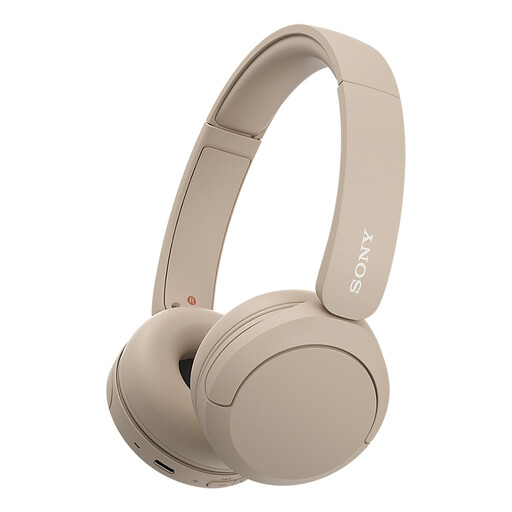
Why it suits this profile: At 147 grams, this on-ear model is lightweight and features Bluetooth, a microphone and multipoint connectivity for your phone and laptop.
The product specifications clearly state Bluetooth, USB-C, AAC/SBC codecs and multipoint connectivity. However, bear in mind the different battery figures given: 40 and 50 hours.
147 grams, multipoint connectivity, USB-C and controls on the earcup.
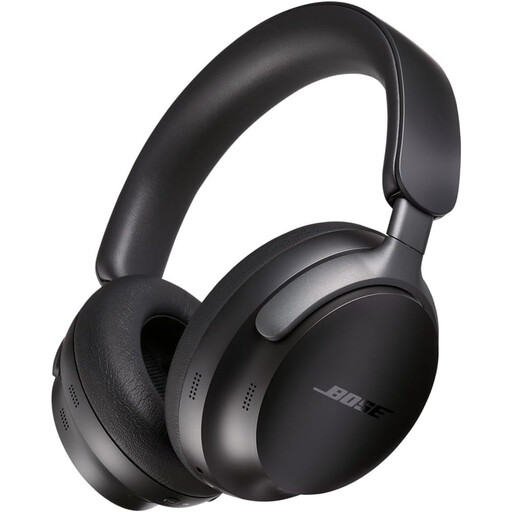
Why it suits this profile: These over-ear headphones feature active noise cancellation, Bluetooth 5.3, multipoint connectivity and an included audio cable for wired use.
As well as ANC, an audio cable is included. This means you can continue using the headphones when the battery is empty, provided your device supports the connection.
24-hour stated battery life, Bluetooth 5.3, ANC and multipoint connectivity.
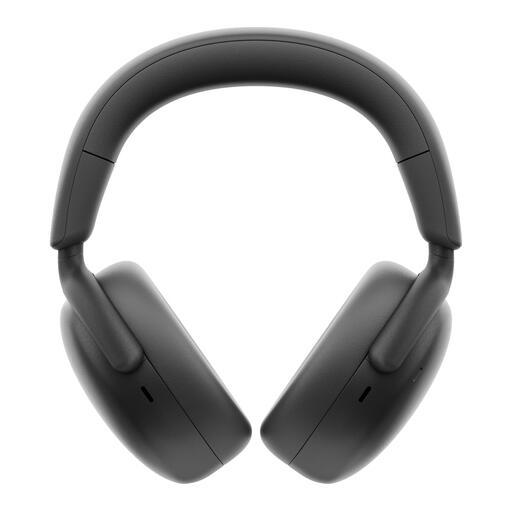
Why it suits this profile: This over-ear headset is designed for long working days and calls, with a microphone, hybrid ANC, Bluetooth 5.3 and a charging station.
The stated battery life is split into 80 hours without ANC and 60 hours with ANC. This makes comparison more transparent than a single unspecified maximum figure.
Up to 60 hours with ANC according to the product specifications, charging station, multipoint connectivity and 3.5mm connection.
We’ve put together a complete, up-to-date list of products that fully meet these strict selection criteria and the applicable European safety regulations.
First charge the headphones, then press and hold the power or Bluetooth button for a few seconds. Next, open the Bluetooth settings on your phone and select the product name. Some models require a brand app for additional settings, but the basic connection is usually made through the Bluetooth menu.
It varies by model and usage. The over-ear models in this selection state approximately 24 to 80 hours, depending on ANC and the measurement method. True wireless earbuds often provide several hours per charge, with additional charges available from the case. Always check the usage time with noise cancellation switched on if you use that feature regularly.
Yes, provided the model has a microphone and its microphone performance suits your surroundings. For quiet home working, a standard Bluetooth headset may be sufficient. In a busy office or while travelling, multiple microphones and noise cancellation for calls are practical advantages. Read the product specifications and check whether your smartphone, laptop or communications platform is supported.
