
Vandaag of morgen in huis

Kwaliteit gegarandeerd

Welkomstaanbiedingen ontgrendelen: GRATIS bezorging | Tot 80% korting | Gratis 30 dagen JoyPlus-proefperiode
Download de app
Wireless headphones are handy for music, podcasts, working from home and listening on the go. Yet many consumers choose mainly based on an appealing photo or a promise of sound quality. As a result, practical features can sometimes disappoint: the controls are awkward, the volume cannot be adjusted accurately or the headphones turn out to be less suitable for everyday transport.
This buying guide helps you focus on the specifications that make a real difference in practice. You’ll also find an overview of popular choices for different usage scenarios.
White wireless headphones or black wireless headphones may look smart, but colour says nothing about comfort, controls or connectivity. So always check how the earcups and buttons are designed. A portable model should be easy to put on and take with you, without having to open a phone menu every time.
Touch controls can sometimes respond to an accidental touch, for example when you adjust the position of the headphones. For users who regularly adjust the volume, physical buttons may feel more reliable. A headphone with a volume wheel also provides direct volume control without having to search for a screen.
A specification such as 20 Hz-20 kHz describes the stated frequency range. It does not automatically mean that every tone will sound equally clear or that the headphones will sound the same to everyone. Also consider the fit, source quality and how you use the device. According to the available product specification, the GT887 series has a range of 20 Hz to 20 kHz; this is a technical specification, not a guarantee of a particular listening experience.
If straightforward operation is important to you, look specifically for headphones with physical buttons. Check the product information to see whether the buttons are listed separately and whether the volume is adjusted using a separate wheel or another physical control.
A volume wheel is particularly useful when:
Do pay attention to where the wheel is positioned. Controls that are too small or difficult to reach can still cause frustration.
Portable headphones should not only be wireless, but also suitable for storage and everyday transport. Look at the construction of the headband, the size of the earcups and how the model fits in your bag. Product information does not always include the folded dimensions. If they are not listed, check the images and specifications on the product page in advance.
A closed-back over-ear model can partially reduce background noise, but the extent of this varies from one design to another. So do not buy a model solely on the basis of terms such as ‘isolation’ when no specific details are provided.
With a wireless headset, it should be clear how the device connects and how it is powered. Check, among other things:
If a particular specification is missing, do not automatically assume that the feature is included. A transparent product description helps to limit disappointment after purchase.
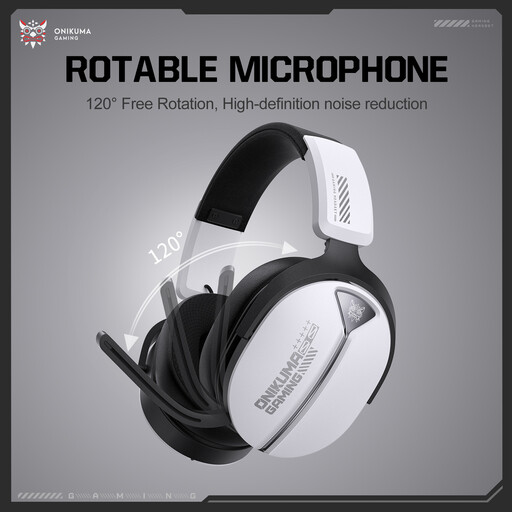
Why it suits this profile: This model combines a portable design with independent physical buttons and a volume wheel. That makes it suitable for everyday listening without complicated controls.
According to the product specification, the controls are physical. You are therefore not entirely dependent on touch controls or an app.
White finish, stated frequency range of 20 Hz-20 kHz and direct volume control via a scroll wheel.
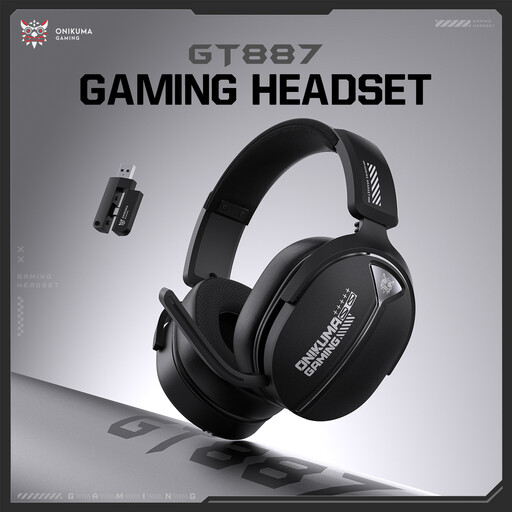
Why it suits this profile: The black finish works well in a minimalist workspace or everyday bag. The combination of physical buttons and a separate volume wheel is designed for simple, direct operation.
The product specification does not state that operation depends on touch controls. The stated frequency range remains a verifiable technical value, not a general promise of sound quality.
Black finish, a stated range of 20 Hz-20 kHz and physical controls on the earcup with a volume wheel.
Why it suits this profile: For users who often switch between listening, pausing and adjusting the volume, physical controls are clearer than relying solely on a smartphone.
The model meets the need for direct operation. However, check the latest information on connectivity, battery and compatible devices before purchasing.
Scroll wheel for volume control, independent buttons and a design intended for portable use according to the product name.
We’ve put together a complete, up-to-date list of products that fully meet these strict selection criteria and the applicable European safety regulations.
First, check which connection the model uses. For Bluetooth, open the Bluetooth settings on your phone and select the headphones from the list. If it uses a wireless receiver, that receiver will usually need to be inserted into a compatible device. Always follow the instructions for the specific model.
Their lifespan depends on the battery, hinges, headband and how they are used. Keep the headphones dry, avoid dropping them and do not force the earcups. When purchasing, also check whether the battery can be replaced and which warranty terms apply. In the EU, consumers generally have the legal guarantee that a product must meet what can reasonably be expected of it.
Power consumption is usually limited, but it varies depending on the connection type, battery and duration of use. A rechargeable model needs to be charged regularly; a model with replaceable batteries requires periodic replacement. So do not look only at the purchase price, but also at the supplied power source, charging cable and information about battery life.
