
Vandaag of morgen in huis

Kwaliteit gegarandeerd

Welkomstaanbiedingen ontgrendelen: GRATIS bezorging | Tot 80% korting | Gratis 30 dagen JoyPlus-proefperiode
Download de app
Buying wireless headphones sounds simple, until you have to choose between an over-ear model, wireless earbuds or wireless in-ear earbuds. Marketing often focuses on a high decibel noise-cancellation rating, long battery life or “studio-quality” sound. However, these terms do not tell you everything about everyday use on the train, in the office or while exercising.
Pay particular attention to the fit, connectivity options and product specifications. Below, you will find the main pitfalls and practical points to consider when listening to music, making calls, travelling and staying active in the Netherlands.
Manufacturers usually state battery life under specific conditions. With active noise cancellation, a high volume or phone calls, playback time may be shorter. So check whether the stated duration applies to:
Headphones with long battery life are particularly practical for travelling and working days, but also check the charging time and the connection used, such as USB Type-C.
Active noise cancellation, often referred to as ANC, uses microphones and electronics to reduce surrounding noise. Its effectiveness can vary depending on the individual, the fit and the type of sound. Low, constant sounds such as train or aeroplane noise are generally a different scenario from voices or sudden sounds.
A brand may quote certain ANC figures based on its own research, but treat such figures as manufacturer product specifications rather than a universal guarantee. A good seal around the earbuds remains important. Transparency mode is useful when you want to remain aware of surrounding sounds in the street or on public transport.
The IP code indicates the extent to which a product is protected against dust or water. IPX4 is designed to protect against splashes, while IPX5 specifies protection against water jets. A product with IP55 or IP57 offers additional protection, but always check the manufacturer’s conditions.
Water resistance is also not the same as waterproofing. Sweat, rain and dropping the earbuds into a puddle are different situations. Dry your sports earbuds after use and only charge them once the contacts are clean and dry.
An over-ear Bluetooth headphone completely covers the ear. This can be comfortable during long listening sessions and often provides passive sound isolation. An on-ear model is usually more compact, but rests on the ear. True wireless earbuds have no cables at all and are easy to carry around.
When choosing wireless in-ear earbuds, look for:
A poor fit can result in less bass, more surrounding noise and a greater chance of an earbud coming loose. Try different ear-tip sizes and check both the left and right ear.
If you are looking for headphones for music and calls, you need to look beyond the number of microphones. Check whether the product description mentions a microphone and whether it offers noise reduction for calls. Your surroundings, wind and the positioning of the microphones all affect how clearly you can be heard.
For example, the Soundcore Liberty 4 Pro lists six built-in microphones. According to its product specifications, the OnePlus Buds Pro 3 has three microphones and a VPU sensor. These are verifiable features, but they do not guarantee that every caller will experience the same call quality.
Bluetooth 5.3 or Bluetooth 5.4 mainly tells you about the supported connection technology. Also check compatibility with your smartphone. AAC and SBC are widely supported. Codecs such as LDAC or LHDC may have additional requirements relating to your phone and settings.
A multipoint connection can be useful if you use a laptop and phone at the same time. Not every model supports this, so look specifically for the feature in the specifications. A USB adapter can be practical for a computer without Bluetooth.
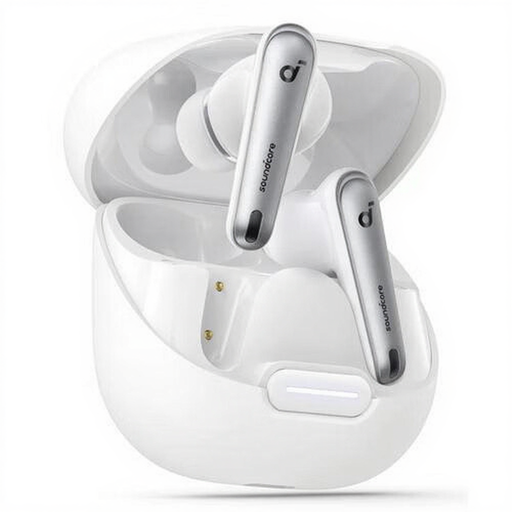
Why it suits this profile: A compact set for everyday listening and calls, with a charging case, USB Type-C and extra ear tips for adjusting the fit.
The product listing mentions ANC, six microphones, Bluetooth 5.3 and IPX4. However, check whether splash resistance is sufficient for the way you exercise.
Up to 10 hours of playback according to the product specifications, a charging case, USB Type-C and extra ear tips.
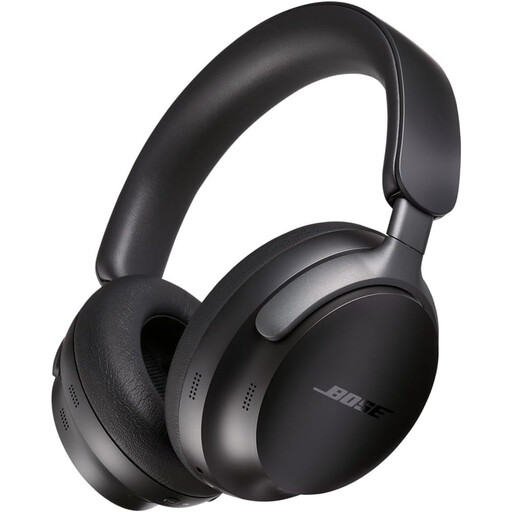
Why it suits this profile: An over-ear model for anyone who values comfort, ANC and a wired backup option while travelling or working from home.
In addition to Bluetooth 5.3, the product information lists an audio cable. This means you can continue listening when the battery runs out.
Active noise cancellation, multipoint, up to 24 hours of battery life and a travel case included.
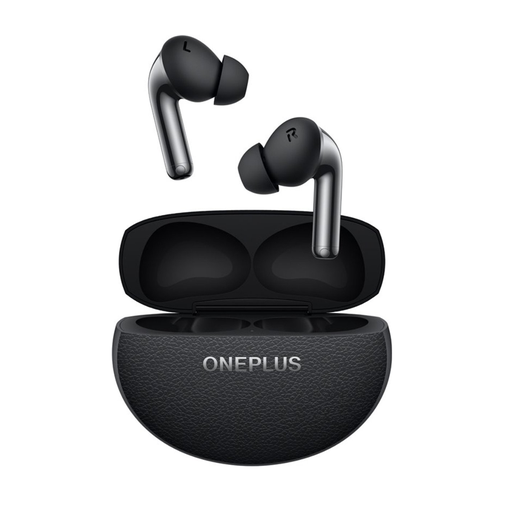
Why it suits this profile: Designed for users looking for ANC, multipoint and a lightweight in-ear design for commuting, calls and exercise.
The specifications distinguish between battery life with and without noise cancellation. The IP55 rating is also clearly stated.
Bluetooth 5.4, two drivers per ear, multipoint and up to 44 hours of total battery life with the charging case according to the product listing.
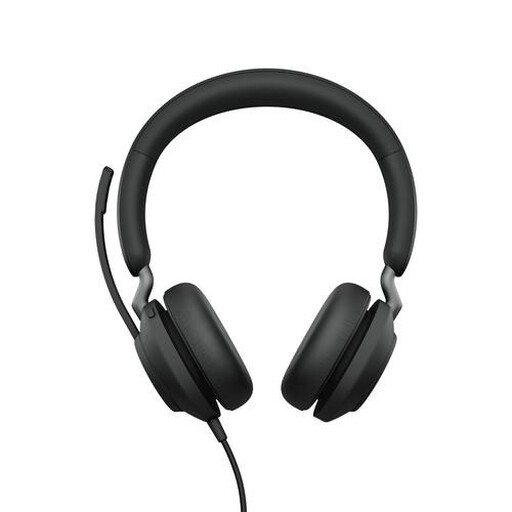
Why it suits this profile: Wireless headphones with a microphone for working from home, online meetings and switching between a computer and phone.
The included USB-A Bluetooth adapter makes connecting to many computers easier. However, check beforehand whether your laptop supports USB-A.
Up to 37 hours of battery life, Bluetooth 5.0, a microphone and a range of up to 30 metres according to the product information.
We have put together a complete, up-to-date list of products that fully meet these strict selection criteria and the applicable European safety regulations.
First, charge the headphones and switch on Bluetooth on your phone. Put the model into pairing mode and select the product name from the Bluetooth list. Google Fast Pair works with some Android models. Apple users may see an automatic pairing window, depending on the model and device.
Technical battery life varies by model and usage. The battery loses capacity over time through charging cycles. Do not store wireless headphones completely flat for long periods, avoid extreme heat and use the supplied or a suitable USB charger. With normal use, earbuds and headphones can last for several years, although wear to the battery, ear cushions and charging contacts cannot be avoided completely.
Apart from the purchase price, there are usually few ongoing costs. You use electricity to charge the case or headphones. However, allow for possible replacement ear tips, ear cushions or a charging cable. Also check the warranty terms and keep your proof of purchase. With a product containing a built-in battery, dismantling it yourself is not recommended.
