
Vandaag of morgen in huis

Kwaliteit gegarandeerd

Welkomstaanbiedingen ontgrendelen: GRATIS bezorging | Tot 80% korting | Gratis 30 dagen JoyPlus-proefperiode
Download de app
A pair of wireless headphones may seem easy to choose at first. But there are clear differences in comfort, battery life, water resistance and noise isolation. A model that’s comfortable for commuting may not be suitable for running or long video calls.
Look out for these three common pitfalls:
Over-ear headphones cover your ears and generally provide better passive noise isolation. They’re useful on the train, when flying or at the office. On-ear headphones rest on your ears and are often more compact, but may feel more pressing after longer periods of wear.
With open-ear headphones, your ears remain mostly uncovered, so you can hear more of your surroundings. This can be useful on a walk or at the office, but sound is more likely to leak out and you’ll still hear background noise.
Wireless earbuds are small and easy to carry around. If you’re considering in-ear models, check whether they come with several sizes of ear tips. A good fit helps with both comfort and sound quality. For sport, sports earbuds with ear hooks or a secure design are often more practical than standard earbuds.
Bluetooth 5.2, 5.3 or 5.4 mainly tells you which connection standard is used. Your actual experience also depends on your smartphone, laptop, distance and any obstacles between the two devices.
Also look out for:
A USB-C port is now common for charging. Bear in mind that “USB-C earbuds” aren’t necessarily wireless. The Samsung EO-IC100 and Sony IER-EX15C use USB-C for a direct wired connection and don’t have Bluetooth.
Compare battery life under the same conditions. A charging case can extend the total listening time, but you’ll need to put the earbuds back in the case in between. A long total playtime can be handy for everyday travel; for a regular workspace, fast charging and multipoint may matter more.
Check the IP rating too:
Don’t use headphones while cycling, driving or in other situations where you need to hear traffic. Also follow EU safety information and avoid listening at high volume for long periods.
The recommendations below are based on verifiable product specifications, such as type, weight, microphones, battery information, Bluetooth and IP rating. Manufacturers’ claims about sound quality or noise cancellation aren’t presented as guaranteed results.
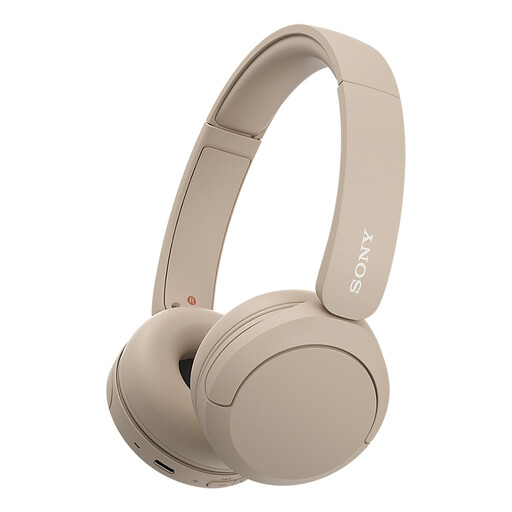
Why it suits this profile: These compact on-ear Bluetooth headphones are well suited to everyday listening, working from home and calls, without the bulk of an over-ear design.
The product details list a microphone, multipoint connection and USB-C charging. The headphones aren’t water-resistant, helping you avoid choosing them for sport.
147 grams, an adjustable headband, soft ear cushions and a connection to two devices. Battery life varies between product specifications, so check the product page.
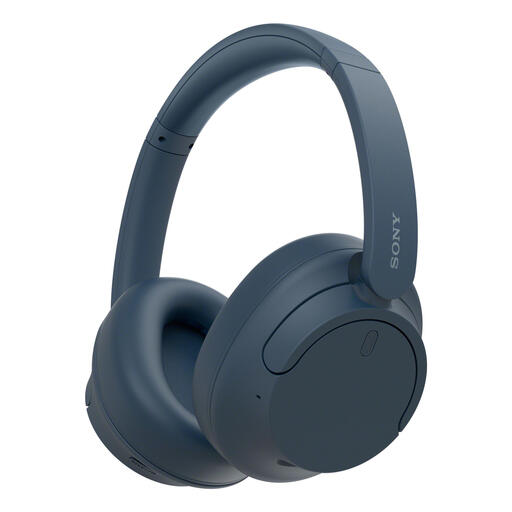
Why it suits this profile: Over-ear noise-cancelling headphones for travellers, people working from home and listeners who want to adjust settings in an app.
The battery information distinguishes between use with and without active noise cancellation. Multipoint also makes it easier to switch between a laptop and phone.
192 grams, active noise cancellation, USB-C, app controls and up to 35 hours according to the product specifications with noise cancelling switched on.
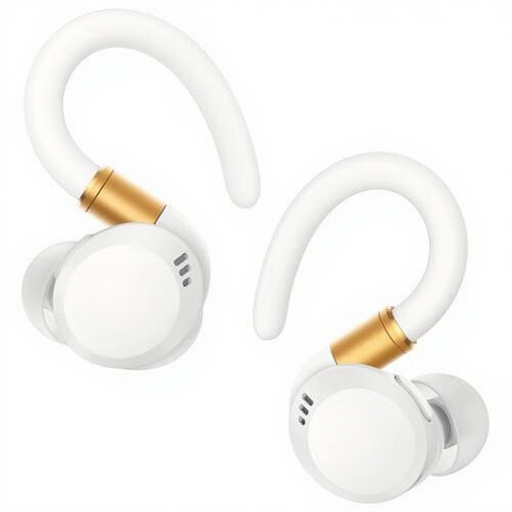
Why it suits this profile: The in-ear design and IP68 rating make this model suited to sport, active days and situations where a secure fit matters.
The IP68 rating and charging case are clearly listed. Check the manual for the exact water-resistance limits, and dry the charging contacts before use.
Up to 12 hours of playtime according to the product details, physical control buttons, AAC and SBC support, and a USB-C charging cable.
We’ve put together a complete, up-to-date list of products that meet these strict selection criteria and comply with current European safety regulations.
First, charge your headphones and switch on Bluetooth on your phone. Put the headphones into pairing mode, open the Bluetooth settings and select the correct product name. You may need an app to connect for the first time. If you’re using multipoint, make sure you pair each device separately.
Battery life per charge varies considerably between models and features. Noise cancelling, volume, codec and call use all affect battery life. The overall lifespan also depends on charging cycles, heat, moisture and storage. Use the supplied or a suitable USB-C charger, and store the product somewhere dry.
Noise-cancelling headphones can reduce background noise while you listen to music. For calls, the microphone and how it processes background noise are particularly important. According to manufacturers’ own information, call quality varies depending on the environment. So check not only the ANC feature, but also the number of microphones and reviews of users’ experiences.
