
Vandaag of morgen in huis

Kwaliteit gegarandeerd

Welkomstaanbiedingen ontgrendelen: GRATIS bezorging | Tot 80% korting | Gratis 30 dagen JoyPlus-proefperiode
Download de app
A pair of wireless headphones may seem easy to choose on paper. You see Bluetooth, noise cancelling, long battery life and an attractive price. In practice, however, you may find that a model is not fully compatible with your phone, feels too heavy during a train journey or has a mediocre microphone for video calls.
The main pitfalls are usually not related to appearance, but to details such as connectivity, fit and battery life. Use these checkpoints to compare Bluetooth headphones, wireless earbuds or a gaming headset in a practical way.
Manufacturers often state the maximum playback time. This figure can vary depending on the connection method, volume, lighting and noise cancelling. For example, a gaming headset with RGB lighting uses more energy than the same model without lighting.
So pay attention to:
Headphones with long battery life are most useful when the stated usage time matches the way you listen.
Bluetooth generally works with smartphones, tablets and laptops, but a games console may have different requirements. Some gaming headsets use a USB dongle for 2.4 GHz. Bluetooth may then not be available directly on a PS4, PS5 or PC without an additional adapter.
Before buying, check:
A USB-C headset can also mean different things: USB-C may be used only for charging, but sometimes it also supports audio. Check the product specifications carefully.
Active noise cancellation, often referred to as ANC, uses microphones and electronics to reduce surrounding noise. Its effectiveness varies by model and by type of sound. Low, constant sounds such as train or aircraft noise are different from voices or sudden sounds.
According to brands’ own research, certain models may offer a specific level of background-noise reduction. Such claims do not automatically mean you will experience silence in every situation. Also consider:
Do not use noise cancelling when cycling, driving or in other situations where you need to continue hearing traffic and surrounding sounds.
Over-ear headphones completely surround the ear. This can help with passive sound isolation and feels comfortable for many users when travelling or working. On the other hand, this type can be larger and warmer to wear.
Wireless earbuds are lighter and easy to carry. For sport, an ear hook or neckband can provide extra support. With in-ear models, check the sizes of the included ear tips. A good fit affects both comfort and sound quality.
Comfortable headphones should not only feel soft the first time you wear them. Check the weight, the width of the headband, how freely the earcups move and the material used for the cushions.
A model weighing 240 to 280 grams may feel different from a heavier model, especially during long periods of work. With a gaming headset, the pressure from the headband and the position of the microphone are also important.
For headphones used for music and calls, the number and positioning of the microphones are relevant details. A product listing may mention multiple microphones or a detachable microphone, for example. This does not necessarily mean that every voice will remain clear in a busy environment, but it does help when comparing the design.
Gamers should pay close attention to low latency. The product information for the ONIKUMA GT806 states less than 30 milliseconds via the 2.4GHz connection. According to the brand’s listing, this is intended to keep picture and sound better synchronised. Always check which connection mode this figure applies to.
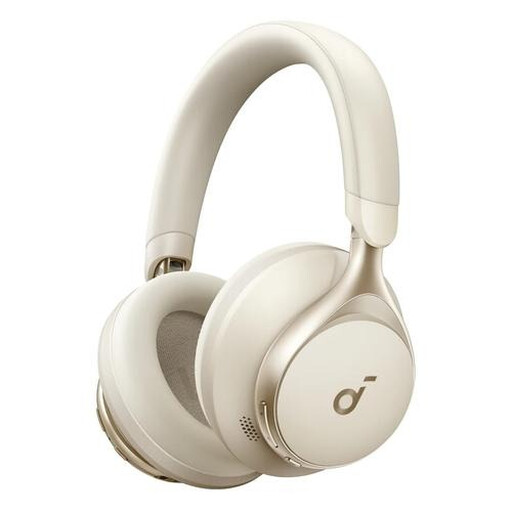
Why it suits this profile: This model combines Bluetooth with a 3.5mm connection. You can therefore listen wirelessly, but switch to a wired connection when the battery runs out.
The battery life is stated as up to 55 hours, and the product information mentions cables for AUX and USB Type-C. When buying, check the current contents of the package.
40mm dynamic drivers, a foldable design, controls on the earcup and a stated weight of 259 grams.
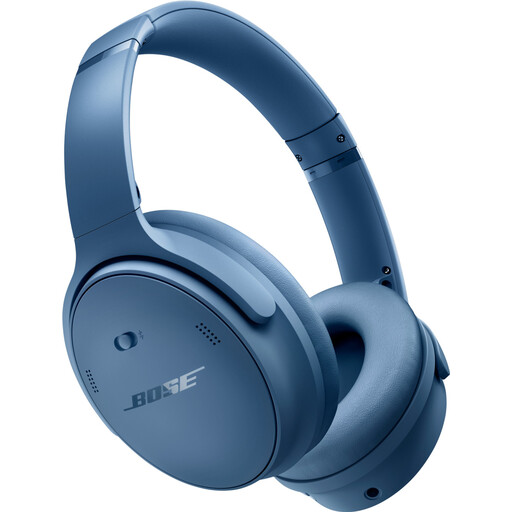
Why it suits this profile: This over-ear model is designed for extended listening and features active noise cancelling, Bluetooth 5.1 and up to 24 hours of battery life.
The product specifications list both ANC modes and an Aware mode. This lets you adjust how much surrounding sound you hear rather than always using complete isolation.
240 grams, a closed-back over-ear design, a Bluetooth range of 9 metres according to the product information, and support for 2.5mm and 3.5mm connections.
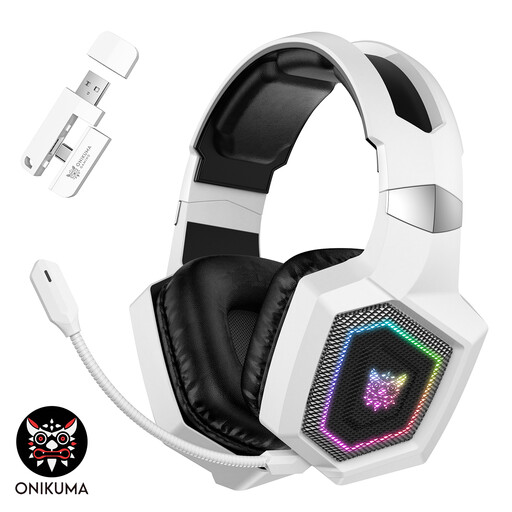
Why it suits this profile: This headset is designed for gamers who want to switch between 2.4 GHz, Bluetooth and a wired Type-C mode.
The product information clearly states that Bluetooth does not work directly with PS4, PS5 or PC and that a separate adapter may be required. For these devices, 2.4 GHz is recommended.
50mm dynamic drivers, a detachable microphone, stated latency below 30 ms via 2.4 GHz and up to 40 hours of use in gaming mode without lighting.
We have put together a complete, up-to-date list of products that fully meet these strict selection criteria and the applicable European safety regulations.
Switch on the headphones and activate pairing mode. Then open the Bluetooth settings on your phone and select the product name. With wireless earbuds, this usually happens from the charging case. If pairing does not work, remove a previous connection or fully charge the device first.
This depends on the volume, Bluetooth or 2.4GHz mode, ANC and any RGB lighting. Do not look only at the maximum number of hours; also check the stated playback time for each mode. A wired option can be useful when you do not want to wait for the headphones to charge while you are out and about.
They can be, but check the microphones and call-related information separately from the ANC function. Noise cancelling reduces background noise for listening, while the microphones determine how your voice is picked up. For many video calls, a stable connection and a well-positioned microphone are at least as important as ANC.
